Metadata: The Part of the File You Did Not Write
About This Lesson
Lesson 2 ended on a specific promise. Section 5 said that a screenshot can expose more than the thing it shows, and it said that Lesson 3 would explain exactly how. This is that explanation.
Lesson 2 also established the mechanism that this lesson attacks. Aggregation defeats anonymity, because a small detail becomes an identifier when it is joined against a second data set. Metadata is what makes that join possible. It is the field that two data sets have in common: a timestamp, a coordinate, an account name, a device model.
So this lesson is the practical half of Lesson 2. Lesson 2 told you that the join happens. This lesson shows you the join key, and it shows you how to remove it.
Learning Objectives
After you read this lesson, you can do these tasks:
- Define metadata and name its main categories.
- Identify the metadata that each common file type carries.
- Explain how an analyst chains metadata into an attribution.
- Strip metadata with the correct tool for each format.
- Verify that a file is clean before you publish it.
Prerequisites
- Lesson 1.1, Privacy, Security, and Anonymity.
- Lesson 1.2, Digital Footprints.
- A Linux machine or a virtual machine for the exercise.
1. What Metadata Is
Metadata is data about data. That definition is correct and useless, so here is a concrete one.
Every file that you make has two parts. The content is what you typed, photographed, or recorded. The metadata is everything else that the file records about its own creation.
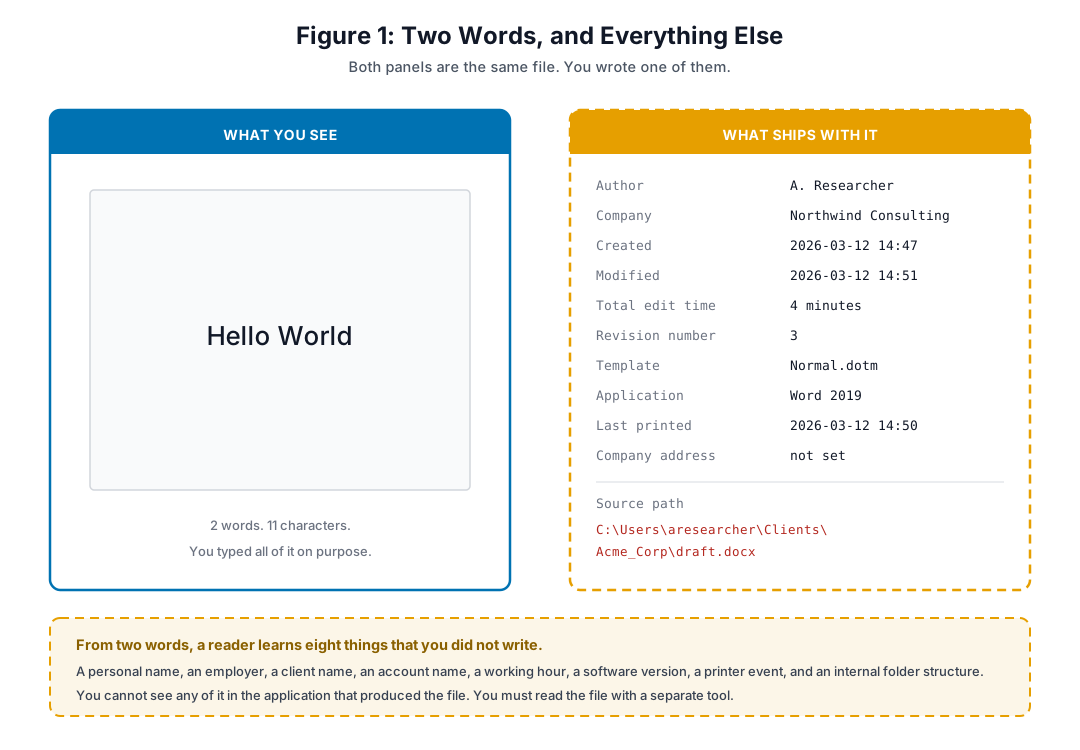
Figure 1. The same file, in two views. You wrote the left panel. The application wrote the right panel.
Look at Figure 1 carefully. The document holds two words. The metadata holds a personal name, an employer, a client name, an account name, a working hour, an application version, a printer event, and an internal folder structure.
You did not type any of it. You cannot see any of it in the application that produced the file. To see it, you must open the file with a separate tool.
A note on the example in Figure 1. The names in that panel are invented. The original teaching version of this example used a real name and a real employer, which is a small and instructive irony. If you build a metadata demonstration for a talk or a class, build it with a fictional persona. A demonstration file gets copied, and it is a real file.
The Categories
File system metadata. Creation, modification, and access times. Permissions and ownership. The full path, which usually holds your account name.
Document metadata. Author, organization, title, keywords. Tracked changes and comments. Revision history. Template and application version. Printer name.
Image metadata, which is normally EXIF. Camera make and model. GPS coordinates. Timestamp. Exposure settings. An embedded thumbnail. On some cameras, a body serial number and a lens serial number.
Message metadata. Sender and recipients. The full chain of routing headers, which usually holds an originating address. Client software and version. Message identifier. Time zone offset. Character encoding.
Network metadata. Addresses, ports, and protocols. Timing and duration. Packet sizes. Time-to-live values, which indicate the operating system. Certificate details.
Read that last category again next to Myth 3 from Lesson 1. Encryption protects the content of a packet. It protects none of the fields listed above.
The point to keep. Metadata is not a defect in these formats. It is a feature that serves a real purpose. A camera records exposure settings because a photographer wants them. A word processor records revisions because an editor needs them. The risk comes from the default, which is that the field travels with the file when you send it to somebody else.
2. Four Cases, and What Each One Proves
Case 1: EXIF Coordinates Locate a Fugitive, December 2012
John McAfee was avoiding authorities after leaving Belize. A magazine published an exclusive interview and included a photograph.
The photograph carried EXIF fields. The fields named an iPhone 4S, and they held GPS coordinates. Readers extracted the coordinates within hours and placed him at a resort in Guatemala. The magazine removed the fields and republished the image, which was already too late. McAfee first said the data was falsified, then confirmed that it was correct. (Reference 1, Reference 2)
What this proves. The publisher was competent and the subject was motivated. Neither one checked the image. Metadata leaks are usually not a knowledge failure. They are a process failure.
Case 2: EXIF Coordinates Locate a Hacker, 2012
The same year, Higinio Ochoa defaced law enforcement websites and left an image on the defaced pages. The image was taken on a telephone, and its EXIF fields held GPS coordinates for a suburb of Melbourne.
The coordinates alone did not identify him. They gave investigators a place. Investigators then joined that place against his public social media, where he had posted about a partner in Australia and about a recent trip there. He was arrested in March 2012 and later served a federal sentence. (Reference 3, Reference 4)
What this proves. This is the Lesson 2 lesson in one case. One metadata field did not identify anybody. One metadata field plus one public profile did. The field was the join key.
Case 3: The File Path in a Deliverable
A red team delivers its final report as a PDF. The client is satisfied. Then somebody reads the document properties, and the source path field says:
C:\Users\jsmith\Documents\Clients\Acme_Corp\Final_Report.pdf
That one string gives an account name, the client’s identity, and the internal folder structure of the testing firm. If the report reaches a third party, the firm has disclosed a client relationship that its contract probably protects, and it has given an attacker a starting point against the firm itself.
What this proves. Client confidentiality is a metadata problem, not only a content problem. In Lesson 2 terms, the professional layer leaked through a field that nobody read.
Case 4: Traffic Analysis Against Encrypted Messages
A researcher coordinates disclosure with several parties over encrypted mail. The content is protected, and it stays protected.
An observer still sees which accounts exchanged messages, at what times, how often, in what sizes, and with what response delays. From that alone the observer can map the group, infer the working hours and time zone of each member, and identify who initiates and who responds.
This is traffic analysis, and it is old, reliable, and cheap. Its power is not a theoretical claim. General Michael Hayden, a former director of both the National Security Agency and the Central Intelligence Agency, said in a public debate at Johns Hopkins University in 2014: “We kill people based on metadata.” (Reference 5, Reference 6)
What this proves. Content encryption and metadata protection are two different controls for two different problems. Lesson 1 made this point with Signal and WhatsApp. This is the same point at the level of a single file or message.
3. What Each File Type Leaks
| Format | Risk | The fields that matter | The specific trap |
|---|---|---|---|
| Office documents (.docx, .xlsx, .pptx) and open document formats | High | Author, organization, template, application version, revision history, comments, tracked changes | Deleted text can survive in the revision record. Removing a paragraph from the visible document does not always remove it from the file. |
| High | Producer and creator applications, author, title, timestamps, source path, form field values, annotations, embedded objects | A PDF made by conversion inherits fields from the source document. Layered redaction that only draws a black rectangle leaves the text underneath selectable. | |
| Images (.jpg, .tiff, and .png with side data) | Very high | GPS coordinates, camera and lens model, serial numbers, timestamp, editing software, embedded thumbnail | The embedded thumbnail can still show content that you cropped out of the main image. |
| Messages (.eml, .msg) | Very high | Full received-header chain, originating address, client and version, message identifier, time zone offset | Your own saved copy of a sent message keeps the blind copy list, even though the recipients’ copies do not. A leaked mailbox exposes it. |
| Archives (.zip, .tar, .7z) | Medium to high | Member paths, modification times, and in some cases ownership and permissions | The archive re-adds metadata around files that you already cleaned. Sanitizing the members does not sanitize the container. |
| Source code and scripts | Medium | File system times, comments, naming habits, formatting style, and the .git directory if you ship it | A repository directory carries author name and mail address in every commit, and the history keeps them after you change the setting. |
| Packet captures (.pcap) | Very high | Addresses, hardware addresses, timing, sizes, protocol behavior | A capture is almost entirely metadata. There is no content-only version of it. |
The Cropping Trap Deserves Its Own Paragraph
Cropping an image to remove a sensitive region is one of the most common sanitization steps, and it has failed twice in well-documented ways.
The old failure is the EXIF thumbnail. Some editors update the main image and leave the original preview thumbnail in place, so the removed region survives inside the file.
The recent failure is different and worse. In March 2023, researchers Simon Aarons and David Buchanan reported a defect called aCropalypse, tracked as CVE-2023-21036. The Markup editor on Google Pixel devices wrote a cropped screenshot over the original file without truncating it, so the tail of the original image stayed on disk after the visible part. A cropped or redacted screenshot could be partly reconstructed. The same class of defect affected Snip and Sketch on Windows 10 and Snipping Tool on Windows 11. The defect had been present since 2018, and Google fixed it in the March 2023 Pixel update. (Reference 7, Reference 8)
The rule. Cropping is an editing operation, not a security control. If a region must not be seen, remove it and then re-encode the file so that a new file is written from scratch. Then verify.
4. How an Analyst Chains Metadata Into a Name
Individual fields look harmless. That is exactly why they work.
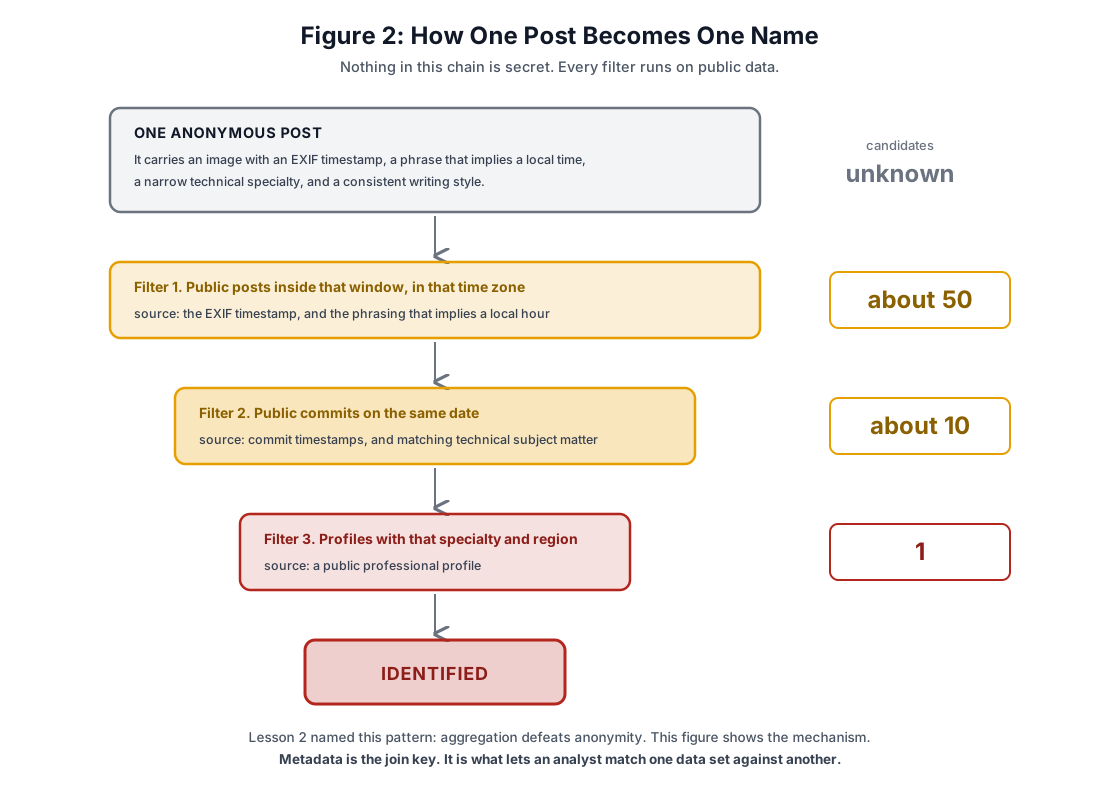
Figure 2. Three filters, each driven by ordinary public metadata, reduce an unbounded pool to one person.
Follow Figure 2. An anonymous post carries four things: an image with a timestamp, a phrase that implies a local hour, a narrow technical specialty, and a writing style.
The first filter takes public posts inside that time window and time zone. That is roughly fifty candidates. The second filter takes public code commits on the same date from people with matching technical interests. That is roughly ten. The third filter checks professional profiles for the specialty and the region. That is one.
No step in that chain required a breach, a subpoena, or a tool that you cannot download.
Timing Is Metadata
Suppose you post anonymously over Tor. The network layer is sound. But you always post between 22:00 and 02:00, on weekdays, with a gap on Tuesday and Thursday evenings.
That schedule is a signature. It can be compared against the activity times of your named accounts, and a match across enough samples is strong evidence. Tor protects the route. It does nothing about when you choose to type.
Writing Style Is Metadata, and Here Are the Real Numbers
You will read the claim that stylometry identifies authors with better than 90 percent accuracy. Treat that number with care, because it usually comes from a study with a small candidate pool.
The relevant study at realistic scale is Narayanan and others, “On the Feasibility of Internet-Scale Author Identification”, published at the IEEE Symposium on Security and Privacy in 2012. Against a corpus of 100,000 candidate authors, the classifier named the correct author as its top result in more than 20 percent of cases, and it placed the correct author in its top 20 results in about 35 percent of cases. (Reference 9)
Twenty percent sounds reassuring. It is not, and here is why. The attack in Figure 2 does not need the classifier to be right on its own. It needs the classifier to turn 100,000 people into a list of 20. Every other filter then runs against that short list. Stylometry is not the identification. It is one more filter, and a strong one.
The correction matters more than the number. If you teach the 90 percent figure, a reader who checks it finds that it does not hold at scale, and then discounts the whole warning. Give the real figure and the real reason it is dangerous.
5. Defense
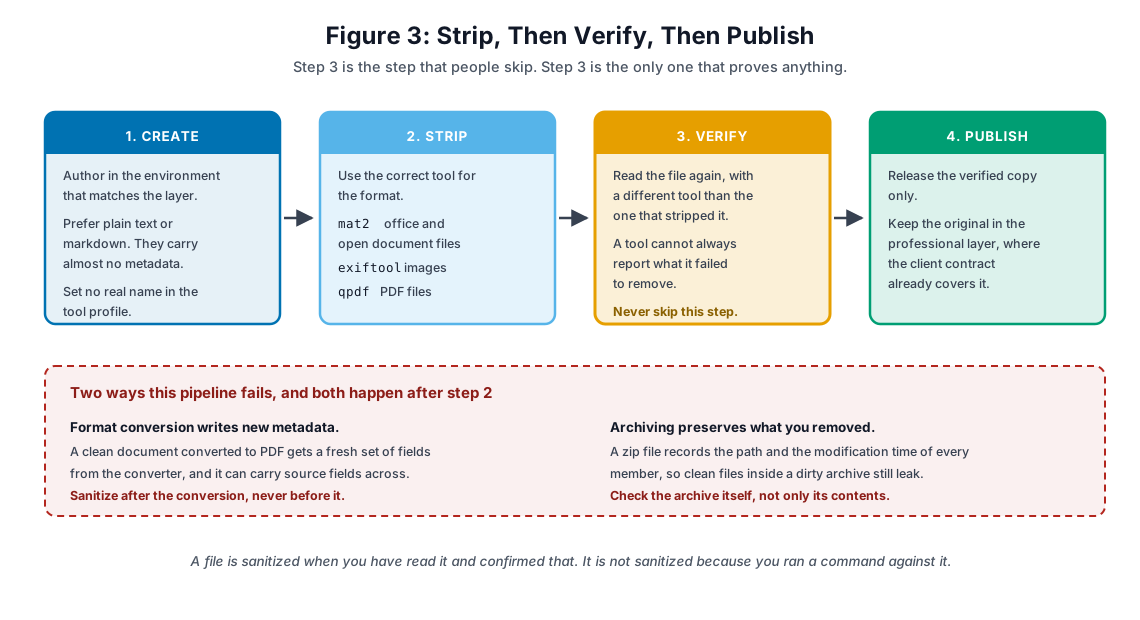
Figure 3. Four steps. The third one is the only one that proves anything.
Step 1: Do Not Create It
The cheapest metadata to remove is metadata that never exists.
Prefer plain text and markdown for anything that does not need layout. Set a neutral author name in the tool profiles of the environment that you use for research. Turn off location tagging in the camera application on the device that you take reconnaissance photographs with, and confirm it rather than assume it.
Step 2: Strip With the Right Tool
There is no single tool that handles every format. Use the one that matches:
- mat2 for office documents and open document formats.
- exiftool for images.
- qpdf for PDF files.
Do not substitute one for another. In particular, exiftool reads office and open document formats but cannot write to them, so a command that tries to strip a .docx or .odt file with exiftool fails. The exercise below covers this.
Step 3: Verify, With a Different Tool
This is the step that people skip, and it is the only step that produces evidence.
Read the file again after you strip it, and read it with a tool other than the one that stripped it. A tool cannot reliably report the fields that it failed to remove, because both operations use the same parser and the same blind spots.
Step 4: Publish Only the Verified Copy
Keep the original in the layer where it belongs. For a client deliverable, that is the professional layer, where a contract already covers it. Publish the verified copy and nothing else.
The Two Failure Points
Both of them happen after step 2, which is why the pipeline order matters.
Format conversion writes new metadata. Convert a clean document to PDF and the converter writes a fresh set of fields, and it can carry source fields across. Sanitize after the conversion, never before it.
Archiving preserves what you removed. A zip file records the path and the modification time of every member. Clean files inside a dirty archive still leak. Check the archive itself, not only its contents.
Compartmentalize the Creation Environment
Lesson 2 gave you four layers. Metadata is one of the main ways that a layer boundary breaks, because the identity leaks through the tool rather than through anything that you wrote.
Author operational work in an operational environment: a separate virtual machine, with its own account name, its own tool profiles, and its own time zone setting where that is workable. This is more reliable than remembering to sanitize, because it removes the need to remember.
Timing Discipline
If your work needs operational anonymity, do not publish on a schedule. Introduce a delay of random length between finishing a thing and releasing it. Batch your responses instead of replying in real time. The objective is to break the correlation between your publication times and the activity times of your named accounts.
A Note on Falsifying Metadata
A file with every field blank is itself unusual. In a set of ordinary documents, a completely empty document stands out and signals that somebody scrubbed it. The countermeasure is to write plausible, neutral values instead of leaving the fields empty: a generic author, a common application version, a normalized timestamp.
Safety warning. Do not do this to a document that may become evidence, and do not do it to a client deliverable without written agreement. Falsifying timestamps or authorship in a report, an incident record, or anything that could enter a legal process is a serious professional problem, and depending on the jurisdiction and the intent, it can be a criminal one. Use blank or neutral fields for your public and operational work. Use accurate fields, with the client’s identifying data removed, for anything that a client, a court, or a regulator may read.
6. Summary
- Metadata is the part of the file that the application wrote. You cannot see it in that application, and it travels with the file.
- Metadata is the join key. It is what lets an analyst match one data set to another, which is the mechanism that Lesson 2 named.
- Encryption protects content. It does not protect timing, size, routing, or any field in this lesson.
- Cropping is not a security control. Removing a region and re-encoding the file is.
- The pipeline is create, strip, verify, publish. Verification with a second tool is the only step that proves anything.
Action item. Take the last three files that you published anywhere, in public, and read their metadata today. Do not fix anything yet. Just read them, and write down what you find. That list is an input to Lesson 4.
The next lesson covers threat modeling. Lessons 1, 2, and 3 gave you concepts, an exposure map, and a set of controls. Lesson 4 is the method that tells you which of those controls you actually need, and which ones you can decline on purpose.
Knowledge Check
Question 1. Metadata is best described as:
- A) The encrypted part of a file
- B) The data that a file records about itself, separate from the content that you created
- C) A checksum that verifies file integrity
- D) Data that only image files carry
Answer: B. Content is what you made. Metadata is what the application recorded around it.
Question 2. In December 2012 a magazine published a photograph of a fugitive. Within hours readers knew which country he was in. The disclosure came from:
- A) Scenery in the background of the photograph
- B) A statement by the magazine
- C) A leak from law enforcement
- D) EXIF fields in the image, which held the camera model and the GPS coordinates
Answer: D. The publisher did not read the image before publishing it.
Question 3. You send a message with a strong end-to-end encryption protocol. Which of these is still available to an observer of the network?
- A) That the two accounts exchanged a message, at what time, and how large it was
- B) The plaintext of the message
- C) The encryption key
- D) Nothing, because the protocol protects all of it
Answer: A. This is traffic analysis. Encryption protects the content and nothing around it.
Question 4. You crop a screenshot to remove a sensitive region before you publish it. Why can this fail?
- A) Cropping always increases the file size
- B) Cropping converts the file to a lossless format
- C) The removed region can survive, either as an embedded thumbnail or as data left after the visible area, depending on the tool
- D) Cropping is reversible only when the file is encrypted
Answer: C. The embedded thumbnail is the old version of this failure. The aCropalypse defect, CVE-2023-21036, is the recent one.
Question 5. A red team delivers a report as a PDF. The source path field reads C:\Users\jsmith\Documents\Clients\Acme_Corp\Final_Report.pdf. What did that field expose?
- A) Only the file name
- B) The tester’s account name, the client’s identity, and the internal folder structure of the testing firm
- C) The client’s internal network range
- D) Nothing, because a file path is not metadata
Answer: B. One string, three disclosures, and at least one of them is probably covered by a confidentiality clause.
Question 6. Research on internet-scale author identification tested a corpus of 100,000 candidate authors. What did it find?
- A) Writing style cannot identify an author above chance.
- B) The correct author was identified in every case.
- C) Identification worked only when the author used a real name.
- D) The correct author was the top result in more than 20 percent of cases, and was inside the top 20 results in about 35 percent of cases.
Answer: D. The danger is not that stylometry names you. The danger is that it reduces 100,000 people to a list of 20, and the other filters then run against that list.
Question 7. Which tool is the correct choice to strip metadata from an .odt or a .docx file?
- A) exiftool, with the -all= option
- B) qpdf, with —remove-metadata
- C) mat2
- D) ImageMagick, with -strip
Answer: C. exiftool reads those formats but cannot write to them, so option A fails with an error. qpdf handles PDF only, and ImageMagick handles images.
Question 8. You sanitize a Word document, then convert it to PDF for delivery. What must you do next?
- A) Sanitize the PDF, because the conversion writes new fields and can carry source fields across
- B) Nothing, because the source was already clean
- C) Re-encrypt the source document
- D) Delete the source document
Answer: A. Sanitize after the conversion, never before it. This is the first of the two failure points in Figure 3.
Question 9. A document with every metadata field blank can be a problem because:
- A) The file will not open in most readers
- B) Blank fields corrupt the file structure
- C) It reduces the file size below a delivery threshold
- D) It is itself unusual, and it signals that somebody deliberately scrubbed the file
Answer: D. Neutral, plausible values attract less attention than an empty set. Read the safety warning in Section 5 before you apply this to anything that could become evidence.
Question 10. You publish anonymous research, and you always post between 22:00 and 02:00 on weekdays. Why is that a risk?
- A) Late posts get less attention
- B) The schedule is itself metadata, and it correlates against the activity times of your named accounts
- C) Servers log more data at night
- D) Tor is slower at night
Answer: B. Tor protects the route. It does not protect the hour that you choose to type.
Exercise: Extraction and Sanitization
Time: 2 to 3 hours, plus 1 hour to write the report.
Objective
Extract metadata from several file types, strip it with the correct tool for each one, and prove that the strip worked.
Environment
A Linux machine or virtual machine, with sudo access and about 500 MB free.
sudo apt update
sudo apt install -y libimage-exiftool-perl mat2 qpdf imagemagick
exiftool -ver && mat2 --version && qpdf --version
Safety note. Do this work on copies. Every exercise below writes to a copy, and the batch script in Part 6 copies the whole directory before it touches anything. Build that habit now, because a sanitization command that runs against an original is destructive and there is no undo.
Part 1: Read a Document (20 minutes)
Create a short document in a word processor, put your name in the author field, and save it as test.odt.
exiftool test.odt
exiftool -a -u -g1 test.odt > metadata_before.txt
The -a flag shows duplicated tags, -u shows unknown tags, and -g1 groups the output by tag family. Use this form for every extraction in this exercise, because the plain form hides fields.
Answer these questions in your notes:
- Which fields identify a person?
- Which fields identify software, and at what version?
- Which fields would let somebody infer your working hours?
- Which field surprised you?
Now convert it and compare:
libreoffice --headless --convert-to pdf test.odt
diff <(exiftool test.odt) <(exiftool test.pdf)
Record what the conversion added. This is the first failure point from Figure 3, and you are meant to see it happen.
Part 2: Read an Image (20 minutes)
Use a photograph from a telephone with location services on, or download a sample set from https://github.com/ianare/exif-samples.
exiftool -a -u -g1 photo.jpg
exiftool -GPS:all photo.jpg
exiftool -GPSPosition photo.jpg
Then look for the thumbnail:
exiftool -b -ThumbnailImage photo.jpg > thumb.jpgIf thumb.jpg has content, open it and compare it against the main image. On a cropped photograph, compare the two carefully. This is the trap from Section 3, and seeing it once is worth more than reading about it.
Part 3: Read a Message (20 minutes)
Export one message from your mail client as a raw source file, and save it as sample.eml.
grep -E "^(From|To|Cc|Bcc|Subject|Date|Message-ID|User-Agent|X-Mailer):" sample.eml
grep "^Received:" sample.eml
Read the Received: headers from the bottom upward. That is the order in which the message travelled.
Answer these:
- Can you find an originating address?
- Which servers handled it?
- What time zone offset does the
Date:header carry? - Which client software sent it?
Part 4: Strip, By Format (30 minutes)
Work on copies.
Documents. Use mat2, not exiftool.
cp test.odt work.odt
mat2 --show work.odt
mat2 work.odt          # writes work.cleaned.odt, the original is not touched
exiftool -a -u -g1 work.cleaned.odt
Now see the failure for yourself:
cp test.odt broken.odt
exiftool -all= broken.odt
That command fails. ExifTool reads open document and office formats, but it cannot write to them. This exact command appears in a lot of published metadata guides, and it does not work. Record the error text in your report.
By default mat2 writes a new file with cleaned inserted before the extension, and it leaves your input alone. Only --inplace modifies the original. (Reference 11)
PDF files. Use qpdf.
qpdf --linearize --remove-metadata --remove-info test.pdf clean.pdf
exiftool -a -u -g1 clean.pdf
Note the flags. --remove-metadata drops the XMP metadata stream and --remove-info drops the document information dictionary. There is no --empty-metadata option in qpdf, although several published guides use one. Check any command that you copy from the internet against qpdf --help before you trust it. (Reference 10)
Images. Use exiftool, or re-encode.
cp photo.jpg work.jpg
exiftool -all= -overwrite_original work.jpg
exiftool -a -u -g1 work.jpg
The re-encode method is more thorough, because it writes a new file rather than editing the existing one:
magick photo.jpg -strip reencoded.jpg
exiftool -a -u -g1 reencoded.jpg
On ImageMagick 7 the command is magick. The older convert command is deprecated, and on some builds it is gone. Re-encoding costs a small amount of image quality, so choose it when the content matters more than the fidelity.
Part 5: Verify (20 minutes)
Verification means reading the file with a tool other than the one that stripped it.
#!/usr/bin/env bash
# verify.sh - report the fields that matter, for one file.
set -euo pipefail

[ $# -eq 1 ] || { echo "usage: $0 <file>" >&2; exit 1; }
[ -f "$1" ] || { echo "no such file: $1" >&2; exit 1; }

meta=$(exiftool -a -u -g1 "$1")

check() {
    printf '[*] %s\n' "$1"
    if printf '%s\n' "$meta" | grep -iE "$2"; then
        printf '    ^^ review the lines above\n'
    else
        printf '    none found\n'
    fi
}

check "identity fields"  "author|creator|owner|artist|by-line|company|producer"
check "location fields"  "gps|location|coordinate"
check "time fields"      "date|time"
check "software fields"  "software|application|version|tool|generator"
check "path fields"      "path|directory|filename|url"

printf '\n=== full output ===\n%s\n' "$meta"
chmod +x verify.sh
./verify.sh clean.pdfThen cross-check the PDF with a second reader, because exiftool and qpdf do not see identical things:
qpdf --json clean.pdf | head -40Some time fields always remain, and that is expected. A modification date on a file is not a disclosure. An author name is. Judge each field, do not just count them.
Part 6: Build the Batch Workflow (30 minutes)
#!/usr/bin/env bash
# sanitize.sh - copy a directory, then strip metadata from the copy.
# The originals are never modified.
set -euo pipefail

[ $# -eq 1 ] || { echo "usage: $0 <directory>" >&2; exit 1; }

src=${1%/}
dst="${src}_sanitized"

[ -d "$src" ] || { echo "not a directory: $src" >&2; exit 1; }
[ -e "$dst" ] && { echo "refusing to overwrite: $dst" >&2; exit 1; }

cp -r -- "$src" "$dst"
echo "[*] working on $dst, the originals in $src are untouched"

find "$dst" -type f -print0 | while IFS= read -r -d '' f; do
    name=$(basename -- "$f")
    ext=${name##*.}
    case ${ext,,} in
        jpg|jpeg|png|tif|tiff)
            echo "[+] image    $name"
            exiftool -q -overwrite_original -all= "$f"
            ;;
        pdf)
            echo "[+] pdf      $name"
            qpdf --linearize --remove-metadata --remove-info "$f" "$f.tmp"
            mv -- "$f.tmp" "$f"
            ;;
        odt|ods|odp|docx|xlsx|pptx)
            echo "[+] document $name"
            mat2 --inplace "$f"
            ;;
        *)
            echo "[-] skipped  $name"
            ;;
    esac
done

echo "[*] done, now verify before you publish"
Four details in that script are deliberate, and they are the difference between a working tool and a destructive one:
- It copies first.
mat2 --inplacemodifies the file that you give it. Run that against a source directory and the originals are gone. The copy makes--inplacesafe. - It refuses to overwrite an existing output directory. A second run against a stale output would otherwise mix cleaned and uncleaned files.
- It uses
-print0withread -r -d ''. A plainfind | while readloop breaks on any file name that holds a space, which is most real deliverables. - It lowercases the extension with
${ext,,}, because.JPGand.jpgare both common. This needs bash 4 or later.
Test it:
mkdir -p samples && cp test.odt test.pdf photo.jpg samples/
./sanitize.sh samples
./verify.sh samples_sanitized/test.pdf
Then confirm the originals in samples/ are still dirty. If they are clean, the script modified the wrong tree and you must fix it before you use it on real work.
Part 7: The Container Check (15 minutes)
Office and open document files are zip archives. Open one and look inside.
mkdir unpacked && cd unpacked
unzip ../test.docx
ls -R
grep -ril "author\|creator\|lastModifiedBy" .
Read docProps/core.xml and docProps/app.xml. Those are the fields that Figure 1 shows.
Now the second failure point from Figure 3:
cd ..
zip -r delivery.zip samples_sanitized/
unzip -l delivery.zip
The listing shows a path and a modification time for every member. Your files are clean, and the container is not. Record what an archive discloses even when its contents disclose nothing.
Deliverables
- Extraction findings. What each file type leaked, with the before output included, and a risk rating for each field.
- Sanitization results. Before and after comparisons, which tool worked for which format, and the exact error text from the two commands in Part 4 that fail.
- Your workflow. Your version of the two scripts, plus a one-page procedure and a pre-publication checklist that you will actually use.
- Reflection. The most surprising field that you found, and one thing that you have already published that you now want to check.
Optional Extensions
- Forensic reading. Take a document and look for content that is present in the file but not visible in the application: tracked changes, comments, and hidden rows or slides.
- Redaction test. Make a PDF, draw a black rectangle over some text, save it, and then try to select and copy the text underneath. Repeat with a proper redaction tool that removes the underlying content, and compare.
- Timing analysis. Export the commit timestamps from one of your own public repositories and plot them by hour. Compare that shape against the posting times of a public account of yours. Decide whether the two patterns match closely enough to link.
Additional Resources
Tools
- ExifTool, for reading almost anything and writing to images and PDFs: https://exiftool.org
- mat2, the metadata anonymisation toolkit, for documents and many other formats: https://0xacab.org/jvoisin/mat2
- qpdf, for PDF structure and metadata: https://qpdf.readthedocs.io
- EXIF sample images, for practice: https://github.com/ianare/exif-samples
Confirm that any tool you adopt is still maintained, and confirm every command against its own help output before you trust it. Section 5 of this article and Part 4 of the exercise exist because two widely copied commands do not work.
Reading
- Electronic Frontier Foundation, Surveillance Self-Defense: https://ssd.eff.org
- Bruce Schneier, Data and Goliath. The chapters on metadata and mass surveillance.
Discussion Questions
- Which of your regular deliverables passes through a format conversion before it reaches a client? Where in that chain does your sanitization step sit?
- Which single metadata field would do you the most damage if it were published today?
- Your creation environment sets your author name, your time zone, and your application versions. Which of those three does your current setup get wrong?
References
- PetaPixel, EXIF Data May Have Revealed Location of Fugitive Software Tycoon John McAfee, 3 December 2012
- NPR, Betrayed By Metadata, John McAfee Admits He Is Really In Guatemala, 4 December 2012
- Higinio Ochoa, case summary and timeline
- CSO Online, Embedded data, not breasts, brought down hacker
- Just Security, Michael Hayden: “We Kill People Based on Metadata”, May 2014
- The New York Review of Books, David Cole, “We Kill People Based on Metadata”, 10 May 2014
- aCropalypse, CVE-2023-21036, overview and affected tools
- BleepingComputer, Google Pixel flaw allowed recovery of redacted and cropped images, March 2023
- Narayanan and others, On the Feasibility of Internet-Scale Author Identification, IEEE Symposium on Security and Privacy 2012
- qpdf command line documentation, metadata removal options
- mat2 manual page, options and default output naming