Digital Footprints: The Trail You Cannot Stop Making
About This Lesson
Lesson 1 ended with a promise. It said that the next lesson covers the data trails that you leave continuously, usually without knowledge of it. This is that lesson.
Lesson 1 also made a claim that this lesson must prove. In the answer key for Figure 1, it said that anonymity does not stop data collection. It only removes the name from the data, and a sufficiently detailed behavior profile can attach the name again. That claim sounds abstract. Section 3 of this lesson shows three documented cases where it happened to real people.
Your digital footprint is the material that makes this possible. It is also the material that you use when you do reconnaissance on a target. The same pipeline runs in both directions.
Learning Objectives
After you read this lesson, you can do these tasks:
- Tell the difference between an active footprint and a passive footprint.
- Describe how data moves from you to a collector, to a broker, and to a buyer.
- Explain how aggregation defeats an identity that has no name attached to it.
- Apply footprint awareness to the four phases of an engagement.
- Sort your own accounts and devices into four isolated layers.
Prerequisites
- Lesson 1.1, Privacy, Security, and Anonymity: Three Different Problems.
- Basic knowledge of web technologies.
1. Two Kinds of Footprint
A digital footprint has two parts. The two parts need different controls, so you must tell them apart.
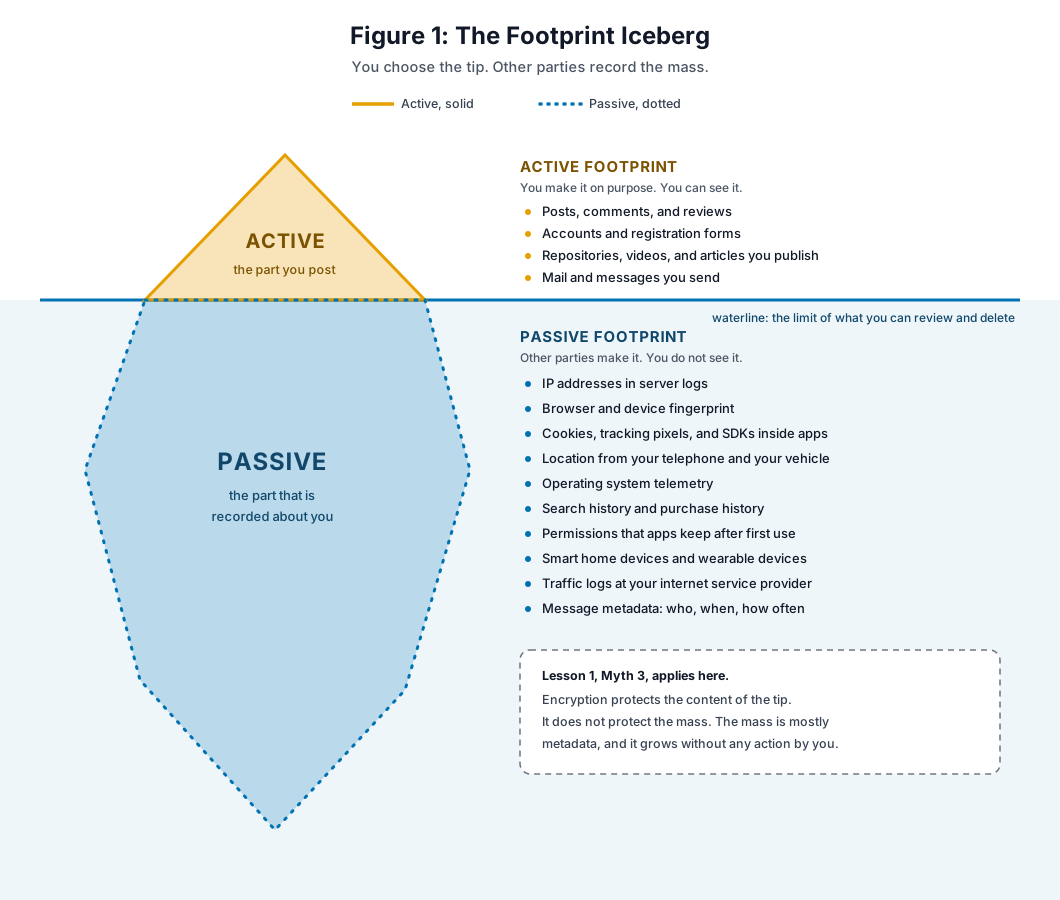
Figure 1. The active footprint is the tip. The passive footprint is the mass below the waterline.
The Active Footprint
The active footprint is the data that you create on purpose. You write a post. You register an account. You publish a repository. You send a message.
The active footprint feels controllable, because you decide to make it. That feeling is only partly correct. You control the moment of creation. You do not control what happens after that moment. A screenshot takes one second. A scraper does not ask permission. An archive keeps a copy.
So the correct rule is this: you control whether an item enters your active footprint. You do not control whether it leaves.
The Passive Footprint
The passive footprint is the data that other parties record about you while you do something else. You take no action, and you get no notice.
Look at the list in Figure 1 again. Almost every item on it is metadata. It is not the content of what you said. It is the record of the fact that you were there, at that time, from that address, on that device.
This connects directly to Myth 3 in Lesson 1. Encryption protects content. Content is the tip. The mass below the waterline is metadata, and encryption does nothing for it.
The important asymmetry. You can review your active footprint. You can list your posts and your accounts, and you can delete some of them. You cannot review your passive footprint, because you do not hold it and you cannot see it. A person who tells you that they have a small digital footprint is describing the tip. They have not measured the mass.
2. Where the Data Goes
The data does not stay with the party that collected it. It moves through a supply chain.
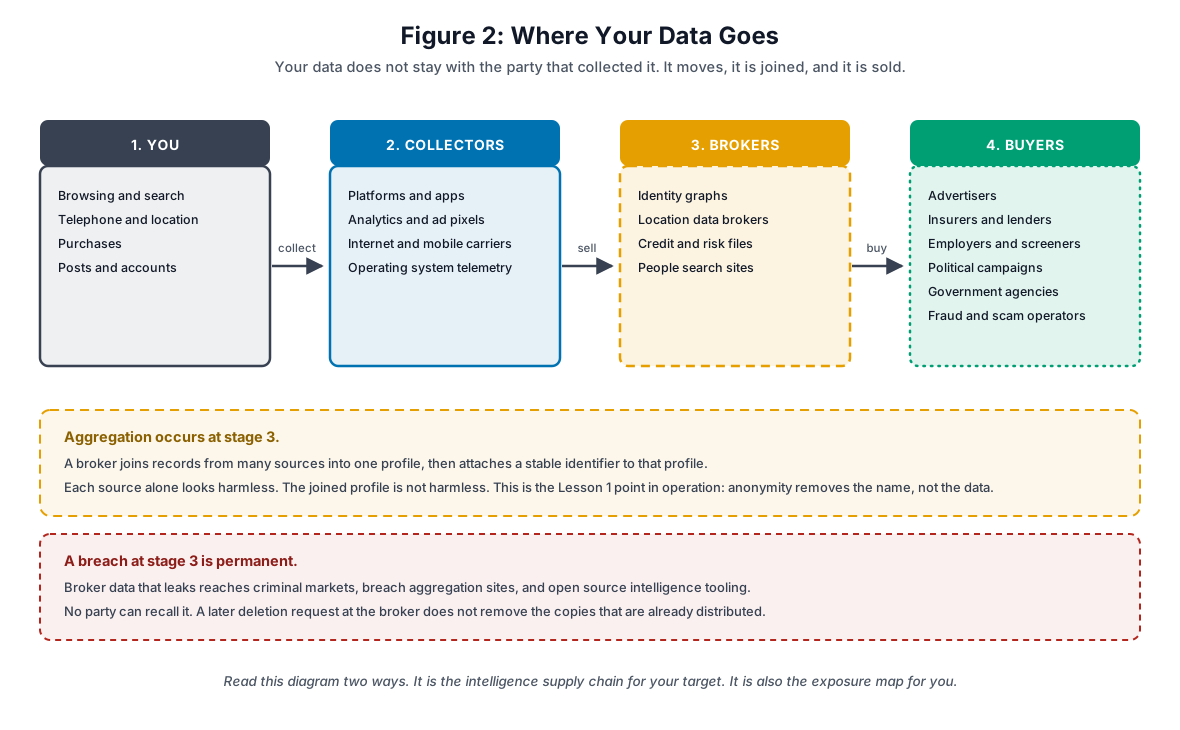
Figure 2. Four stages. You make the data, a collector records it, a broker joins it, and a buyer uses it.
Stage 2: The Collectors
The collectors are the parties that you touch directly. Platforms and apps record what you do inside them. Analytics scripts and advertising pixels record what you do on sites that the platform does not own. Your internet service provider and your mobile carrier see the destination of each connection, and they see the timing of each connection, even when the content is encrypted. Your operating system sends telemetry.
You have some leverage at this stage. You can decline an app, you can block a tracker, and you can encrypt a connection.
Stage 3: The Brokers
The brokers are the parties that you never touch. They buy from the collectors, they buy from each other, and they join the records into one profile.
A profile can hold your names and your former names, your current address and your former addresses, your telephone numbers, your mail addresses, your age, your household members, your income band, your occupation, your property records, your court records, your vehicle records, your purchase categories, and your inferred interests.
Currency warning, and this is why the vetting step matters. Broker lists go out of date quickly, so do not trust an old one. Two examples from the last few years:
- Acxiom is frequently named as the largest consumer data broker. The company sold its Acxiom Marketing Solutions business to the Interpublic Group in October 2018. That deal moved data on about 2.2 billion consumers to an advertising holding company, and the remaining public company continued as LiveRamp. If you read a source that describes Acxiom as one independent company, that source is out of date. (Reference 8)
- Oracle BlueKai appears in almost every older data broker list. Oracle announced its exit from the advertising business in June 2024, and Oracle Advertising products ended on 30 September 2024. That entry is now historical. (Reference 9)
The lesson here is not the specific names. The lesson is that the broker layer restructures itself constantly, and a list that you copy from a three-year-old article will be wrong.
Stage 4: The Buyers
Advertisers buy for targeting. Insurers and lenders buy for risk scoring. Employers and background screeners buy for hiring decisions. Political campaigns buy for voter targeting. Government agencies buy data that they would otherwise need legal process to obtain. Fraud operators buy the same data after it leaks.
The Regulator Is Now Active Here
This part of the ecosystem is under enforcement, and the enforcement is recent. Two orders show the direction:
- In January 2024 the United States Federal Trade Commission ordered the location data broker X-Mode Social, and its successor Outlogic, to stop the sale and the sharing of sensitive location data. It was the first order of its kind. (Reference 10)
- In May 2026 the Federal Trade Commission settled with Kochava. The order stops Kochava and its subsidiary from selling, sharing, or disclosing sensitive location data without express consent. The complaint concerned location data from hundreds of millions of mobile devices. (Reference 11)
These orders are useful to you for two reasons. First, they are primary sources that state what the brokers actually held, which is better evidence than a blog estimate. Second, they show that “the data was anonymous” is not an accepted defense when the data is precise location history.
Read Figure 2 Twice
For an ethical hacker this diagram has two meanings.
Read left to right, it is the intelligence supply chain for your target. Breach dumps, people search sites, and broker previews are where open source intelligence comes from.
Read as a mirror, it is your own exposure map. The same pipeline that gives you a target profile gives a target a profile of you.
3. Aggregation Defeats Anonymity
This is the core section. Lesson 1 stated the principle. Here is the evidence.
The pattern is always the same. A party removes the names from a data set. The party calls the result anonymous and publishes it. A researcher joins the anonymous data set against a second source, and the names come back.
Case 1: AOL, August 2006
AOL published about 20 million search queries from roughly 650,000 users, collected over three months. AOL removed the account names and put a number in place of each one.
Reporters at the New York Times took user number 4417749 and read the queries as a set. The queries named a town, they named a surname, and they described a life. The reporters identified Thelma Arnold, a 62-year-old woman in Lilburn, Georgia, and she confirmed it. The AOL chief technology officer resigned later that month. (Reference 1, Reference 2)
What this proves. The number was not an anonymizer. The search history was itself the identifier. Nobody needed to break anything.
Case 2: Netflix, 2008
Netflix published an anonymized set of movie ratings from about 500,000 subscribers for a public contest.
Arvind Narayanan and Vitaly Shmatikov matched that set against public reviews on the Internet Movie Database. A very small amount of outside knowledge was sufficient to find a specific subscriber record. The joined records exposed viewing history that the subscribers had not made public. (Reference 3)
What this proves. Aggregation does not need a breach and it does not need a leaked key. It needs a second data set. Second data sets are always available.
Case 3: Strava, January 2018
Strava published a global heatmap of user activity. The map held no names. It held only aggregated location traces.
Analysts noticed activity traces in places with no civilian population. The traces showed the perimeters of military sites, the routes between them, and the daily routine of the people who ran them. The United States Department of Defense started a review. (Reference 4)
What this proves. This is the most important case for your work. There was no name, no account, and no content. The pattern of movement was enough. If you run the same route at the same time every day, the route is your identifier.
Case 4: Your Browser, Right Now
You do not need a public data set for this one. In 2010 Peter Eckersley collected fingerprints from about half a million browsers through the Electronic Frontier Foundation Panopticlick project. About 84 percent of them were unique. Among browsers that ran Flash or Java, the figure was higher. The fingerprint held at least 18.1 bits of identifying information. (Reference 5, Reference 6)
That study is old, and the specific numbers have moved as browsers changed. The mechanism did not move. Your screen size, your fonts, your time zone, your language, and your extension set combine into a value that is very close to unique.
The rule that comes out of these four cases. Aggregation defeats anonymity. Small details that look harmless alone become an identifier when they are joined. This is why Lesson 1 put an encrypted password vault and a pseudonymous tracked account in different regions of the Venn diagram. The pseudonymous account is the dangerous one, because it keeps collecting.
4. The Permanence Problem
Deletion at a platform does not delete the data. It removes one copy from one place.
Where the Other Copies Are
- Web archives. The Internet Archive has kept snapshots of the public web since 1996.
- Search caches. A search engine can serve a cached copy after the source page is gone.
- Screenshots. Any reader can keep a copy, and you get no notice.
- Scrapers. Automated collectors copy public social media continuously.
- Breach dumps. Data that leaks is redistributed and indexed. It never comes back.
The Retention Reality
Even a company that intends to delete your data usually cannot delete all of it:
- Regulation requires the company to keep some records for a fixed period.
- Backups hold your data until the backup rotation expires, and some rotations are long.
- Partners and processors already have their copies.
- An acquisition transfers the historical data to a new owner with a new privacy policy.
- A breach that already happened cannot be undone by a later deletion.
Code Repositories Are the Worst Case
A repository keeps history by design. That is the point of a repository, and it is also the risk.
The scale is measured. In 2019 Michael Meli, Matthew McNiece, and Bradley Reaves scanned public GitHub commits for nearly six months. They found thousands of new unique secrets leaked every day, across more than 100,000 repositories. Only about 19 percent of the secrets they found were removed at any point during a two-week observation window. (Reference 7)
Note what that number means. A deletion in your working tree does not remove the secret from the commit history, and a force push does not remove it from a fork that somebody already made.
For a security professional this cuts wider than API keys. A commit history can also carry a former employer name in a comment, an internal address range in an example configuration, a client software version, or a mail address in the commit metadata that you set up years ago and forgot.
Why Permanence Is a Specific Risk for You
- Attribution. An old post can link two personas that you intended to keep separate.
- Technique fingerprinting. Your tooling and your method become recognizable across engagements.
- Timeline correlation. Activity times map your working hours and your time zone.
- Social engineering. An adversary who studies your history writes a better pretext than one who does not.
- Later reinterpretation. A post that was normal in its own context can read badly ten years later, to a reader who does not have the context.
5. Footprint Awareness During an Engagement
The theory is now practical. Here is where the footprint appears in real work.
Phase 1: Reconnaissance
Every action that you take against a target is logged somewhere.
| What you do | What it records |
|---|---|
| Load the target website | Your address, your user agent, your fingerprint, and the time |
| Search for the company | Your query history at the search provider |
| View an employee profile | A view notification, if you are signed in |
| Star a security tool | A public signal on your account |
Controls. Do the research from a dedicated environment. Keep a separate browser profile for each engagement. Use a persona that has no link to your other layers. Never run reconnaissance from the connection that you use for personal work.
Safety warning. Read the rules of engagement first. This repeats a warning from Lesson 1, because it is the warning that people ignore. Many formal programs require the opposite of anonymity. A program can require a registered source address, or a specific identification header, or a rate limit. Some programs prohibit Tor. The scope agreement has priority over the general instinct. A scope violation can remove you from the program, and it can remove the legal protection that the agreement gives you.
Phase 2: Communication
You must contact a person as part of the test.
Mail headers show the timing, the route, and the client software. A telephone number is tied to an identity and to a billing record. A messaging app can expose your number or your profile photograph to the other party. Your writing style is itself a signature, and stylometry is a real technique.
Controls. Use a communication channel that belongs only to the operational layer. Use a voice over internet protocol number, not your own. Keep the channel out of your normal client software, so that no signature or contact list leaks into it.
Phase 3: Disclosure and Publication
You found something and you want to publish it.
Screenshots are the usual failure. A screenshot can hold a terminal prompt with your user name and your host name, an internal address range in the developer tools, a browser tab bar with your other tabs, a taskbar with your client software, and a system clock that gives your time zone.
Controls. Sanitize before you publish, not after. Capture on a clean virtual machine that is built for screenshots. Strip file metadata. Read the whole image, not only the part that you meant to show. Lesson 3 covers this in detail, because it is the most common single mistake in published research.
Phase 4: Conferences and Community
Badge scans record your movement between rooms. Conference network logs record your device. Photographs and video capture your face. Location tags on posts confirm that you were there. Your public follower list maps your professional network.
Controls. Decide in advance which layer you attend as. Turn location services off. Assume that a camera is present. If your operational persona must stay separate from your public persona, do not attend as both in the same week, because the timeline correlates.
6. The Four-Layer Model
You cannot have a zero footprint. A working security professional needs a public presence, and an attempt to have none is itself a signal.
The objective is not elimination. The objective is separation.
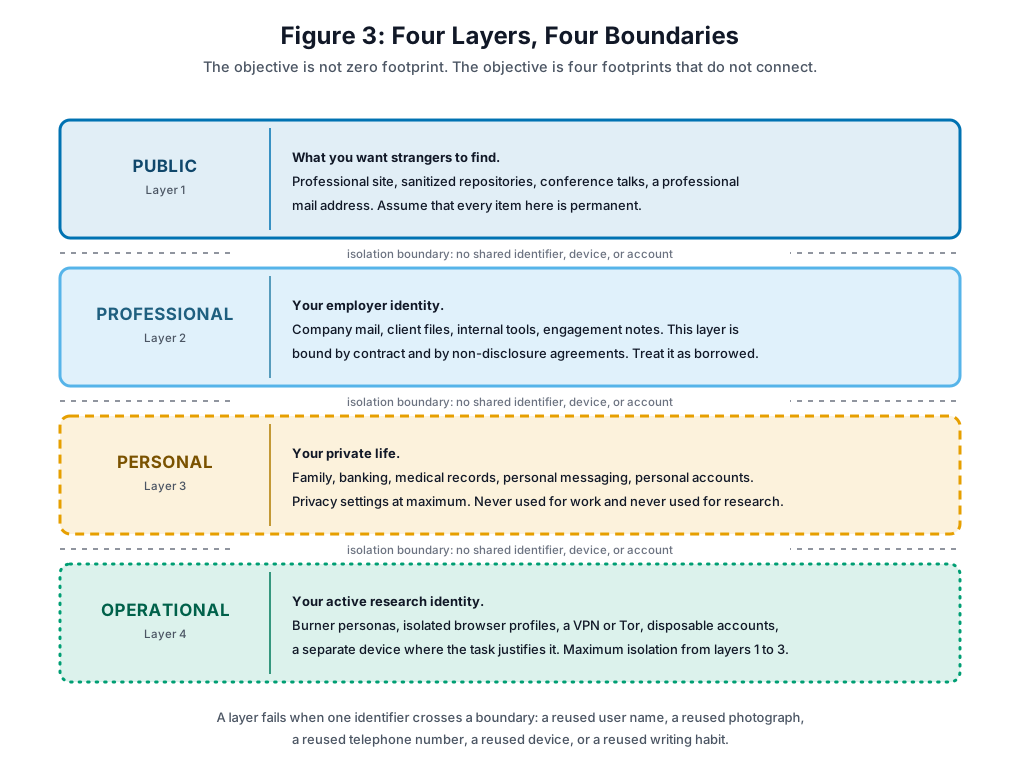
Figure 3. Four layers with three isolation boundaries. The boundaries are the control, not the layers.
The layers are ordinary. The boundaries do the work. A boundary holds when no identifier crosses it: no shared user name, no shared photograph, no shared telephone number, no shared mail address, no shared device, and no shared writing habit.
Reader exercise. Sort these eight items into the four layers before you continue. One of them is deliberately difficult.
- A recording of your conference talk, published under your real name.
- The mail account that receives your client engagement reports.
- A code hosting account that you made to fork tooling for one bug bounty program.
- The mobile number that receives your bank one-time codes.
- A blog under a pen name where you publish vulnerability research.
- The laptop that holds your family photographs.
- A social media account that you use to contact a person during an authorized social engineering test.
- Your profile on a professional recruitment network.
Answer Key for the Exercise
Do the exercise before you read this part.
| Item | Layer | Why |
|---|---|---|
| 1. Conference talk recording | Public | You published it to be found. Treat it as permanent. |
| 2. Client report mail account | Professional | It holds data that belongs to the client, under contract. |
| 3. Bug bounty fork account | Operational | It is tied to one engagement. It must not link to your public account. |
| 4. Bank one-time code number | Personal | It is an authentication factor. It must never appear in any other layer. |
| 5. Pen name research blog | It depends, and this is the point | It is operational while the pen name must not link to you. It becomes public the moment that you cite it in a job application or a talk. You cannot move it back. Decide which one it is before you publish the first post. |
| 6. Family photograph laptop | Personal | It is not a work device, and it must never be used for research. |
| 7. Social engineering test account | Operational | It exists for one authorized test, and it is disposed of after the test. |
| 8. Recruitment network profile | Public | It exists to be found by strangers. |
Item 5 is the item that catches people. A layer assignment is a decision, and the decision is difficult to reverse. Lesson 1 said that you must decide your trade-offs consciously, and that the worst failures happen when a person did not know that there was a choice. Item 5 is that principle in one line.
7. Summary
- A footprint has an active part that you create and a passive part that others record. The passive part is larger and you cannot review it.
- Data moves from you to collectors, to brokers, and to buyers. The broker layer restructures often, so check that any broker list you use is current.
- Aggregation defeats anonymity. AOL, Netflix, and Strava are documented cases. No name is needed, and no breach is needed.
- Deletion removes one copy. Archives, caches, scrapers, backups, and breach dumps hold the others. Commit history is the worst case.
- The objective is four isolated layers, not zero footprint. The boundaries are the control.
Action item. Lesson 1 asked you to write down where you use security, where you need privacy, and where anonymity actually applies. Get that worksheet out now. The exercise below adds real evidence to it, and Lesson 4 uses both.
The next lesson covers metadata. Section 5 of this lesson said that a screenshot can expose more than the thing it shows. Lesson 3 explains exactly how, and it covers the tools that remove it.
Knowledge Check
Question 1. Which of these is a passive digital footprint?
- A) A review that you write on a shopping site
- B) A repository that you publish
- C) The browser fingerprint that a site records when you visit
- D) A comment that you leave on a technical forum
Answer: C. A fingerprint is recorded without your action and without notice. The other three are things that you create on purpose.
Question 2. Why is the passive footprint the more difficult problem?
- A) It accumulates without your action, so you cannot review or delete most of it.
- B) It always holds more sensitive data than the active footprint.
- C) It is illegal in most countries.
- D) Only your internet service provider stores it.
Answer: A. The difficulty is the lack of visibility and the lack of control, not the sensitivity of any one item.
Question 3. In August 2006 AOL published about 20 million search queries and put a number in place of each account name. Reporters identified user 4417749 as a named person. What does this case prove?
- A) Search engines do not keep query logs.
- B) A numeric identifier is a strong privacy control.
- C) The data was not sensitive, because it held no names.
- D) Removal of the name does not remove the identity, because the behavior pattern is itself an identifier.
Answer: D. The search history identified the person. The number protected nothing.
Question 4. A broker joins your purchase records, your location history, and your property records into one profile. Which statement from Lesson 1 does this confirm?
- A) Open source software is not automatically secure.
- B) Anonymity removes the name from the data. It does not stop the collection, and a detailed behavior profile can attach the name again.
- C) A VPN gives complete anonymity.
- D) Privacy and security are the same problem.
Answer: B. This is the second row of the Lesson 1 answer key, shown in operation.
Question 5. You start reconnaissance on a target company. Which action makes the least risky footprint?
- A) A search from your work network
- B) A view of employee profiles from your personal professional-network account
- C) A connection request to an employee
- D) A visit to the public site through a fresh browser profile over Tor, with no sign-in
Answer: D. It gives no attributable address and no signed-in identity. Check the rules of engagement first, because some programs prohibit Tor and require a registered source address.
Question 6. The Strava global heatmap in January 2018 exposed the layout of military sites. The published data held no names. The exposure came from:
- A) Aggregated location patterns, which showed routes and daily routines
- B) Weak transport encryption in the Strava application
- C) A breach of the Strava user database
- D) Metadata in photographs that users uploaded
Answer: A. There was no breach and no name. The movement pattern was the identifier.
Question 7. Which statement about deleted online content is the most accurate?
- A) Deletion at the platform removes each copy.
- B) Only the original platform keeps a copy.
- C) Archives, search caches, screenshots, scrapers, and breach dumps can hold the content after the platform deletes it.
- D) Content expires automatically after 90 days.
Answer: C. Deletion removes one copy from one place. It does not reach the others.
Question 8. Compartmentalization means:
- A) Use of the strongest available encryption on each account
- B) Separate identities for separate purposes, with no identifier shared between them
- C) One hardened device for all activities
- D) Deletion of your accounts on a fixed schedule
Answer: B. The separation is the control. Encryption is a different control for a different problem.
Question 9. You publish vulnerability research. Your screenshots show a terminal prompt with your desktop user name, an internal address range, and a client-specific configuration. What did you do?
- A) You obeyed a responsible disclosure policy.
- B) You managed your active footprint correctly.
- C) You gave the required level of transparency.
- D) You linked your operational layer to your public layer, and you exposed client data.
Answer: D. Two failures in one image. One boundary broke, and confidential client detail left the professional layer.
Question 10. The four-layer model in this lesson is:
- A) Public, professional, personal, operational
- B) Active, passive, deleted, archived
- C) Browser, mail, social, telephone
- D) Security, privacy, anonymity, encryption
Answer: A. Four layers, and three isolation boundaries between them.
Exercise: OSINT Self-Assessment
Time: 3 to 4 hours, plus 1 to 2 hours to write the report.
Objective
Run open source intelligence collection against yourself. Find out what a stranger can learn, and find out which pieces join together.
Safety Notes
Read these before you start.
- Run the searches from a browser profile that is not signed in to any of your accounts.
- Some people search sites require more personal data before they will process an opt-out. Do not give a site more than it already holds. If an opt-out asks for a document that the site does not have, stop and record that fact instead.
- You may find data about family members. That data is not yours to publish. Keep it in your notes only.
- This exercise is uncomfortable for most people. That reaction is the correct reaction, and it is the reason the exercise works.
Part 1: Search Engines (30 minutes)
Search for yourself in a private browser window.
- Your full name in quotation marks.
- Your name with your city, then with each employer, then with each mail address.
- Each user name that you have used, on its own.
- Site-limited searches against the platforms that you use.
- Repeat the set on a second and a third engine. Different engines index different pages.
- Run a reverse image search on any profile photograph that you use.
Deliverable. A list of findings, sorted into personal data, professional data, contact data, images, and unexpected items.
Part 2: Social Media and User Names (30 minutes)
For each platform that you use, record what a signed-out stranger sees. Check your employer history, your connection list, your group memberships, your location tags, your tagged photographs, and your old posts.
Then check your code hosting accounts specifically. Look at the mail address in your old commits, at comments in old code, and at example configuration files.
Tool currency note. User name enumeration tools change often and some older ones are now advertising sites. Check that a tool is still maintained before you trust its result, and confirm each hit by hand. A false positive on a user name search sends you down a wrong path.
Deliverable. A platform inventory with a privacy rating for each entry, and a list of every place that one user name appears.
Part 3: Data Brokers and Deletion (45 minutes)
Task 3.1. Search for yourself on the major people search sites. Record the addresses, the telephone numbers, the relatives, and the associates that each one shows. The free preview is normally enough to make the point.
Task 3.2. Check public record sources: county property records, state court records, business registrations, and professional license boards.
Task 3.3. Check your mail addresses against a breach notification service, and record which breach exposed which field.
Task 3.4, and this one is new. California now runs a central deletion route. The Delete Request and Opt-out Platform, which is called DROP, opened to consumers on 1 January 2026. It takes one verified request and applies it to every data broker registered in California. From 1 August 2026 those brokers must read the platform at least every 45 days and process the requests. (Reference 12, Reference 13, Reference 14)
Do this:
- If you are a California resident, submit a request through the official state platform and record the date.
- If you are not, read the California data broker registry anyway. It is a public list of registered brokers, and it is more current than any list in a blog post. Use it to build your own opt-out queue.
- Record the date of each request that you send. Deletion is not permanent. Brokers reacquire data, so this becomes a recurring task, not a one-time task.
Deliverable. A broker findings document, with the high-risk exposures marked and a dated opt-out log.
Part 4: Technical Footprint (30 minutes)
Task 4.1. Send yourself a message from your normal mail account and read the full headers. Record the addresses, the client software, and the route.
Task 4.2. Download three to five files that you have shared publicly. Extract the metadata with a metadata tool. Record author names, software versions, timestamps, location coordinates, and organization names.
Task 4.3. Run a browser fingerprint test. Record your uniqueness result, and record which attributes contribute most. Then run the same test in a hardened browser and compare.
Deliverable. A technical findings document with the metadata examples included.
Part 5: Timeline and Correlation (30 minutes)
This part is the point of the whole exercise. Parts 1 to 4 collect. Part 5 joins.
Task 5.1. Build a timeline from everything that you found: when each account appeared, when you changed employer, when you moved, and where the gaps are.
Task 5.2. Find the patterns. Look for a repeated user name, a repeated photograph, a repeated writing habit, a consistent posting time, and a person who appears on more than one platform.
Task 5.3. Draw the link map. Start from one public item, such as your name, and draw a line to every item that you can reach from it. Then start from a second item that you believed was separate and do the same. Where the two maps touch, a boundary has failed.
Deliverable. A timeline and a link map. Hand drawing is acceptable.
Part 6: Threat Analysis and Plan (30 minutes)
Task 6.1. Take the adversary position. From your findings, what could a person build? A convincing phishing message? Your home or office location? An answer to a security question? A confidentiality problem for a client?
Task 6.2. Rate each finding from 1 to 5. 1 means expected public data. 3 means data that you would prefer to be private. 5 means significant risk.
Task 6.3. Write a remediation action for every finding rated 4 or 5. State whether the item can be deleted, restricted, opted out, or only isolated. Some items cannot be removed. Record those separately, because a threat model must account for them.
Deliverable. A threat analysis with a prioritized action list.
Submission
Produce one report:
- Summary, one page. The most concerning findings, an overall assessment, and the top three immediate actions.
- Findings, from Parts 1 to 5. Redact sensitive detail in any screenshot before you include it. This exercise is not a reason to make a new exposure.
- Action plan, one to two pages. Prioritized steps, dates, and the resources that each step needs.
- Reflection, one page. What surprised you, what you did not know was public, and which practice you will change this week.
Assessment Criteria
| Area | Points | What is measured |
|---|---|---|
| Coverage | 30 | Did you work through every source and record the results? |
| Correlation analysis | 30 | Quality of the pattern work and the link map, and the strength of the adversary reasoning |
| Action plan | 20 | Realistic, specific, prioritized, and dated |
| Presentation | 20 | Clear organization and supporting evidence |
| Total | 100 |
Optional Extensions
- Automation comparison. Run an automated collection framework and compare the result with your manual work. Record what the tool found that you missed, and what you found that the tool missed.
- Historical analysis. Use a web archive to find old versions of your profiles. Record data that should have been removed and was not.
- Peer review. Run this exercise against a colleague, with their written permission and an agreed scope. Written permission, not verbal. This is the same rule that applies to any engagement.
Additional Resources
Tools to Try
- Cover Your Tracks, from the Electronic Frontier Foundation. Browser fingerprint test: https://coveryourtracks.eff.org
- Have I Been Pwned. Breach exposure check: https://haveibeenpwned.com
- ExifTool. File metadata extraction: https://exiftool.org
- OSINT Framework. A directory of collection sources: https://osintframework.com
- California data broker registry, from the state privacy agency: https://cppa.ca.gov/data_brokers/
Check that any tool is still maintained before you rely on its output. This is the same vetting step that Section 2 applies to broker lists.
Reading
- Electronic Frontier Foundation, Surveillance Self-Defense: https://ssd.eff.org
- Privacy Guides: https://www.privacyguides.org
Discussion Questions
- Which single finding from your self-assessment would be the most useful to an adversary, and why that one?
- Which of your four layers is the weakest today, and which identifier crosses its boundary?
- Name one item in your footprint that you cannot delete. What do you do about it instead?
References
- TechCrunch, First Person Identified From AOL Data: Thelma Arnold
- AOL search log release, overview and timeline
- Narayanan and Shmatikov, Robust De-anonymization of Large Sparse Datasets, IEEE Symposium on Security and Privacy 2008
- CBS News, Data from fitness app Strava highlights locations of soldiers and U.S. bases, 28 January 2018
- Eckersley, How Unique Is Your Web Browser?, Privacy Enhancing Technologies Symposium 2010
- Electronic Frontier Foundation, Is Every Browser Unique? Results from the Panopticlick Experiment
- Meli, McNiece, and Reaves, How Bad Can It Git? Characterizing Secret Leakage in Public GitHub Repositories, NDSS 2019
- Interpublic Group, completion of the Acxiom Marketing Solutions acquisition, 1 October 2018
- Marketing Dive, Oracle exits advertising business following revenue falloff, June 2024
- Federal Trade Commission, Order Prohibits Data Broker X-Mode Social and Outlogic from Selling Sensitive Location Data, January 2024
- Federal Trade Commission, FTC to Ban Kochava and Subsidiary from Selling Sensitive Location Data, May 2026
- California Privacy Protection Agency, Information for Data Brokers
- California Privacy Protection Agency, Delete Request and Opt-out Platform system requirements
- California Delete Act, Senate Bill 362, overview and deadlines