Counter-Surveillance: Six Indicators That Mean Something
About This Lesson
Counter-surveillance guides usually cover a large subject carefully. The common four-tier model of surveillance is a good one, and the advice to focus on the middle two tiers is correct. The usual response frameworks are sound. The material on elicitation is the most useful part of the subject: bracketing and assumptive questions are techniques most security professionals have met without having a name for them.
This lesson adds four things.
A typical detection routine costs between two and a half and seven working weeks a year. Add up the daily, weekly, monthly and quarterly tiers that guides prescribe and that is what you get.
A typical indicator list runs to about forty items and gives a base rate for none of them. Combined with the instruction to trust your instincts, that produces a detector which fires constantly and is almost always wrong. There is a smaller set that means something.
On the channels most likely to affect you, the usual techniques report nothing. Interception using a root certificate that is already trusted, the monitoring agent on your work machine, and records handed over under a nondisclosure order are all invisible to the standard routine. Two of the three need a decision rather than a detector.
Three commonly given commands do not do what guides say they do. The usual metadata cleaning command leaves the original recoverable, and the tool’s own documentation says so.
Learning Objectives
After you read this lesson, you can do these tasks:
- Price a detection routine before you adopt it, and convert polling into alerting.
- Reject a surveillance indicator that has no base rate, and name the benign cause that beats it.
- List the small set of indicators whose benign rate is near zero, and alert on those only.
- Name the channels against which the usual checks return clean by design, and say what replaces detection there.
- Clean metadata from a PDF so that it cannot be recovered.
- Site a traffic capture somewhere other than the machine under suspicion.
- Decide when a surveillance detection route is worth running, and what it cannot tell you.
Prerequisites
- Lesson 8.2, on compartmentalization, whose argument this lesson extends.
- Lesson 7.4, on self-hosted DNS, which has already built the observation point this lesson needs.
- Lesson 7.5, on testing, which covers leak testing properly and is not repeated here.
- Module 1, on threat modeling.
1. Price the Routine Before You Adopt It
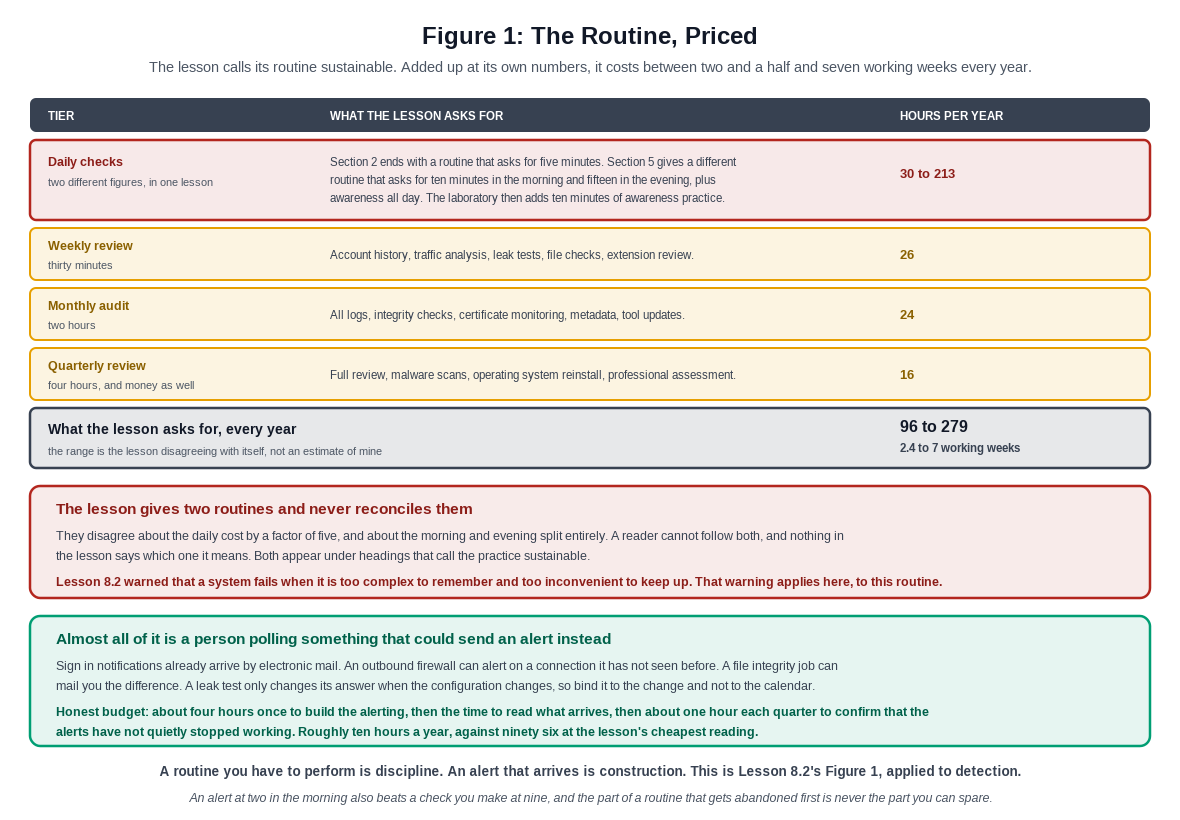
Figure 1. A typical routine, added up.
Take a detection routine of the kind counter-surveillance guides prescribe. One common version: five minutes daily, thirty minutes weekly, two hours monthly, four hours quarterly. Another common version: ten minutes in the morning, fifteen minutes in the evening, awareness during work, then the same weekly, monthly and quarterly tiers. Training plans often add ten minutes of daily awareness practice on top.
The arithmetic is simple and worth doing yourself.
| Tier | Low reading | High reading |
|---|---|---|
| Daily | 5 min x 365 = 30 hours | 35 min x 365 = 213 hours |
| Weekly | 30 min x 52 = 26 hours | 26 hours |
| Monthly | 2 h x 12 = 24 hours | 24 hours |
| Quarterly | 4 h x 4 = 16 hours | 16 hours |
| Total | 96 hours | 279 hours |
Ninety-six hours is two and a half working weeks. Two hundred and seventy-nine hours is seven. The quarterly tier in these routines often also asks for a professional security assessment and an operating system reinstall, so part of the cost is money rather than time.
Both versions are usually presented as sustainable.
Lesson 8.2 warned that a separation scheme fails when it is too complex to remember and too inconvenient to keep up. That warning applies here, to this routine. The pattern is familiar: guides state the sustainability principle correctly and then do not apply it to their own routines.
What the cost is actually buying
Look at what the daily and weekly tiers contain. Check account notifications. Glance at the network monitor. Verify the tunnel is up. Review login history. Run a leak test. Review extensions.
Every one of those is a person polling a system that could send an alert instead.
- Sign-in notifications already arrive by email. Reading them when they arrive costs nothing and catches the event hours earlier than a morning review does.
- An outbound firewall alerts on a connection it has not seen before. That is the whole value of the tool, and checking it daily by hand discards it.
- A file integrity job can run on a schedule and mail you the difference. Running
sha256sum -cby hand once a week is the same check, done later and less often. - A leak test only changes its answer when the configuration changes. Bind it to the change, not to the calendar. Lesson 7.5 covers this in full.
The honest budget for the alerting version is about four hours once to build it, then the time it takes to read what arrives, then about an hour each quarter to confirm that the alerts have not quietly stopped working. Call it ten hours a year, against ninety-six for the cheapest version of the routine above.
This is Lesson 8.2’s Figure 1 applied to detection. A routine you have to perform is discipline. An alert that arrives is construction. The test is the same one: what happens if you stop paying attention right now? A routine stops. An alert still arrives.
The quarterly review is the one tier worth keeping as a scheduled human activity, because its job is different: not to look for surveillance, but to confirm that the alerting itself still works. Alerts fail silently. A rule that stopped matching, a mailbox filter that swallowed the notifications, an agent that stopped after an update. One hour a quarter spent deliberately triggering each alert and confirming it arrives is worth more than the ninety-five hours it replaces.
2. Indicators Without Base Rates
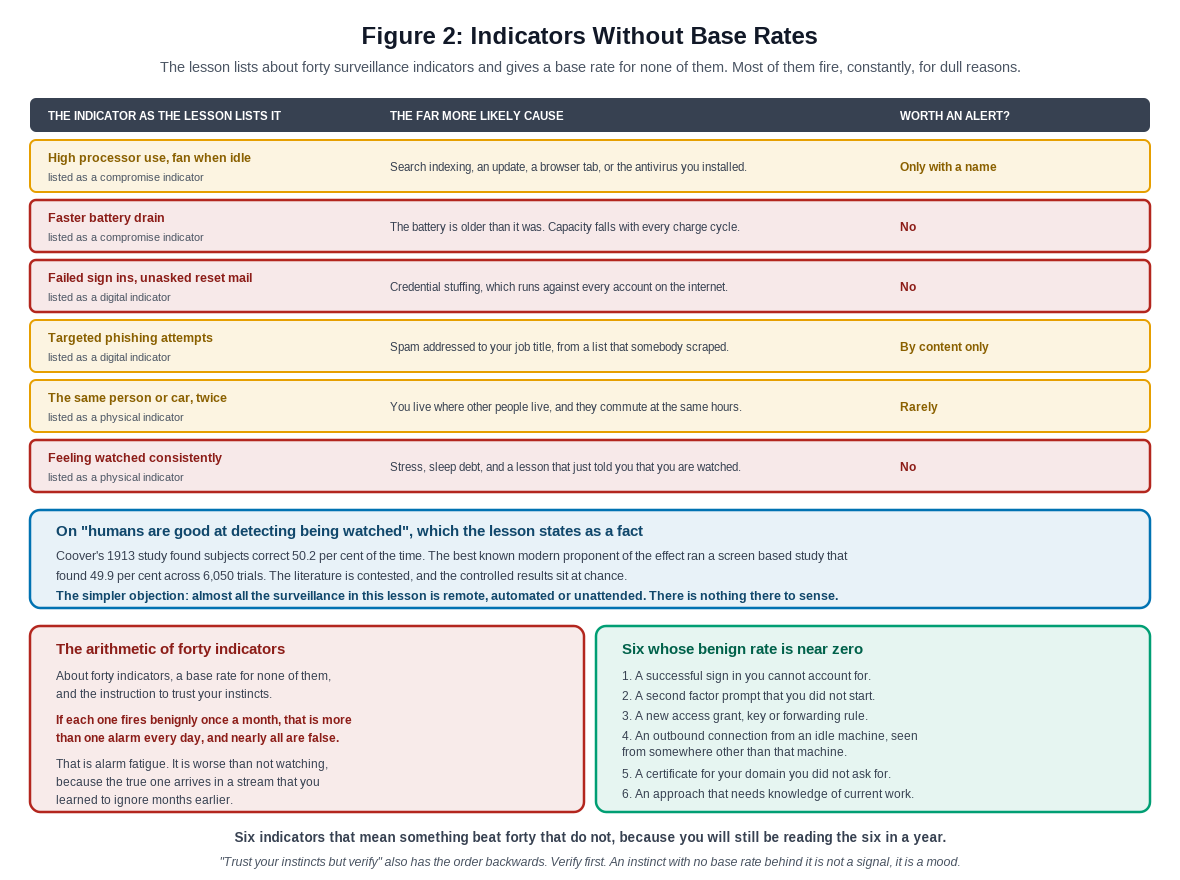
Figure 2. Six common indicators, against what actually causes them.
Typical counter-surveillance material lists roughly forty surveillance indicators across digital, physical and social sections. It gives a base rate for none of them, and it usually closes with the instruction to trust your instincts and verify with evidence.
Consider what that produces.
High processor use, a fan running when idle, unusual disk activity. These are search indexing, an update, a browser tab with a bad advertisement, and the antivirus product you installed on purpose. On a normal machine they occur most days.
Faster battery drain. Lithium cells lose capacity with every charge cycle. A battery that lasted eight hours last year lasting six this year is a battery, not an adversary. This indicator has no diagnostic value at all and should be removed.
Failed sign-in attempts, password reset messages you did not request. Credential stuffing runs against every account on the internet, continuously, using passwords from old breaches. Receiving these is evidence that you have accounts, not that you have an adversary.
Targeted phishing. Most mail that appears to know your job is spam sent to a list somebody scraped from a conference program or a professional network. Phishing becomes an indicator only when its content requires knowledge that is not public.
The same person or vehicle at more than one location. You live somewhere that other people also live, shop where they shop, and commute when they commute. The prior probability of seeing the same car twice in a week in your own neighborhood is high.
Feeling watched consistently. This is the one that does the most damage, because guides treat it as a sensor.
On the claim that humans detect being watched
Some guides state that humans are good at detecting being watched, and use that to support trusting an instinct. The evidence does not support the claim.
Coover’s 1913 study, the first to publish its method and data, found subjects correct 50.2 percent of the time and concluded that the feeling was groundless. The best-known modern proponent of the effect is Rupert Sheldrake, and his own screen-based study found a hit rate of 49.9 percent across 6,050 trials. The literature is genuinely contested, and the skeptical and parapsychological camps each dispute the other’s methods, but the controlled results sit at chance (Reference 5). A claim whose strongest advocate’s own data lands on 49.9 percent is not a foundation for an operational decision.
There is a simpler objection, and it does not require the research at all. Almost all the surveillance described in this lesson is remote, automated or unattended. Traffic analysis, platform records, OSINT collection, scraping, a camera on a memory card, a subpoena. There is no one in the room. There is nothing to sense.
The arithmetic of forty indicators
Suppose each of forty indicators fires for a benign reason once a month. That is more than one alarm every day, and essentially all of them are false. For scale on the other side of the ratio: one antivirus vendor’s telemetry recorded 31,031 affected users of monitoring software worldwide in a year, and noted that the true figure is higher (Reference 8). Whatever the real number is, it is not one alarm a day per person.
A detector tuned that way does not give you information. It trains you to dismiss the category. This is alarm fatigue, and anyone who has worked a security operations queue knows how it ends: the true positive arrives in a stream that was tuned out months earlier. The failure mode is not that you investigate too much. It is that you stop.
So the question is not how many indicators you can list. It is which ones are rarely explained by anything dull.
Six that are worth an alert
- A successful sign-in you cannot account for. Not a failed one. Failures are weather. A success means somebody has the credential.
- A second-factor prompt you did not start. This means the password is already gone, and you are the only thing between the adversary and the account. It is also the one prompt people approve by reflex.
- A new access grant, application password, public key, or mail forwarding rule you did not create. These are persistence mechanisms. Nothing benign creates them. This indicator is usually missing from indicator lists, and it is the most valuable one here, because it survives a password change.
- An outbound connection from a machine that should be idle, observed from somewhere other than that machine. The qualifier is the whole point, and Section 4 covers it.
- A certificate issued for a domain you control that you did not request. Certificate transparency monitoring is common advice, and correct. This is the one place where the usual detection advice matches an indicator with a near-zero benign rate.
- An approach whose content requires knowledge of your current work. Not interest in your field. Knowledge of this engagement, this target, this week. That is the social indicator that cannot be explained by a scraped list.
Six indicators that mean something beat forty that do not, because you will still be reading the six in a year.
One correction of order while we are here. The usual advice is to trust your instincts but verify with evidence. Reverse it. Verify first, and let the evidence decide whether the instinct was worth having. An instinct with no base rate behind it is not a signal.
3. Where the Routine Returns Clean by Design
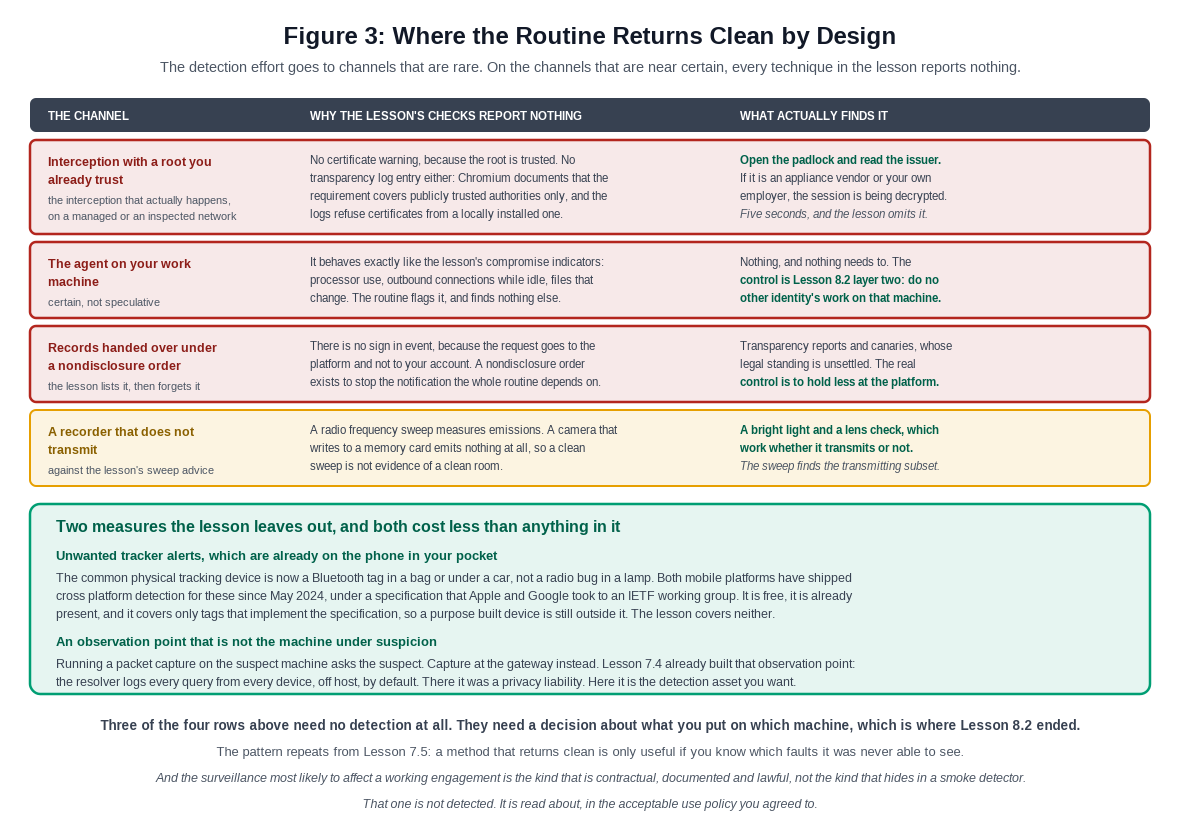
Figure 3. Four channels, and the two cheap measures most routines omit.
Lesson 7.5 made an argument about testing: a method that returns clean is only useful if you know which faults it was never able to see. The same argument applies here, and it is sharper, because the channels the usual routine cannot see are more likely than most of the ones it covers.
Interception using a root you already trust
The usual advice gives two ways to detect a machine-in-the-middle attack. The first is to never ignore a browser certificate warning. The second is certificate transparency monitoring.
Both return clean against the interception that actually happens.
When a proxy decrypts traffic using a root certificate that is already installed on the machine, which is how corporate TLS inspection works and how a hostile managed device would work, the browser shows a padlock. The certificate chains to a root the machine trusts, so there is no warning to ignore.
Certificate transparency does not see it either. Chromium’s own documentation states that the transparency requirements apply only to publicly trusted authorities, that organizations using their own or locally installed authorities are outside the requirement, and that the logs will not accept certificates from such an authority in any case (Reference 2). So no entry is created, and monitoring the logs returns nothing.
What does detect it takes five seconds and is missing from most routines. Open the padlock and read the issuer. If the certificate for a public website was issued by an appliance vendor, by your employer, or by anything that is not a public certificate authority, the session is being decrypted. A reader who learns that one habit is better protected against real interception than a reader who completes an entire monthly audit.
The agent on your work machine
This is the surveillance with the highest probability of affecting a working security professional, and most counter-surveillance guides do not mention it.
An endpoint agent on a managed machine collects process execution, command lines, network connections and file activity, continuously, by design and by contract. During an engagement it collects the engagement.
Note what it does to the usual indicators of compromise. Processor use, outbound connections while the machine is idle, and files changing without your action describe endpoint protection software exactly. A reader who follows the routine on a managed machine finds their employer’s agent, correctly identifies it as software that watches everything they do, and learns nothing else.
There is nothing to detect here, because nothing is hidden. The control is a decision, and Lesson 8.2 already made it: layer two, separate devices. Do no other identity’s work on a machine you do not administer. The surveillance is not defeated. It is confined to the compartment that consented to it.
Records handed over under a nondisclosure order
Platform records are a well-known surveillance channel, reachable by legal process. The usual detection advice for accounts is login notifications and login history review.
Neither can see it. The request goes to the platform, not to your account, so there is no sign-in event to appear in any history. And a nondisclosure order exists specifically to prevent the platform from telling you, which removes the notification the entire routine depends on.
The only available signals are indirect: transparency reports, and warrant canaries, whose legal standing is unsettled and has not been resolved by a court (Reference 6). Neither is a detection method you operate.
So the control is upstream, and it is the same control as everywhere else in this course. Hold less at the platform. What is not retained cannot be produced. This is Module 4 and Module 5 territory, and it is the correct answer to a channel on which detection is structurally impossible.
A recorder that does not transmit
Guides often recommend a radio frequency sweep as part of a thorough room check, and treat a clean sweep as a result.
A radio frequency detector measures emissions. A camera that writes to a memory card and never connects to a network emits nothing, so it cannot appear on any detector or scanning application. A device that is powered off emits nothing either. A clean sweep means the sweep found no relevant transmission under the conditions of that sweep. It is not evidence of a clean room (Reference 7, which is vendor material and should be read as such, although the physics does not depend on the source).
What does work regardless of transmission is a bright light and a lens check, because a lens reflects a direct light source back whether the device is recording, idle or off. That is free, and it is more reliable than the equipment guides suggest buying.
Two measures most routines leave out
Unwanted tracker alerts. The common physical tracking device in 2026 is a Bluetooth tag in a bag or attached to a car, not a radio bug in a lamp. Both mobile platforms have shipped cross-platform detection for these since May 2024, under a specification that Apple and Google published jointly and then took to an IETF working group (References 3 and 4). It is free, it is already running on the phone in your pocket, and it alerts when a tag that is not yours travels with you. The limitation is real and should be stated: it only covers tags that implement the specification, so a purpose-built tracker is outside it.
An observation point that is not the machine under suspicion. Section 4.
4. Three Commands That Do Not Do What Guides Say
The usual metadata cleaning command leaves the original recoverable
This is the most serious of the three, because you perform the step, verify it, get a clean result, and ship a file that still contains your name.
The commonly given command is:
exiftool -all= document.pdf
exiftool document.pdf          # should show minimal metadata
ExifTool’s own documentation for PDF explains why that is not sufficient. ExifTool writes PDF changes using an incremental update, which it describes as fast and reversible. All metadata edits are reversible. The original values are still present in the file, above the update that marks the fields empty, and the documentation gives the command that restores them. It also states plainly that this is a potential security problem, because old information is never actually deleted from the file (Reference 1).
So anybody who receives the document can run this:
exiftool -PDF-update:all= document.pdf # restores the original metadataVerification with exiftool document.pdf does not catch it, because ExifTool reads the current state and reports the fields as empty. The usual check returns clean on the fault.
The fix is to rewrite the file so that the old objects are not carried forward:
exiftool -all:all= document.pdf
qpdf --linearize document.pdf clean.pdf
exiftool -a -G1 -s clean.pdf               # list every remaining tag
The order matters. ExifTool clears the fields, and qpdf rebuilds the file structure, which discards the update history. Running qpdf alone does not strip metadata, because the information dictionary and the XMP stream are referenced objects and are preserved.
This applies to PDF. For images, exiftool -all= -overwrite_original image.jpg rewrites the file, and the usual advice holds.
One caveat worth carrying: a document can hold identifying material that is not metadata at all. Tracked changes, a comment, an author name inside an embedded image’s own EXIF block, or a redaction drawn as a black rectangle over text that is still selectable underneath. Metadata cleaning does not touch any of those.
A capture on the suspect machine asks the suspect
A common first detection technique is to capture traffic with tcpdump on the device you are investigating.
If the concern is malware, this is asking the suspect to report on itself. Software that is hiding at a sufficient level hides its own traffic from the host’s own capture, because the capture is subject to the same operating system the malware has already compromised. A clean result from a host-based capture against a host-level compromise is not evidence.
The capture belongs off the host, at the gateway, where the traffic is observed by a machine the suspect does not control.
Lesson 7.4 already built that observation point. A local resolver logs every query from every device on the network, off host, by default. In 7.4 that default was a liability, because it quietly records every device and every guest. Here it is the detection asset you want. The same fact, opposite sign, depending on what you are doing with it. If you built the resolver in Module 7, you already have the right place to look.
The same reasoning applies to file integrity monitoring. A baseline generated with sha256sum and stored on the machine it describes can be regenerated by anything with write access to that machine. Store the baseline somewhere else, or sign it with a key that is not on the machine, or the check verifies nothing.
Two notes on the tools commonly listed. tcpdump examples often use en0, which is a macOS interface name and will not work as written on Linux or Windows. And of the common file integrity tools, AIDE is actively maintained, with releases continuing into 2026. Check the maintenance status of anything else before you build a routine on it.
A monitoring tool that no longer exists
Some guides still recommend Facebook’s certificate monitoring among their certificate transparency tools. That page returns HTTP 404 as of 14 October 2026. The working options are crt.sh, Cert Spotter, and CertStream for a live feed.
Certificate transparency monitoring is otherwise good advice, and it is one of the few common techniques that detects something with a near-zero benign rate. It is worth setting up for any domain you control, as an alert rather than as a monthly review.
5. The Surveillance Detection Route, and What It Cannot Tell You
Physical surveillance often gets the most space in counter-surveillance material, even in guides that open by saying most security professionals will not face sophisticated physical surveillance. That second statement is correct, and it is an argument for spending less time here.
Two problems with the technique as usually taught.
A surveillance detection route makes you legible. Typical instructions describe sudden reversals, stopping at shop windows to use reflections, and boarding a train as the doors close. Performed in front of a trained team, these do not defeat surveillance. They identify you as somebody who is running counter-surveillance, which is itself information, and which changes how you are handled afterward. The classical doctrine is that detection should be passive and should not announce itself. If you run a route at all, it should look like your ordinary movement.
A single route cannot distinguish a follower from a coincidence. This is the base-rate problem again, in a different costume. A person who turns the same two corners as you on one occasion is almost certainly going the same way. Confidence comes from independent sightings, across unrelated locations, recorded before you knew they mattered. One run produces an impression, and an impression is what Section 2 warned about.
The usual guidance is right that this is not something to do constantly, and right about when it is warranted: before meeting a sensitive source, before entering a high-security compartment, after a credible threat. That list is short on purpose. Keep it short. Practicing a formal route every month, as some training plans suggest, puts a rare, expensive technique on a calendar, which is the same error as the rest of the routine.
Pattern variation is better value and needs no technique. A routine that is not fixed is more expensive to watch, and it costs nothing to maintain beyond not being a creature of habit.
6. Your Counter-Surveillance Log Is Itself a Target
Guides often ask you to keep an incident tracking spreadsheet, an observation log and a threat timeline. Their templates ask for descriptions of people, and for vehicle makes, models and license plates.
Think about what that file is.
It is a record of exactly what you noticed, when you noticed it, and what you concluded. It is the single most useful document an adversary could read, because it tells them precisely which of their methods you detected and which you did not. During an engagement it will also accumulate client names, system details and dates, because surveillance notes and engagement notes are written at the same desk about the same week.
Guides rarely say where this file should live.
Three things follow.
Apply the same compartmentalization to the log that you apply to the work. It belongs in the compartment it describes, encrypted at rest, not in a general notes application that synchronizes to a personal account. A counter-surveillance log in the personal compartment links the compartments by itself.
Keep client and engagement material out of it. Record that an approach referenced a current engagement. Do not record which engagement. The detail adds nothing to your own analysis, and it converts a security note into a document you are contractually responsible for.
Descriptions of uninvolved people are personal data, and you are now the controller. A private individual maintaining a file of photographs, physical descriptions and license plates of people who have done nothing has a retention problem and, in several jurisdictions, a legal one. Record behavior and time, keep it for a defined period, and delete it when the period ends.
Common response guidance has a similar gap. It advises revoking all sessions and, in the device case, considering physical destruction. Both destroy evidence. If the incident touches an engagement, your contract probably specifies notification timing and may require preservation, and the contract should be read before the response starts rather than after. Containment and preservation are both legitimate goals, and they conflict. Deciding which one wins is a decision to make in advance, in writing, which is exactly what a response playbook template is for. Most templates do not have a line for it, so add one.
7. What the Standard Advice Gets Right
Three corrections and a budget critique can leave a false impression, so this is worth stating directly.
The four-tier surveillance model is a good one.
- Tier 1, mass surveillance: everyone is subject to it. Address it with ordinary privacy tools.
- Tier 2, sector surveillance: aimed at the security community as a group.
- Tier 3, targeted surveillance: aimed at you specifically.
- Tier 4, advanced persistent surveillance: nation-state level, and extremely difficult to detect. That is a different profession, and it needs professional help.
Concentrate on tiers 2 and 3. Most counter-surveillance writing fails to make this distinction and leaves the reader doing tier 4 work against a tier 1 problem.
Elicitation is the most immediately useful thing to learn. Elicitation is getting information out of somebody in conversation without asking for it directly. Learn the techniques by name:
- Flattery: “You’re the expert on this, what do you think about [a specific technical detail]?” It makes you want to show what you know.
- Criticism: “I heard [company] has terrible security.” It makes you want to correct them, with specifics.
- The hypothetical: “If you were testing [a specific target], how would you approach it?” It extracts your methodology.
- Bracketing: “Do you make 200k from bug bounties?” Both numbers are wrong on purpose, so your correction gives the real figure.
- The assumptive question: “When did you stop researching [target company]?” It presumes the fact it is fishing for.
They are real, they are used at conferences, and most people meet them without a name for them. Naming a technique is most of defending against it. The right responses are unglamorous: be vague, redirect, change the subject.
Need-to-know applies to friendly conversations too. That continues the best idea in Lesson 8.2.
Never ignoring a certificate warning is right, even though Section 3 shows that the warning will not fire against the most likely interception. A warning that does appear is always worth stopping for.
A documented response framework is the right instinct. Section 6 adds a line to the template rather than replacing it.
And counter-surveillance is professional awareness, not paranoia. Some guides undermine that by opening with the flat claim that you are being watched. That is rhetoric, and it is the opposite of an evidence-based approach. Appropriate vigilance is a conclusion you reach from a threat model. It is not a premise.
8. The Version That Fits a Working Week
Everything above reduces to one routine.
Build once, in about four hours.
- Turn on sign-in, new-device and security-change notifications on every account that matters, and make sure they reach a mailbox you actually read.
- Review and remove existing access grants, application passwords, public keys and mail forwarding rules now, so that any new one is an event.
- Install an outbound firewall and let it alert. Accept the noise for a week while you build the allowlist, then leave it alone.
- Put a capture or a logging resolver at the gateway, not on the endpoints. If you built the resolver in Module 7, this is done.
- Set up certificate transparency alerting for any domain you control.
- Run a file integrity job on a schedule that mails you the difference, with the baseline stored off the machine.
Then read what arrives. That is the whole daily practice. The six indicators in Section 2 are the ones worth acting on.
Learn one habit. Open the padlock and read the issuer when you are on a network you do not control. Five seconds.
Event-driven, not scheduled.
- Leak tests after a configuration change, following Lesson 7.5.
- Metadata cleaning before a file leaves a compartment, using the
qpdfsequence from Section 4. - A surveillance detection route before a meeting that warrants one, and not otherwise.
One hour a quarter. Not to look for surveillance. To trigger each alert deliberately and confirm it still arrives, because alerts fail silently and a detection system you have not tested is a detection system you are guessing about.
That is roughly ten hours a year. It detects more than the ninety-six-hour version, because an alert at two in the morning beats a check you make at nine, and because a routine that fits inside a working week is still running in month seven.
Lesson 8.2 asked a question of every compartment: what would happen if I tried to do the wrong thing right now? The detection equivalent is just as short.
What happens if I stop paying attention?
A routine stops. An alert still arrives.
Quiz
Question 1. A detection routine has a daily tier of 5 to 35 minutes, plus 30 minutes weekly, 2 hours monthly and 4 hours quarterly. What does it cost in a year?
A. Under 20 hours, which is negligible B. About 40 hours, one working week C. It depends entirely on how many accounts you hold D. Between about 96 and 279 hours, which is two and a half to seven working weeks
Answer: D
The daily tier dominates. An alerting setup of about ten hours a year detects more, because it does not depend on you checking.
Question 2. Why is “faster battery drain” not a usable surveillance indicator?
A. Lithium cells lose capacity with every charge cycle, so the benign cause is near universal B. Modern malware is designed to minimize power consumption C. Battery reporting is inaccurate on most operating systems D. It only applies to mobile devices
Answer: A
An indicator is only useful when the benign explanation is rare. Here the benign explanation is certain.
Question 3. A corporate proxy decrypts your traffic using a root certificate installed on the machine. Why do both of the usual machine-in-the-middle checks return clean?
A. The proxy uses a certificate from a public authority B. Certificate transparency logs are not updated in real time C. There is no browser warning because the root is trusted, and no transparency log entry because the requirement covers publicly trusted authorities only D. Browser warnings are disabled by group policy
Answer: C
Chromium documents both halves. The detection that does work is to open the padlock and read the issuer.
Question 4. What does exiftool -all= document.pdf actually do?
A. It removes all metadata permanently from the file B. It marks the metadata fields empty with an incremental update, leaving the original recoverable C. It fails silently on encrypted PDFs D. It removes metadata but leaves the file unreadable to some viewers
Answer: B
ExifTool’s documentation calls the edit reversible, gives the command that restores it, and warns that this is a security problem.
Question 5. Why should a traffic capture for compromise investigation not run on the machine under suspicion?
A. Capture tools consume too much disk space on a working machine B. The capture file would be encrypted by the malware C. Packet capture requires administrator rights that are often unavailable D. Host-level compromise can hide its own traffic from the host’s capture, so a clean result is not evidence
Answer: D
The capture belongs at the gateway. Lesson 7.4’s resolver already provides that observation point.
Question 6. Which of these has a benign explanation rate close to zero, and is therefore worth an alert?
A. A new mail forwarding rule you did not create B. A password reset message you did not request C. A failed sign-in attempt from an unfamiliar country D. Higher than expected network data usage
Answer: A
B, C and D are weather. A forwarding rule is a persistence mechanism, and it survives a password change.
Question 7. What does a clean radio frequency sweep of a room establish?
A. That there are no recording devices in the room B. That any devices present are not currently transmitting a detectable signal C. That no device was present during the sweep period D. That the room is safe for sensitive conversation
Answer: B
A camera recording to a memory card emits nothing. A light and a lens check work whether a device transmits or not.
Question 8. Why can account monitoring not detect records handed over under legal process?
A. Platforms do not log administrative access B. The request goes to the platform rather than the account, so there is no sign-in event, and a nondisclosure order prevents the notification C. The access happens outside normal business hours D. The notification arrives but is usually filtered as spam
Answer: B
The control is upstream, not detective. Hold less at the platform.
Question 9. What is the problem with listing forty indicators and adding “trust your instincts”?
A. Nobody can memorize forty indicators B. Several of the indicators overlap with each other C. If each fires benignly once a month that is more than one alarm a day, almost all false, which trains you to ignore the category D. The indicators are weighted towards digital surveillance
Answer: C
Alarm fatigue. The true positive then arrives in a stream that was tuned out months earlier.
Question 10. Which counter-surveillance skill is the most immediately useful to a working security professional?
A. Recognizing elicitation techniques by name: flattery, provoked correction, the hypothetical, bracketing and the assumptive question B. A quarterly operating system reinstall schedule C. A radio frequency sweep procedure for hotel rooms D. Surveillance detection route techniques
Answer: A
These techniques are real, common at conferences, and mostly defeated by being named.
References
- ExifTool PDF Tags documentation, on the incremental update technique, its reversibility, the
-PDF-update:all=recovery command, and the warning that old information is never deleted from the file. https://exiftool.org/TagNames/PDF.html - Chromium project, Certificate Transparency documentation, stating that the requirements apply only to publicly trusted certificate authorities and that locally installed authorities are outside them. https://chromium.googlesource.com/chromium/src/+/lkgr/net/docs/certificate-transparency.md
- Apple Newsroom, May 2024, on cross-platform unwanted tracking alerts shipping in iOS 17.5 and on Android 6.0 and later. https://www.apple.com/newsroom/2024/05/apple-and-google-deliver-support-for-unwanted-tracking-alerts-in-ios-and-android/
- IETF datatracker, Detecting Unwanted Location Trackers, the Apple and Google draft taken to an IETF working group. https://datatracker.ietf.org/doc/draft-ledvina-apple-google-unwanted-trackers/
- Wikipedia, “Psychic staring effect,” covering Coover’s 1913 result of 50.2 percent, Sheldrake and Smart’s screen study at 49.9 percent across 6,050 trials, and the dispute between the skeptical and parapsychological literatures. https://en.wikipedia.org/wiki/Psychic_staring_effect
- Yale Law Journal, “Warrant Canaries and Disclosure by Design,” on nondisclosure orders and the unsettled legal standing of canaries. https://www.yalelawjournal.org/forum/warrant-canaries-and-disclosure-by-design
- Vendor guidance on hidden camera detection, stating that a device recording to a memory card with no network connection produces no radio frequency signal and will not appear on any detector. Vendor material, read accordingly. https://hiddensec.com/blog/do-hidden-camera-detectors-work/
- Kaspersky Securelist, “The State of Stalkerware,” reporting 31,031 unique affected users in its own telemetry for 2023, with the note that the real figure is higher. Useful as an order of magnitude for how rare targeted device monitoring is against the population of indicators that fire daily. https://securelist.com/state-of-stalkerware-2023/112135/
Where This Goes Next
Lesson 8.4 applies operational security to specific operations. The question to carry into it from here is which detections are worth building per engagement rather than permanently, because an engagement has a defined start and end and a routine does not.
Lesson 8.5 covers incident response, where response planning properly belongs. Two things from this lesson belong there too: the conflict between containment and evidence preservation, and the contractual notification timing that decides it. Both are decisions to make before an incident, in writing.
Module 7, Lesson 7.4 is worth revisiting with Section 4 in mind. The query logging that looked like a privacy liability when you built the resolver is the off-host observation point this lesson needs.
Next lesson: Module 8 Lesson 4: OPSEC Per Operation: Scope, Deletion, and the Report’s Afterlife