OS Telemetry: Not Your Privacy, Your Client’s Data
About This Lesson
Most operating system hardening guides do two things: they list what the operating system collects, and they tell you how to turn as much of it off as you can. The usual inventory is accurate and the usual steps work. The better guides also end honestly: you cannot fully eliminate collection, settings revert with feature updates, and you have to keep checking.
This lesson adds three things, and the third changes what hardening is for.
A hundred switches with no check is a list of intentions. After seven modules arguing that a configuration you have not observed in operation is a belief rather than a state, this lesson gives you the check: capture what the machine sends, before and after.
The largest new collection surface on the platform is not telemetry. A searchable screenshot history of everything on your screen now ships on Windows. It is not telemetry in the usual sense, and most hardening checklists do not touch it.
And the usual framing is wrong for people doing this work. Hardening guides treat collection as a personal privacy preference. For anybody doing security work professionally the question is not whether a vendor learns your interests. It is whether material you were trusted with leaves on a sync you forgot about.
Learning Objectives
After you read this lesson, you can do these tasks:
- Name what each major platform collects, and the gap between the levels you can and cannot turn off.
- Verify that hardening changed the machine’s behavior rather than its settings screens.
- Describe the screenshot history feature, its genuine safeguards, and its documented gaps.
- Explain why screen content is a different category from telemetry.
- Reframe the whole question as an engagement-data problem, and reach the conclusion that follows.
- Say when hardening is the answer and when the answer is a different machine.
Prerequisites
- Modules 1 to 7. Lesson 7.5 in particular, because this lesson applies its argument to the whole operating system.
1. What Gets Collected
Collection falls into three tiers. Basic: versions, hardware, identifiers, installed software, crashes. Advanced: application usage, search queries, voice, location, file access patterns. Intrusive: typing data, clipboard, document and photo scanning, advertising identifiers.
The platforms differ. Windows collects the most and permits the least refusal: on consumer editions the minimum level still sends a substantial amount, and the lower level exists only under management policy (Reference 5). macOS collects less, and still collects. Most Linux distributions collect nothing by default, and their code is open to audit. Remember that auditable is not the same as audited.
One point to hold on to: “cannot be fully disabled” is a statement about the floor, not about what you achieved. Knowing the floor exists tells you nothing about how close to it you got, and Section 2 is about that gap.
2. A Hundred Switches, and No Check
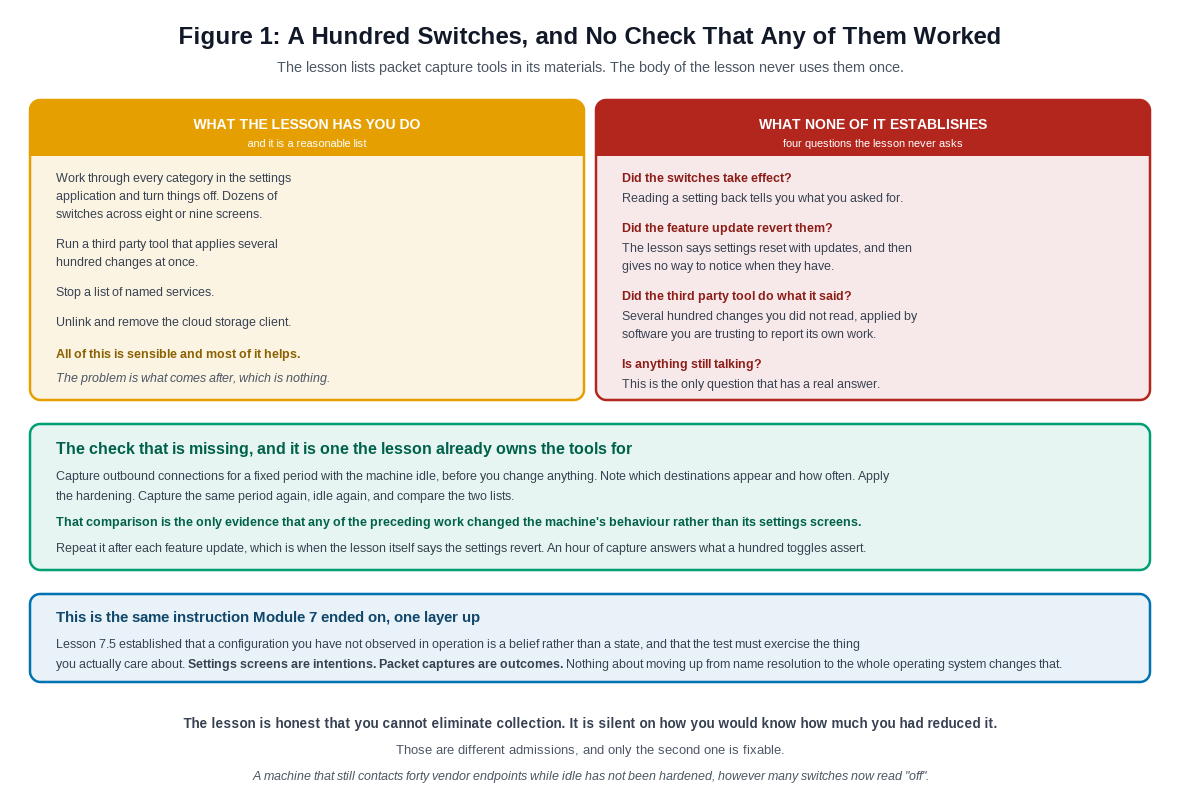
Figure 1. What a typical hardening sequence has you do, and what none of it establishes.
A typical Windows hardening sequence goes like this: work through every category in the Settings application, run a third-party tool that applies several hundred changes at once, stop a list of named services, and remove the cloud storage client.
All of it is sensible, and most of it helps. The problem is what comes after, which is usually nothing.
Four questions to ask after any hardening pass:
Did the switches take effect? Reading a setting back tells you what you asked for. Lesson 7.2 found a security control that displayed the level you selected and did not apply it until restart, for years.
Did the feature update revert them? Settings reset with feature updates. You need a way to notice when they have.
Did the third-party tool do what it said? Several hundred changes you did not read, applied by software you are trusting to report on its own work. A tool can be well regarded and still not be verified.
Is anything still talking? This is the only one of the four with a real answer available.
The check
Capture outbound connections for a fixed period with the machine idle, before you change anything. Note which destinations appear and how often. Apply the hardening. Capture the same period again, idle again, and compare.
That comparison is the only evidence that the hardening changed the machine’s behavior rather than its settings screens.
Repeat it after each feature update, because that is when settings revert. An hour of capture answers what a hundred toggles assert.
If your hardening guide lists packet capture tools in its materials, this is what they are for.
Why this keeps happening
This is Lesson 7.5’s finding one layer up. Settings screens are intentions. Packet captures are outcomes. Moving from name resolution to the whole operating system does not change the relationship between them.
Admitting that you cannot eliminate collection is honest. It is a different admission from saying you do not know how much you reduced it, and only the second one is fixable.
3. A Surface Most Checklists Predate
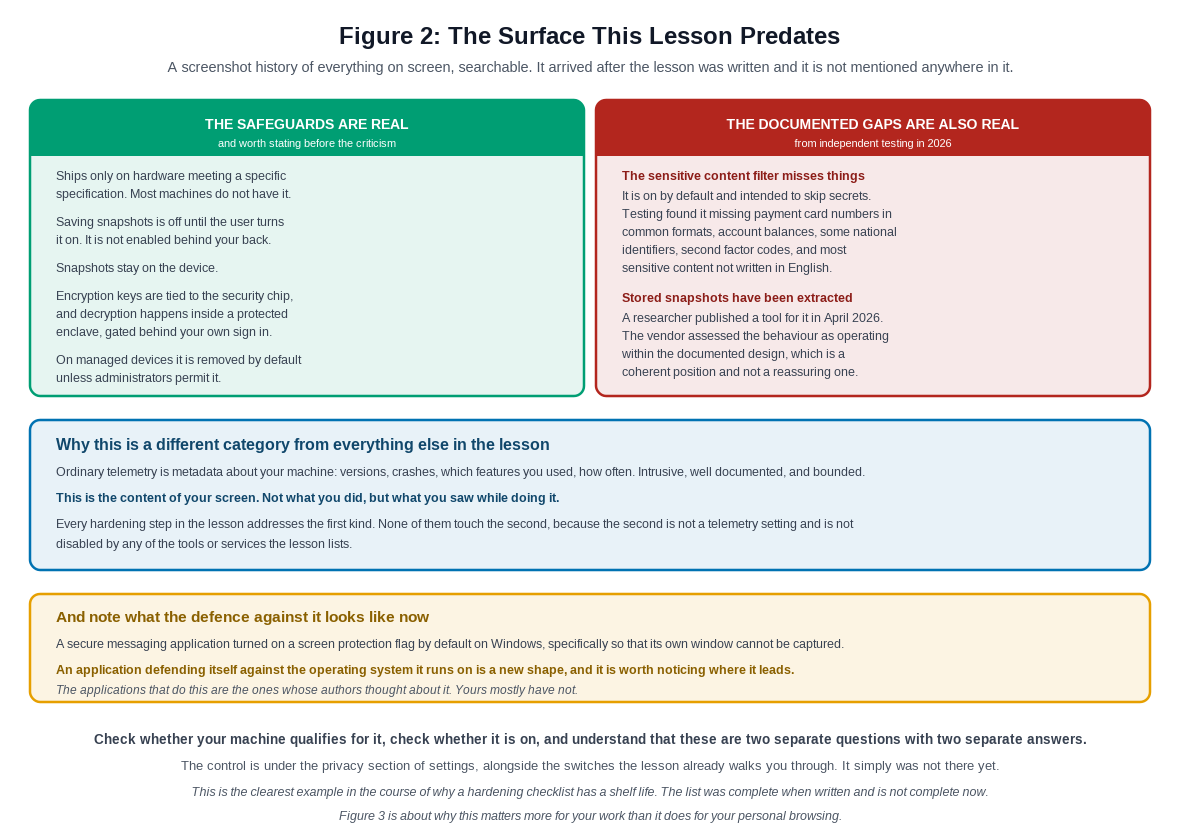
Figure 2. Screenshot history, its safeguards, and its gaps.
A searchable history of screenshots of everything on your screen now ships on Windows. Most hardening checklists were written before it arrived, so they do not mention it.
The safeguards are real, and worth stating first
It ships only on hardware meeting a specific specification, so most machines do not have it. Saving snapshots is off until the user turns it on; it is not enabled behind your back. Snapshots stay on the device. The encryption keys are tied to the security chip, decryption happens inside a protected enclave, and access is gated behind your own sign-in. On managed devices it is removed by default unless administrators permit it (Reference 1).
That is a considerably better design than the version first announced, and the improvements came from the reaction to it.
The documented gaps are also real
The sensitive content filter misses things. It is on by default and intended to skip secrets. Independent testing in 2026 found it missing payment card numbers in common formats, account balances, some national identifiers, second-factor codes, and most sensitive content not written in English (Reference 2).
Stored snapshots have been extracted. A researcher published a tool for it in April 2026. The vendor assessed the behavior as operating within the documented design (Reference 2). That is a coherent position and it is not a reassuring one, because it means the protection was never intended to survive an attacker who already has your session.
Why this is a different category
Ordinary telemetry is metadata about your machine: versions, crashes, which features you used. Intrusive, well documented, bounded.
This is the content of your screen. Not what you did, but what you saw while doing it.
The usual hardening steps address the first kind. None of them touch the second, because it is not a telemetry setting and no telemetry tool or service list disables it. The control sits in the privacy section of Settings, beside the switches you already walk through.
What defending against it looks like now
A secure messaging application turned on a screen protection flag by default on this platform, specifically so its own window cannot be captured (Reference 3).
An application defending itself against the operating system it runs on is a new shape. The applications that do it are the ones whose authors thought about it. Yours mostly have not.
The transferable point
This is the clearest example in the course of why a hardening checklist has a shelf life. A list that was complete when it was written is not complete now, and nothing about the list signals that. Check what has been added to the platform since any checklist you follow was published.
4. Two Currency Corrections
The common first step may no longer be available. Many Windows hardening sequences begin with choosing an offline account during setup, to avoid a vendor account entirely.
The vendor has stated it is removing the known mechanisms for creating a local account during setup, and the command-line workarounds were removed in preview builds (Reference 4). Reports conflict on whether the registry method still works on current release builds, and it varies by build and installation image.
So treat it as build-dependent and verify it on your own image. The other routes reported are an unattended answer file or a third-party installation tool. The step is not wrong so much as no longer reliable, and it is often the first instruction in the sequence.
The usual closing advice undersells one thing. Guides are right that collection cannot be eliminated, and their lists of broken functionality are accurate. But “use Linux for security work, keep Windows for compatibility” usually appears as a closing aside. Section 5 argues it is the actual conclusion.
5. The Reframe
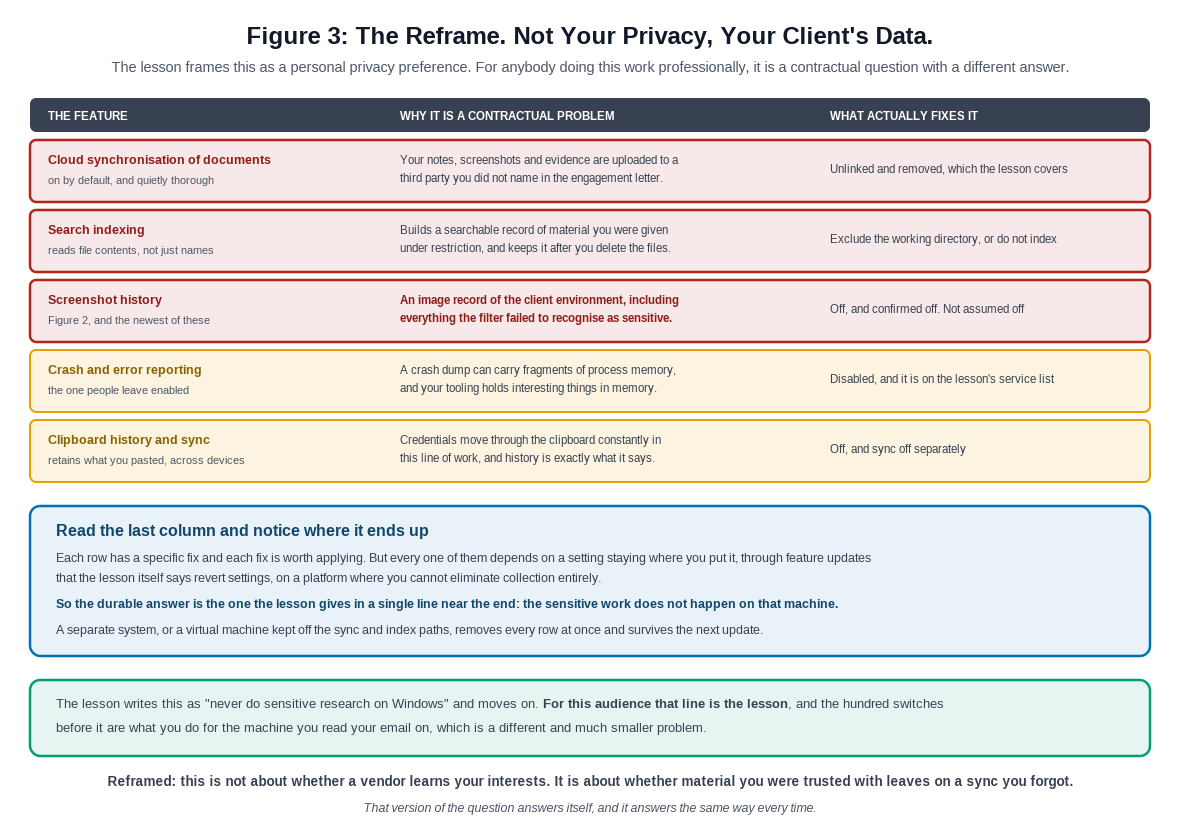
Figure 3. Five features, and why they are contractual rather than personal.
Most treatments frame telemetry as a privacy preference: do you want the vendor to know these things about you. For people doing security work that is the wrong question.
| Feature | Why it is a contractual problem |
|---|---|
| Cloud document sync | Your notes, screenshots and evidence upload to a third party not named in the engagement letter |
| Search indexing | Builds a searchable record of restricted material, and keeps it after you delete the files |
| Screenshot history | An image record of the client environment, including whatever the filter failed to recognize |
| Crash reporting | A dump can carry fragments of process memory, and your tooling holds interesting things in memory |
| Clipboard history and sync | Credentials move through the clipboard constantly in this work, and history is exactly what it says |
Each row has a specific fix, and each fix is worth applying.
But every one depends on a setting staying where you put it, through feature updates that revert settings, on a platform where collection cannot be eliminated.
Where that ends up
The durable answer is a single line: the sensitive work does not happen on that machine.
A separate system, or a virtual machine kept off the sync and index paths, removes every row at once and survives the next update. It does not depend on a hundred switches holding their position, and it does not need re-auditing every quarter.
Guides usually write this as “never do sensitive research on Windows” and move on. For this audience that line is the lesson. The hundred switches are what you do for the machine you read your email on, which is a real and much smaller problem.
Stated as a question you can answer
Not “do I want the vendor to have this.” That invites a preference, and preferences drift.
“If this machine were examined tomorrow, what would it hold that belongs to somebody else?”
That version answers itself, and it answers the same way every time.
Key Takeaways
- The usual inventory is accurate and the usual hardening steps work. What they lack is a check and the right framing.
- A hundred switches with no verification is intention, not outcome. Capture outbound traffic idle, before and after, and compare.
- “Cannot be fully disabled” describes the floor, not how close to it you got.
- A searchable screenshot history now ships on Windows. Real safeguards, documented gaps in the sensitive-content filter, and extraction demonstrated in 2026.
- Screen content is a different category from telemetry, and the usual hardening steps do not touch it.
- The common first hardening step is now build-dependent. Verify it on your own installation image.
- Reframe it as engagement data, and five separate fixes collapse into one durable answer.
- The sensitive work does not happen on that machine. That is the conclusion, not an aside.
Knowledge Check
Question 1. A hardening guide lists packet capture tools among its materials. In this lesson’s method, what are they for?
A. Identifying which services to disable B. Verifying that the hardening changed the machine’s behavior C. Measuring the performance cost of the hardening D. Nothing; packet capture has no role in hardening
Answer: B
Capture outbound connections idle before you harden, capture again after, and compare. Without that, the hardening is a long list of settings and no outcome check.
Question 2. Which verification do most hardening checklists skip?
A. Reading each setting back after applying it B. Confirming the third-party tool reports all changes applied successfully C. Capturing outbound connections while idle, before and after hardening, and comparing D. Checking the vendor’s privacy dashboard for collected data
Answer: C
That comparison is the only evidence the work changed behavior rather than settings screens. Option A is what most checklists implicitly rely on, and it is exactly what Lesson 7.2 showed can lie.
Question 3. Collection on Windows “cannot be fully disabled”. What does that statement establish?
A. That a floor exists, which says nothing about how close to it you got B. That hardening is pointless and should be skipped C. That the remaining collection is limited to crash reports D. That only managed editions can reduce collection meaningfully
Answer: A
Knowing the floor exists and knowing where you are relative to it are different pieces of information, and only the second is actionable.
Question 4. Which safeguards on the screenshot history feature are genuine?
A. None; the feature is enabled by default on all current machines B. Only that it can be removed by an administrator C. It is cloud-processed, so the device holds nothing D. Restricted hardware, off until the user enables it, on-device storage, keys tied to the security chip, and sign-in gating
Answer: D
Stating these first matters, because the design improved substantially after its first announcement. The documented gaps sit alongside them rather than instead of them.
Question 5. What did independent testing in 2026 find about its sensitive-content filter?
A. That it correctly excludes all financial and authentication data B. That it only operates when the device is locked C. That it misses payment card numbers in common formats, account balances, second-factor codes, and most non-English sensitive content D. That it cannot be enabled on consumer editions
Answer: C
The filter is on by default and intended to skip secrets. A researcher also published a snapshot extraction tool, which the vendor assessed as within the documented design.
Question 6. Why is screen content a different category from ordinary telemetry?
A. Because it is transmitted to the vendor rather than kept locally B. Because telemetry is encrypted and screen content is not C. Because it is collected without any user control at all D. Because telemetry is metadata about the machine, while this is what you saw while using it
Answer: D
Option A is wrong in an instructive way: the snapshots stay on the device, which is a real safeguard and does not make the exposure smaller when the device is the thing being examined.
Question 7. What is the status of the common first Windows hardening step, choosing an offline account during setup?
A. Build-dependent. The vendor has stated it is removing the known mechanisms, and reports conflict on current release builds B. Unchanged and fully supported through the setup wizard C. Removed entirely, with no remaining route to a local account D. Only available on managed editions
Answer: A
The command-line workarounds were removed in preview builds. Verify it on your own installation image rather than assuming, because it is often the first instruction in the sequence.
Question 8. Why does reframing this as engagement data change the answer?
A. Because clients are legally required to approve your operating system choice B. Because each row stops being a preference and becomes material belonging to somebody else C. Because telemetry is permitted for personal use but not commercial use D. Because engagement data is excluded from collection by default
Answer: B
Preferences drift and settings revert. An obligation to somebody else does not, which is why the reframe produces a stable answer where the preference framing produces a checklist.
Question 9. The five engagement-data rows each have a specific fix. What is the problem with relying on those fixes?
A. They require administrator access that most users lack B. They conflict with each other and cannot all be applied C. Each depends on a setting holding its position through feature updates that revert settings D. They only apply to one of the three operating systems covered
Answer: C
That is why the five collapse into one durable answer: a separate system, or a virtual machine kept off the sync and index paths, removes every row at once.
Question 10. For security work, what is the durable conclusion of this lesson?
A. Apply the hundred switches and accept the residual collection B. Use the third-party tool as the primary hardening method C. Switch all machines to Linux for every purpose D. The sensitive work does not happen on that machine
Answer: D
The switches are what you do for the machine you read your email on, which is a real and much smaller problem than the one this audience actually has.
References
- Microsoft, Recall configuration and availability, including the hardware requirement, opt-in behavior, on-device storage and enterprise default. https://learn.microsoft.com/en-us/windows/client-management/manage-recall
- Wikipedia, “Windows Recall,” summarizing the 2026 extraction tool, the vendor’s assessment, and independent testing of the sensitive-information filter. https://en.wikipedia.org/wiki/Windows_Recall
- BleepingComputer, “Signal now blocks Microsoft Recall screenshots on Windows 11.” https://www.bleepingcomputer.com/news/security/signal-now-blocks-microsoft-recall-screenshots-on-windows-11/
- Pureinfotech, “Microsoft blocks bypass to skip Microsoft Account during setup on Windows 11,” on the removal of the known local-account mechanisms. https://pureinfotech.com/microsoft-blocks-windows-11-microsoft-account-bypass/
- Microsoft, Windows diagnostic data levels and what each one sends. https://learn.microsoft.com/en-us/windows/privacy/configure-windows-diagnostic-data-in-your-organization
Where This Goes Next
Lesson 8.2 covers compartmentalization, which is where Section 5’s conclusion gets built properly. The separate machine is one instance of a general method, and that lesson generalizes it.
The rest of Module 8 is operational security: counter-surveillance, operations, and incident response. This lesson is the odd one out in that set, and reading it as the prologue to 8.2 rather than as a hardening checklist is the way to make it fit.
Next lesson: Module 8 Lesson 2: Compartmentalization: Build It So the Wrong Thing Is Impossible