Testing DNS Privacy: What the Tests Prove, and What They Cannot Reach
About This Lesson
Most DNS leak-test guides make the right argument, and it is the one this whole course has been building towards: you configured it, therefore it works is the dangerous assumption. Configurations break. Updates change settings. Networks behave differently. Applications ignore you. The usual list of leak types is accurate, and the usual command-line checks are sound.
The corrections in this lesson are narrow, and they are all of one kind: those guides apply their skepticism to your configuration and not to their own test method.
A web leak test measures one thing: which resolver reached the test site’s authoritative server. That is a useful fact and a narrower one than “is my DNS private”. It cannot tell you which application asked, which protocol carried the query, or what the machine does when the encrypted resolver is unreachable.
So a standard worked example, with three simultaneous failures, contains a fault that the standard method returns clean on. The recommended tests find two of the three.
And four tests are missing, two of which take a single command.
Learning Objectives
After you read this lesson, you can do these tasks:
- Explain the mechanism a web leak test uses, and derive its limits from that mechanism.
- Say why a passing leak test is compatible with entirely unencrypted resolution.
- Explain why a browser-based test cannot detect application bypass, one of the best-known leak types.
- Detect transparent interception with one command, rather than by comparing answers.
- Determine which resolver each application uses, for which no web tool exists.
- Test what the machine does when encrypted resolution fails, which is the check that separates a working control from one silently in fallback.
Prerequisites
- The whole of Module 7, particularly Lesson 7.1’s Figure 3 and Lesson 7.2’s section on fallback.
1. What a Leak Test Measures
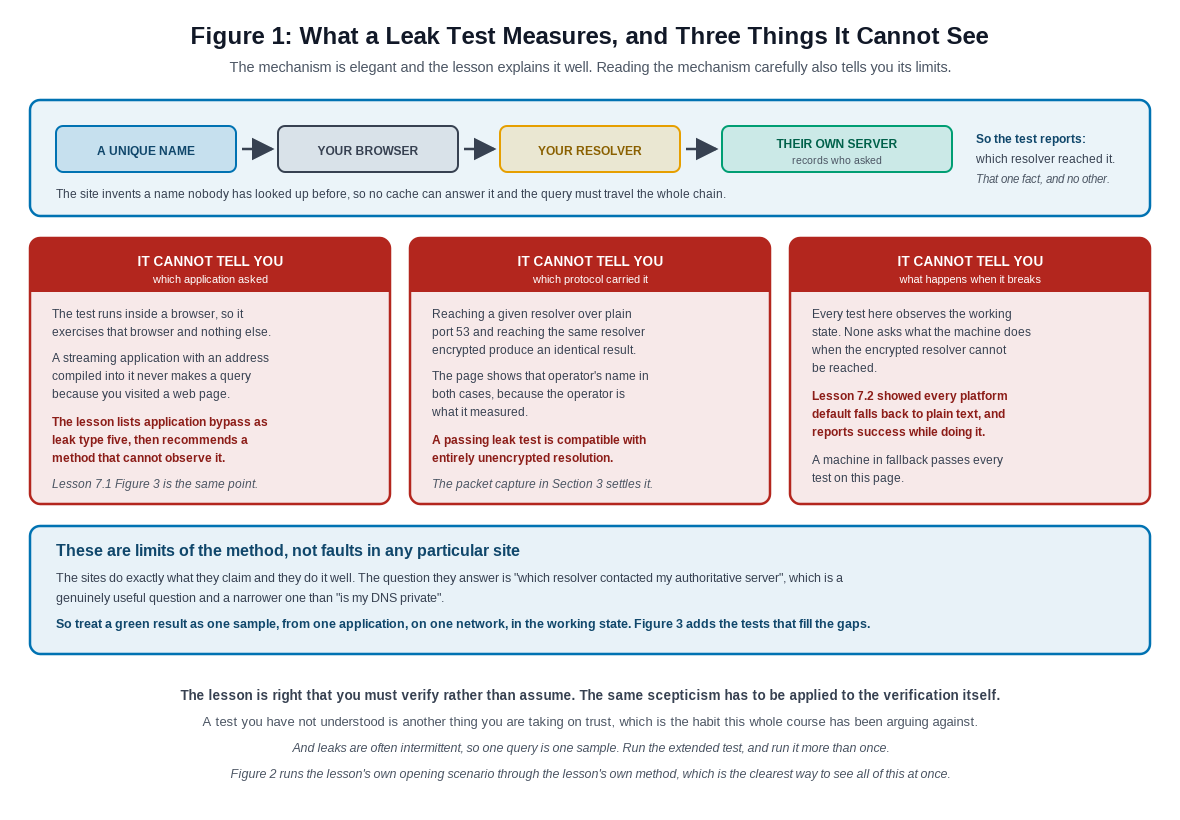
Figure 1. The mechanism, and what follows from it.
Start with the mechanism. The site invents a name nobody has looked up before, so no cache can answer it and the query must travel the whole chain. Your browser asks for it. Your resolver fetches it from the site’s own authoritative server. That server records the address the query arrived from.
So the test reports which resolver reached it. That one fact, and no other. Three things follow.
It cannot tell you which application asked
The test runs inside a browser. It exercises that browser and nothing else.
A streaming application with a resolver address compiled into it does not make a query because you visited a web page. Guides list application bypass as a leak type and then recommend a method that cannot observe it.
This is Lesson 7.1’s Figure 3 again, and it keeps reappearing because it is structural rather than an oversight.
It cannot tell you which protocol carried the query
Reaching a given resolver over plain port 53 and reaching the same resolver encrypted produce an identical result. The page shows that operator’s name either way, because the operator is what it measured.
A passing leak test is compatible with entirely unencrypted resolution.
Some guides half-catch this. A walkthrough of the Cloudflare help page will note that if you are connected but not using encrypted transport, the traffic is still visible to your network on port 53. Correct, and it applies to every provider, not only that one. For anybody else, a packet capture is what settles it.
It cannot tell you what happens when it breaks
Every test here observes the working state. None asks what the machine does when the encrypted resolver cannot be reached.
Lesson 7.2 established that every platform default falls back to plain text and reports success while doing it. A machine sitting in fallback passes every test on this page.
These are limits of the method
The sites do exactly what they claim, and they do it well. The question they answer is genuinely useful.
Treat a green result as one sample, from one application, on one network, in the working state. Leaks are often intermittent, so run the extended test and run it more than once.
2. A Standard Worked Example
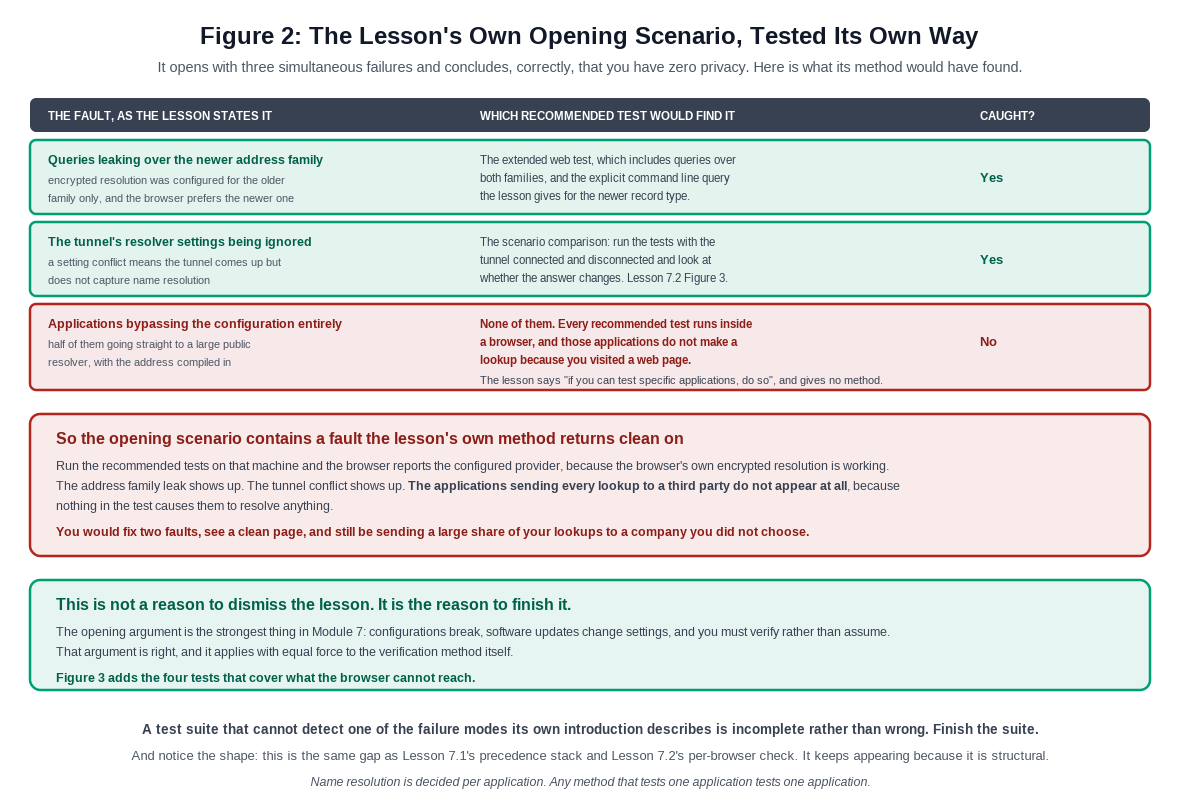
Figure 2. Three faults, tested the standard way.
Leak-test guides often open with a worked example like this one, and it is a good one. Encrypted resolution configured in the browser, carefully, to a named provider. A tunnel on top. A security professional who knows what they are doing. And three simultaneous failures:
- Queries leaking over the newer address family, because only the older one was configured.
- The tunnel’s resolver settings ignored because of a setting conflict.
- Half the applications bypassing the configuration and going straight to a large public resolver.
The conclusion is that you have zero actual DNS privacy. That is right.
Now run those three faults through the method the same guides recommend.
The address family leak: caught. The extended web test includes queries over both families, and a command-line query for the newer record type checks it directly.
The tunnel conflict: caught. Run the tests with the tunnel connected and disconnected and compare, which is the standard scenario comparison, and which Lesson 7.2’s Figure 3 sets out properly.
The application bypass: not caught. Every recommended test runs inside a browser. Those applications do not resolve anything because you loaded a web page. Guides say “if you can test specific applications like streaming services, do so”, and give no method.
So what actually happens
You run the tests on that machine. The browser reports the configured provider, because the browser’s own encrypted resolution is working correctly. You find the address family leak. You find the tunnel conflict. You fix both.
You now see a clean page and are still sending a large share of your lookups to a company you did not choose.
That is not a reason to dismiss leak tests. It is the reason to finish the job. The opening argument is right, and it applies with equal force to the verification method itself.
3. Four Tests to Add
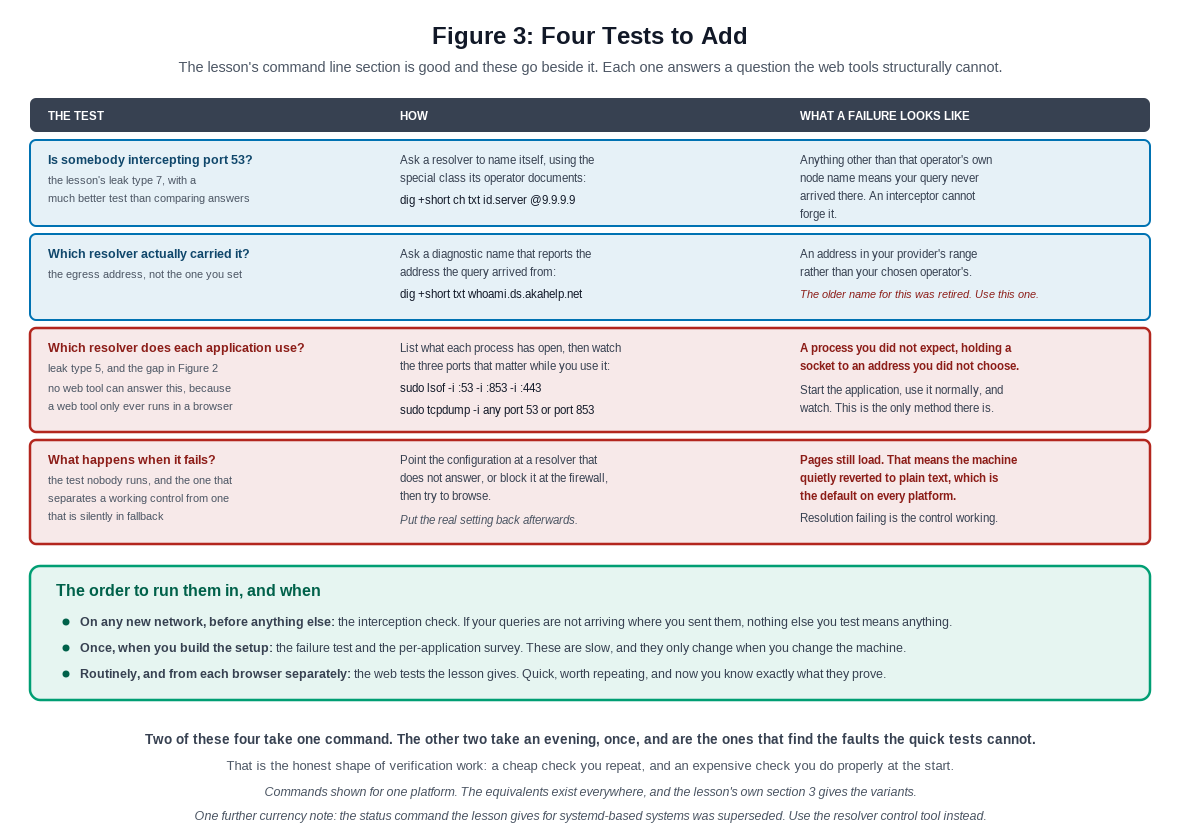
Figure 3. What to run, and when.
These sit beside the usual command-line checks rather than replacing them. On systemd-based Linux, use resolvectl status to see the active resolver. The older systemd-resolve --status command is superseded.
Is somebody intercepting port 53?
Interception is a well-known leak type, and the usual suggested detection is to query two resolvers and compare the answers. That is weak, because a competent interceptor returns correct answers.
The better test asks the resolver to identify itself, using a query class reserved for the purpose. Quad9 documents this explicitly (Reference 1):
dig +short ch txt id.server @9.9.9.9If the answer is anything other than that operator’s own node name, your query never arrived there. An interceptor can forge an address record. It cannot produce the operator’s internal node identifier. The same technique has been used to measure redirection at scale (Reference 3).
Which resolver actually carried it?
A diagnostic name that reports the address the query arrived from, which is the egress address of whichever resolver was genuinely used (Reference 2):
dig +short txt whoami.ds.akahelp.netExpect an address in your chosen operator’s range. One in your provider’s range means your configuration is not in effect. Several large resolvers offer an equivalent text-record check of their own (Reference 4).
Note the currency problem here: the long-standing name for this check was retired and replaced by the one above (Reference 2). Guides across the internet still give the old one, which is a small example of the same drift Lesson 6.5 described.
Which resolver does each application use?
No web tool answers this, for the reason in Section 1. The method is to list what each process has open, then watch the three ports that matter while you use the application:
sudo lsof -i :53 -i :853 -i :443
sudo tcpdump -i any port 53 or port 853
Start the application, use it normally, and watch. A process you did not expect holding a socket to an address you did not choose is the finding.
This is slow and it is the only method there is. Do it once, properly, when you build the setup.
What happens when it fails?
The test nobody runs, and the one that separates a working control from one silently in fallback.
Point the configuration at a resolver that does not answer, or block it at the firewall, and then try to browse.
If pages still load, the machine quietly reverted to plain text. That is the default on every platform, as Lesson 7.2 set out, and the settings that govern it are documented (Reference 5). Resolution failing is the control working correctly.
Put the real setting back afterward.
The order to run them in
On any new network, before anything else: the interception check. If your queries are not arriving where you sent them, nothing else you test means anything.
Once, when you build the setup: the failure test and the per-application survey. Slow, and they only change when the machine changes.
Routinely, and from each browser separately: the standard web tests. Quick, worth repeating, and now you know exactly what they prove.
Two of the four take one command. The other two take an evening, once, and find the faults the quick tests cannot.
4. What a Passing Test Actually Entitles You to Say
Not “my DNS is private”. That claim is larger than any evidence on offer.
“At this moment, on this network, from this browser, with everything working, my lookups reached the resolver I chose.”
That is narrower, it is true, and it is enough to act on. It also makes visible what is still untested: the other applications, the other networks, the failure path, and whether the transport was encrypted at all.
And it leaves untouched every row of Lesson 7.1’s Figure 1 that was never about resolution in the first place. Your provider still sees every destination address you connect to, regardless of what any of these tests report. That was row one of the first lesson in this module and it is still standing at the end of the last one.
Key Takeaways
- The central argument of leak testing is correct and is this course’s own thesis. Verify rather than assume.
- A leak test measures which resolver reached the test site. One useful fact, narrower than privacy.
- It cannot see which application asked, which makes application bypass invisible to it.
- It cannot see which protocol carried the query. A passing test is compatible with no encryption at all.
- It cannot see failure behavior, and a machine in fallback passes everything.
- The opening scenario contains a fault the method returns clean on, so you would fix two of three and see a green page.
- Four tests to add, two of them one command each: interception, egress address, per-application survey, failure behavior.
- The claim a passing test supports is this moment, this network, this browser, working state.
Knowledge Check
Question 1. What does a web-based leak test actually measure?
A. Which recursive resolver contacted the test site’s authoritative server B. Whether your queries were encrypted in transit C. Which applications on your machine resolved names during the test D. Whether your provider is logging your lookups
Answer: A
The site invents a name no cache can answer, and its own authoritative server records the address the query arrived from. That is one useful fact, and a narrower one than the question people ask of it.
Question 2. Why is a passing leak test compatible with entirely unencrypted resolution?
A. Because the test only samples a small number of queries B. Because caches can answer before the query reaches the resolver C. Because reaching a resolver over plain port 53 and reaching it encrypted produce the same result D. Because the test measures only the final hop to the authoritative server
Answer: C
The page reports the operator, because the operator is what it measured. A packet capture is what settles the protocol question for any provider other than the one with its own help page.
Question 3. Why can a browser-based test not detect application bypass?
A. Because applications use a different protocol that the test cannot parse B. Because bypassing applications encrypt their queries C. Because the test only runs the standard rather than the extended check D. Because the test runs in a browser, and a separate application does not resolve anything because you loaded a web page
Answer: D
Guides list application bypass as a leak type and then recommend a method structurally unable to observe it. This is Lesson 7.1’s precedence problem reappearing.
Question 4. The worked example in Section 2 has three simultaneous faults. How many would the standard method find?
A. All three, which is why the scenario is used as the worked example B. Two: the address family leak and the tunnel conflict C. One: the address family leak only D. None, because the browser reports the configured provider throughout
Answer: B
The application bypass is the one it misses. You would fix two faults, see a clean page, and still be sending a large share of your lookups to a company you did not choose.
Question 5. What is the strongest test for transparent interception of port 53?
A. Asking the resolver to identify itself with a reserved query class, and checking the node name B. Checking whether response times differ between resolvers C. Comparing the answers returned by two different resolvers D. Running the extended web test on several networks
Answer: A
Comparing answers is weak, because a competent interceptor returns correct answers. An interceptor can forge an address record and cannot produce the operator’s internal node identifier.
Question 6. What does the diagnostic name check report?
A. The address of the authoritative server that answered B. The egress address of whichever resolver actually carried your query C. Whether the resolver validates signatures D. The number of hops between you and the resolver
Answer: B
Expect an address in your chosen operator’s range. Note also that the long-standing name for this check was retired and replaced, and many guides still give the old one.
Question 7. How do you determine which resolver a particular application uses?
A. Run the extended web test while the application is open B. Check the application’s settings for a configured resolver C. Consult the resolver’s own query log, which records the originating process D. List what each process has open and capture traffic on the relevant ports while using the application
Answer: D
No web tool answers this. It is slow, it is the only method available, and it is worth doing once properly when you build the setup.
Question 8. What does it mean if pages still load after you point your configuration at a resolver that does not answer?
A. The machine reverted to plain text resolution, which is the default on every platform B. Your cache is serving the pages, and the test is inconclusive C. The resolver is reachable after all and the configuration is correct D. Encrypted resolution is working, since the failure was handled gracefully
Answer: A
Resolution failing is the control working correctly. This is the check that separates a working configuration from one sitting silently in fallback, and it is the one nobody runs.
Question 9. In what order should these checks be run?
A. All of them, every time, on every network B. The web tests first, since a clean result makes the others unnecessary C. Interception on every new network; failure and per-application once at build time; web tests routinely and per browser D. Per-application first, since it is the most thorough
Answer: C
If your queries are not arriving where you sent them, nothing else you test means anything, which is why interception comes first on unfamiliar networks.
Question 10. What claim does a passing leak test entitle you to make?
A. That your DNS is private B. That your provider cannot see which sites you visit C. That no application on the machine is bypassing your configuration D. That at this moment, on this network, from this browser, with everything working, your lookups reached the resolver you chose
Answer: D
Option B is false for a separate reason that survives every test in this lesson: your provider still sees every destination address you connect to, which was row one of Lesson 7.1.
References
- Quad9 documentation, frequently asked questions, on using a reserved-class identity query to detect transparent redirection. https://docs.quad9.net/FAQs/
- Akamai, “Introducing new whoami tool for DNS resolver information,” on the current diagnostic names and the retirement of the previous ones. https://www.akamai.com/blog/developers/introducing-new-whoami-tool-dns-resolver-information
- RIPE Labs, “Operator Level DNS Hijacking,” on measuring redirection at scale with resolver-identification queries. https://labs.ripe.net/Members/babak_farrokhi/operator-level-dns-redirection
- Google Public DNS discussion, on the equivalent text-record check for verifying which resolver was used. https://groups.google.com/g/public-dns-discuss/c/1p2dAOvg_BM
- Mozilla, DNS over HTTPS FAQs, on fallback behavior and the settings that govern it. https://support.mozilla.org/en-US/kb/dns-over-https-doh-faqs
Module 7 Complete: DNS Privacy and Encrypted DNS
Five lessons, and the same question runs through all of them.
7.1 found that name resolution exposes your browsing, your routine and your tooling, and that encrypting it takes the names from your provider while leaving every destination address exactly where it was. 7.2 supplied the protocols and found that the web port does not make lookups indistinguishable, that every platform default falls back to plain text, and that “redundant with a tunnel” is three different outcomes. 7.3 supplied the one design that separates who from what, and found it running on seven operators, two of whom hold most of the relays and also run resolvers. 7.4 removed the resolver entirely through on-premises recursion, at the cost of an anonymity set of one at every authoritative server, and created a household query log in the process.
And 7.5 asked whether any of it worked, which is the right question to end on, and found that the standard test method reaches less far than its own argument demands.
The through-line, which is Module 6’s as well: every measure moved an observation rather than removing one, and the only one that removed anything outright did so by making you the sole occupant of your own position. Knowing exactly where an observation moved to is the whole of the skill.
Row one of Lesson 7.1’s first figure is still standing. Your provider sees every address you connect to, and nothing in five lessons of DNS privacy touched it. That is Module 6’s territory, which is why the two modules belong next to each other.
Next module: Module 8 Lesson 1: OS Telemetry: Not Your Privacy, Your Client’s Data