Self-Hosted DNS: Blocking Is the Reliable Win, Recursion Is the Trade
About This Lesson
Three lessons have circled the same observer. Encrypting your lookups moves them from your provider to a resolver. Relaying them splits who from what, if you configure it properly. Neither removes the resolver.
This lesson does. Run full recursion on a machine in your house and there is no resolver company in the path at all. That is the only thing in Module 7 that eliminates the problem rather than relocating it, and it is why this lesson belongs here.
Three things need saying, because most build guides skip them.
Most people who build this do not build that. The blocker and the recursive resolver are separate pieces. Install the blocker, accept the default upstream (Reference 6), and every query still goes to one large company. You gained network-wide ad blocking, which is a real and good thing, and no resolver privacy whatsoever. Guides often say “no third party sees queries” without naming which build they mean.
Recursion is a trade, and common advice has one side of it backwards. It claims authoritative servers see “a different source IP” when you run your own resolver. They see yours. That is what removing the middleman does, and the advice files it under benefits.
The build creates a new observer, and most guides give it four words. Query logging is on by default, and it records every lookup from every device and every guest on your network, in one place, behind a web interface.
Learning Objectives
After you read this lesson, you can do these tasks:
- Tell apart the three arrangements people call self-hosted DNS, and say which one you are building.
- State who sees your queries in each, and what each one genuinely buys.
- Explain what full recursion trades, in both directions.
- Explain why the crowd you were hiding in disappears, and when that matters.
- Decide the query-logging question deliberately rather than by default.
- Score the finished build against the observers from Lesson 7.1.
Prerequisites
- Lessons 7.1 to 7.3.
- Module 6 Lesson 6, whose trust ledger is the argument this lesson repeats one layer down.
1. Three Things People Build
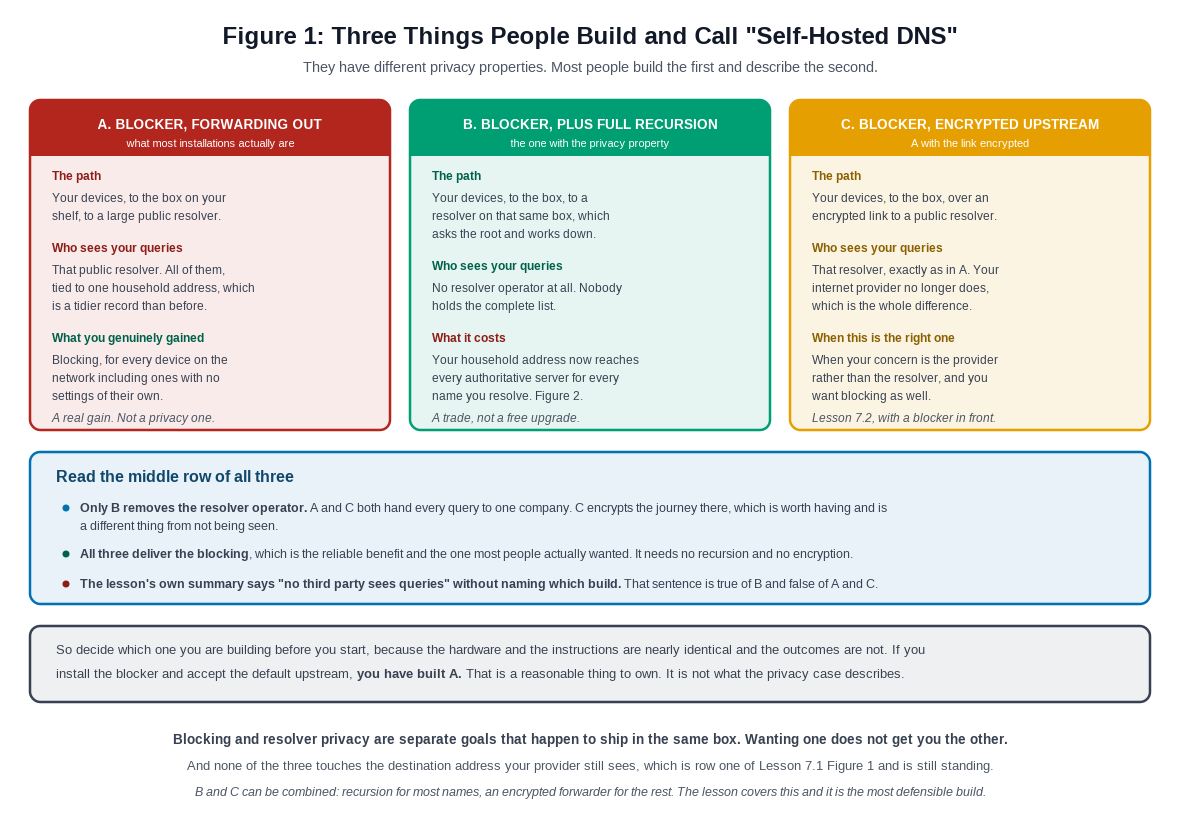
Figure 1. Same hardware, same instructions, different outcomes.
Build A: a blocker that forwards out. Your devices query the box on your shelf. It drops the names on its block lists and forwards everything else to a large public resolver.
That resolver sees every query you make, and keeps its own operational records of them (Reference 4), now tied to one household address instead of several devices, which is a tidier record than you had before. What you gained is blocking, for every device on the network including ones with no settings of their own.
That is a real gain and it is not a privacy gain. This is what most installations are.
Build B: a blocker plus full recursion. The box runs its own resolver, which asks the root servers and works down. No resolver operator exists in the path. Nobody holds the complete list.
The cost is Section 2.
Build C: a blocker with an encrypted upstream. Build A with the link to the resolver encrypted. The resolver still sees everything. Your internet provider no longer does, which is the entire difference and is worth having when the provider is your concern.
The sentence that needs qualifying
The usual benefits list says “No third party sees queries.” True of B. False of A and C.
The same section lists “No external queries (recursive resolver)” under a different heading, so the information is present. It is the summary that overstates, and the summary is what people remember.
Decide which build you are making before you start, because the hardware and the instructions are nearly identical.
B and C can be combined: recursion for most names, an encrypted forwarder for the rest. It is the most defensible arrangement.
2. What Recursion Actually Trades
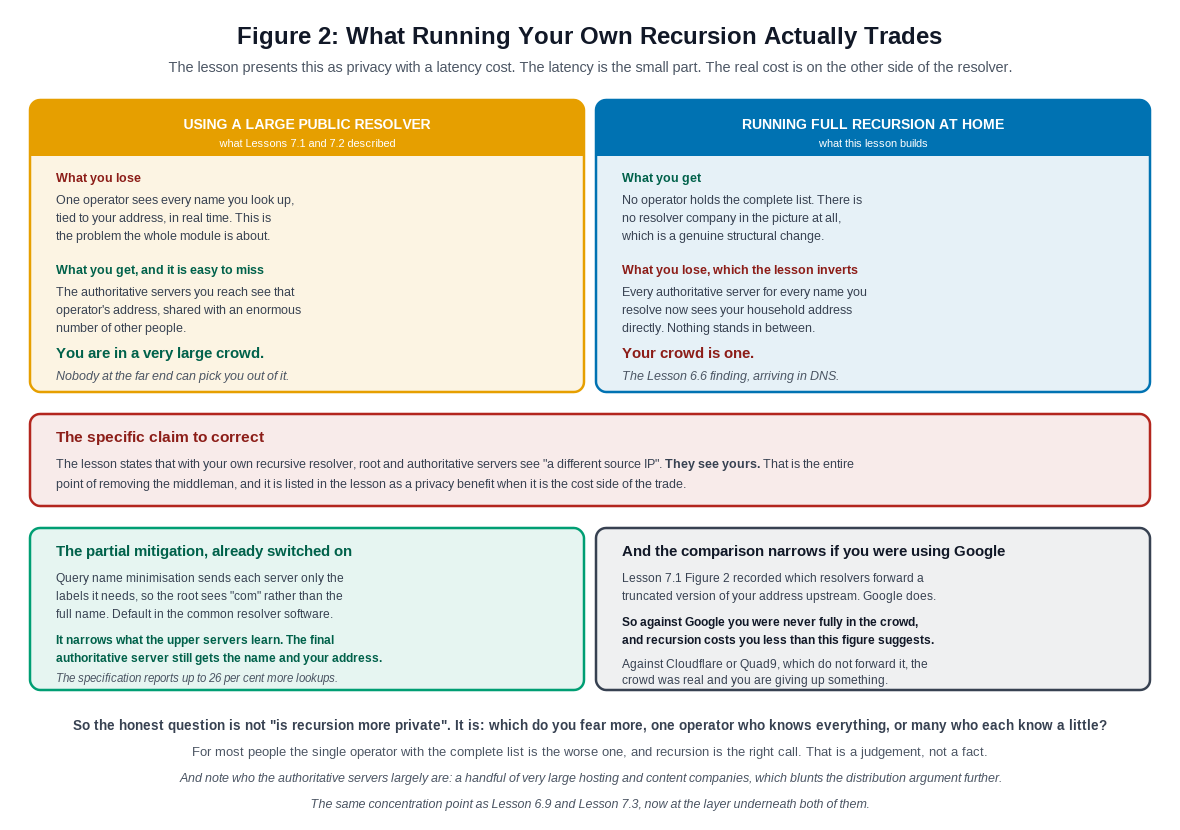
Figure 2. Both sides of it.
Most guides present recursion as privacy with a latency cost. The latency is the small part.
Using a large public resolver
What you lose: one operator sees every name, tied to your address, in real time. That is the problem the whole module is about.
What you get, and it is easy to miss: the authoritative servers you reach see that operator’s address, shared with an enormous number of other people. You are in a very large crowd, and nobody at the far end can pick you out of it (Reference 1).
Running full recursion at home
What you get: no operator holds the complete list. There is no resolver company in the picture. A genuine structural change, and the only one in this module.
What you lose: every authoritative server for every name you resolve now sees your household address directly. Nothing stands between you and them.
Your crowd is one.
That is the Module 6 Lesson 6 finding arriving in DNS. Self-hosting moved the observer and handed you an anonymity set of exactly one, and the shape is identical.
The claim to correct
A common claim is that root and authoritative servers see “a different source IP (Unbound)” when you run your own recursive resolver.
They see yours. Unbound on a machine in your house uses your household address, because that is what removing the middleman means. It is listed as a privacy benefit and it is the cost side of the trade.
The partial mitigation, already switched on
Query name minimization sends each server only the labels it needs, so the root sees com rather than the full name. It is the default in the common resolver software, as Lesson 7.1 established.
It narrows what the upper servers learn. The final authoritative server still receives the full name and your address, which is the exposure that matters.
The specification reports it costs up to 26 per cent more lookups and up to 5 per cent more failed ones, although measurements of the common software in its default mode found almost no increase (References 2, 3).
One wrinkle that narrows the comparison
Lesson 7.1 Figure 2 recorded which resolvers forward a truncated version of your address upstream. Google does.
So if you were using Google, you were never fully in that crowd, and recursion costs you less than this figure suggests. Against Cloudflare or Quad9, which do not forward it, the crowd was real and you are giving something up.
The honest question
Not “is recursion more private.” It is: which do you fear more, one operator who knows everything, or many who each know a little?
For most people the single operator with the complete list is worse, and recursion is the right call. That is a judgment rather than a fact, and it is worth knowing you made it.
And note who the authoritative servers largely are: a handful of very large hosting and content companies. That blunts the distribution argument further, and it is the same concentration finding as Lessons 6.9 and 7.3, now at the layer beneath both.
3. The Observer You Just Built
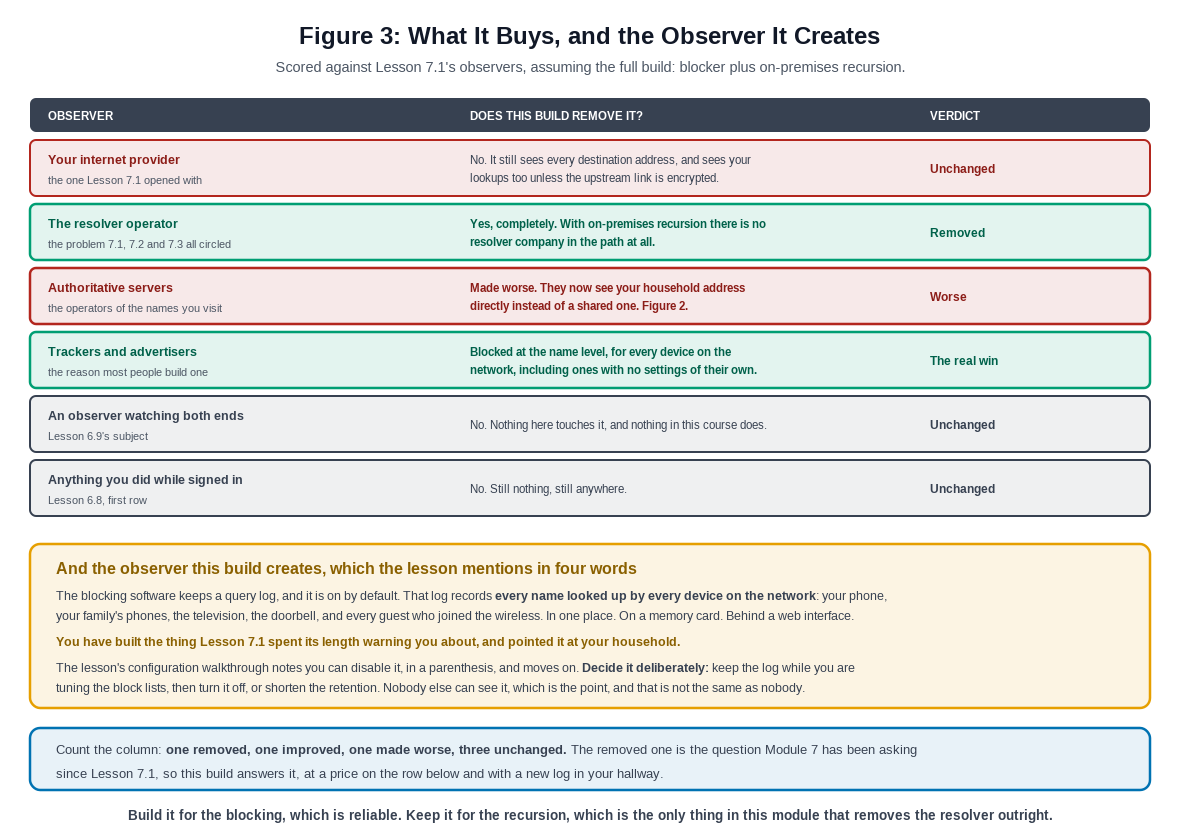
Figure 3. Scored against Lesson 7.1’s observers, plus the new one.
The blocking software keeps a query log and it is on by default.
That log records every name looked up by every device on the network. Your phone, your family’s phones, the television, the doorbell, and every guest who joined the wireless. In one place. On a memory card. Behind a web interface.
You have built the thing Lesson 7.1 spent its length warning about, and pointed it at your household.
Most walkthroughs note that you can disable it, in a parenthesis, and move on.
Decide it deliberately. The log is genuinely useful while you are tuning block lists, because without it you cannot tell which list broke which site. The reasonable pattern is to keep it during setup, then turn it off or shorten retention once things are stable.
Nobody else can see it, which is the point of self-hosting, and that is not the same as nobody.
The score
| Observer | Does the full build remove it? |
|---|---|
| Your internet provider | No. Still sees every destination address, and your lookups unless the upstream is encrypted |
| The resolver operator | Yes, completely. The achievement |
| Authoritative servers | Made worse. They now see you directly |
| Trackers and advertisers | Blocked at the name level, network-wide. The reliable win |
| An observer watching both ends | No |
| Anything done while signed in | No |
One removed, one improved, one made worse, three unchanged.
The removed one is the question Module 7 has been asking since Lesson 7.1, so this build answers it. At a price on the row below, and with a new log in your hallway.
4. Practical Notes
Older walkthroughs show old menus. Pi-hole reorganized its configuration and web interface in version 6, in February 2025 (Reference 5). Guides written before that use menu names that no longer exist. The settings themselves are the same.
The device is a single point of failure for your whole network. When it stops, nothing resolves and every device fails at once. Configure a second resolver on the router, understanding that devices will use it freely and it will not block anything.
It only works at home. Lesson 7.1’s Figure 3 applies: this is one more place name resolution gets decided, and it loses to anything configured on the device itself. A laptop on a cafe network gets none of this. The fix is to tunnel home, which is Module 6 Lesson 6’s Figure 1, case A.
Blocking at the name level is coarse. It cannot block a tracker that shares a name with something you need, which is why first-party analytics and some large platforms survive it. It is not a substitute for browser-level blocking, it is a complement that covers devices a browser extension cannot reach.
Validation is worth switching on. Self-hosting lets you validate signatures properly rather than trusting a resolver to have done it, which is a genuine integrity benefit distinct from everything else in this lesson.
Key Takeaways
- Three different builds share one set of instructions. Only the one with on-premises recursion removes the resolver operator.
- Install the blocker, accept the default upstream, and you built A. Network-wide blocking, no resolver privacy. A good thing to own, described wrongly.
- Recursion is a trade. No operator holds the whole list, and every authoritative server now sees your household address directly.
- Common advice has one side backwards. Authoritative servers do not see “a different source IP”. They see yours.
- Your crowd goes from very large to one, which is the Lesson 6.6 finding in DNS.
- Query name minimization helps at the top of the chain and not at the bottom, where the exposure is.
- Query logging is on by default and records every device and guest. Keep it for tuning, then decide.
- Score: one observer removed, one improved, one made worse, three unchanged.
Knowledge Check
Question 1. You install the blocking software and accept the default upstream resolver. What have you built?
A. A fully recursive resolver with no third party in the path B. Network-wide blocking, with every query still going to one large company C. An encrypted link to your provider’s resolver D. Nothing useful, since blocking requires recursion to function
Answer: B
The blocking is real and worth having. The resolver privacy is not there, because the blocker and the recursive resolver are separate pieces and only one of them was installed.
Question 2. Which of the three builds removes the resolver operator?
A. The blocker with an encrypted upstream, because encryption hides the queries B. All three, since the queries originate on hardware you own C. Only the one running full recursion on the premises D. None; the operator is unavoidable in any arrangement
Answer: C
Encryption protects the journey to the resolver, not you from the resolver. That distinction has now appeared in three consecutive lessons.
Question 3. What do authoritative servers see when you run full recursion at home?
A. The address of whichever root server referred you B. A randomized address generated per query by the resolver software C. Nothing identifying, because query name minimization strips the source D. Your household address, directly, because nothing stands in between
Answer: D
Common advice files this under privacy benefits and states that they see “a different source IP”. That is the one claim in the section that is backwards.
Question 4. What do you give up by removing the public resolver from the path?
A. The crowd you were hiding in at the authoritative layer B. The ability to validate signatures on responses C. Network-wide blocking, which requires an upstream resolver D. Encryption of your queries in transit
Answer: A
A public resolver’s address is shared with an enormous number of users. Your own resolver’s address is shared with your household, which is a crowd of one for these purposes.
Question 5. How much does query name minimization help a home recursive resolver?
A. Completely; upper servers learn nothing and the final server learns only the address B. It narrows what root and top-level servers receive, but the final authoritative server still gets the full name and your address C. Not at all, since it only applies to forwarding resolvers D. It helps only when combined with an encrypted upstream
Answer: B
It is on by default and is worth having. It does not address the exposure that matters, which is at the bottom of the chain rather than the top.
Question 6. If you were previously using Google’s resolver, why does recursion cost you less than it first appears?
A. Because Google does not operate authoritative servers B. Because Google’s resolver rotates its outbound addresses per query C. Because Google forwards a truncated version of your address upstream anyway, so you were never fully in the crowd D. Because Google’s cache is large enough that most queries never reach authoritative servers
Answer: C
Lesson 7.1 Figure 2 recorded exactly this. Against Cloudflare or Quad9, which do not forward it, the crowd was real and the trade is sharper.
Question 7. What does the query log on the device record by default?
A. Only queries that were blocked, for list-tuning purposes B. Only queries from devices with static addresses C. Aggregate counts, with no individual names retained D. Every name looked up by every device and every guest on the network
Answer: D
It is genuinely useful while tuning block lists, because without it you cannot tell which list broke which site. The reasonable pattern is to keep it through setup and then decide.
Question 8. Scored against Lesson 7.1’s observers, what does the full build achieve?
A. One removed, one improved, one made worse, three unchanged B. All six removed, which is why it is the module’s strongest technique C. Three removed and three unchanged D. None removed; it relocates the resolver’s knowledge onto your own hardware
Answer: A
The removed one is the question Module 7 has been asking since the start, so the build earns its place. It is one row, at a price on the row below it.
Question 9. Why does none of this help your laptop on a cafe network?
A. Blocking software cannot run on portable hardware B. The resolver only answers queries that reach it, and a laptop elsewhere never sends it any C. Public networks block the protocol the device uses D. Recursion requires a static address, which cafes do not provide
Answer: B
This is Lesson 7.1’s Figure 3 again: name resolution is decided in several places and the box at home is only one of them. The fix is to tunnel home.
Question 10. What is the reliable benefit of this build, as opposed to the conditional one?
A. Hiding your destination addresses from your internet provider B. Removing the resolver operator, which every build achieves C. Blocking at the name level for every device on the network, including devices with no settings of their own D. Defeating correlation by an observer watching both ends
Answer: C
It needs no recursion and no encryption, it works the moment the box is plugged in, and it is what most people actually wanted. The resolver privacy is the conditional part.
References
- Internet Society, “Introduction to DNS Privacy,” on what a host implementing its own recursive resolver exposes to authoritative servers, and on resolvers hiding stub addresses. https://www.internetsociety.org/resources/deploy360/dns-privacy/intro/
- RFC 9156, DNS Query Name Minimisation to Improve Privacy, including the reported increase in lookups and failures. https://www.rfc-editor.org/rfc/rfc9156.html
- RIPE Labs, “Making the DNS More Private with QNAME Minimisation,” on measured overhead by implementation and mode. https://labs.ripe.net/author/wouter_de_vries/making-the-dns-more-private-with-qname-minimisation/
- Cloudflare, 1.1.1.1 public DNS resolver privacy documentation, including what is logged for operation and debugging. https://developers.cloudflare.com/1.1.1.1/privacy/public-dns-resolver/
- Pi-hole, version 6 release notes and post-release findings, February 2025, on the reorganised configuration and interface. https://pi-hole.net/blog/2025/02/21/v6-post-release-fixes-and-findings/
- Pi-hole documentation, upstream DNS providers. https://docs.pi-hole.net/guides/dns/upstream-dns-providers/
Where This Goes Next
Lesson 7.5 tests all of it, and it is the lesson this module has been building towards. Bring Lesson 7.1’s Figure 3: the question was never what you configured, it was which resolver actually answered. A household with a blocker, a recursive resolver, a browser doing its own lookups and a phone that roams off the network has at least four answers to that question at once.
Next lesson: Module 7 Lesson 5: Testing DNS Privacy: What the Tests Prove, and What They Cannot Reach