DoH and DoT: The Question Is Not Whether It Is On, But What It Does When It Fails
About This Lesson
Lesson 7.1 made the case that name resolution is exposed. This lesson supplies the two protocols that encrypt it: DNS over HTTPS, which carries lookups inside an ordinary web connection, and DNS over TLS, which uses a dedicated port. Both are standardized, both work, and the usual configuration instructions are broadly accurate for each platform.
Good guides to these protocols also list their limits: the destination address, the handshake, traffic analysis, resolver trust, and application bypasses. That is a real list, and most treatments do not have it.
Three common claims about them need correcting, and they are all consequential.
The claim that carrying lookups on the web port makes them indistinguishable from web traffic is not true. Guides repeat it often, and the whole censorship-resistance argument rests on it. Networks stop encrypted lookups routinely, and none of the common methods requires blocking the port. One of them is an off switch the browser vendor built in on purpose.
Every platform’s default falls back to plain text when encryption fails. Guides rarely mention this, and common troubleshooting advice actively steers you into the falling-back mode as a fix for pages that will not load. That fixes the symptom by turning off the thing you installed, and every later check that reads back the configuration still reports success.
The advice to skip encrypted lookups when a tunnel is running is wrong. It treats one outcome as the only outcome. There are three, the difference between them is decided by the browser rather than by the tunnel, and one of the three is the leak Module 6 opened with.
Learning Objectives
After you read this lesson, you can do these tasks:
- Describe both protocols accurately, including what each one reveals to a network operator.
- List five ways a network stops encrypted lookups, and say which of them need to block the web port. None do.
- Explain why the traffic-analysis result is worse than most guides suggest, not better.
- Find the fall-back setting on your platform and choose it deliberately.
- Explain why common troubleshooting advice disables the feature you installed.
- Determine which of three outcomes you have when a tunnel and browser lookups are both configured.
- Verify encrypted resolution in a way that actually tests the application doing the lookups.
Prerequisites
- Lesson 7.1, particularly Figure 1 on what encryption moves and Figure 3 on precedence.
- Module 6 Lesson 5 on leaks, which Section 6 depends on.
1. The Two Protocols, Stated Plainly
DNS over TLS (Reference 6) opens a connection on a dedicated port and speaks the ordinary name resolution protocol inside it. A network operator sees a connection to that port and knows exactly what you are doing. They cannot see the names.
DNS over HTTPS (Reference 5) carries the same lookups inside an ordinary web request on the standard web port. A network operator sees a web connection.
The usual technical descriptions of both are correct, and the usual platform instructions work. Two framing points need updating.
The system-wide versus browser-only split is obsolete. Many guides present DoT as the system-level protocol and DoH as the browser-level one, and build a decision matrix on that distinction. It no longer holds: Windows 11 does DoH system-wide, Android has supported both since version 11 with native DoH from version 13 (Reference 8), Apple devices have supported both since iOS 14 and macOS 11 through a configuration profile (Reference 9), and Linux has several options for each. Pick the protocol on what the network permits and on failure behavior, not on scope.
The overhead and complexity arguments are real and small. They are correct as stated and they should not decide anything for a personal machine.
2. “Indistinguishable From Web Traffic”
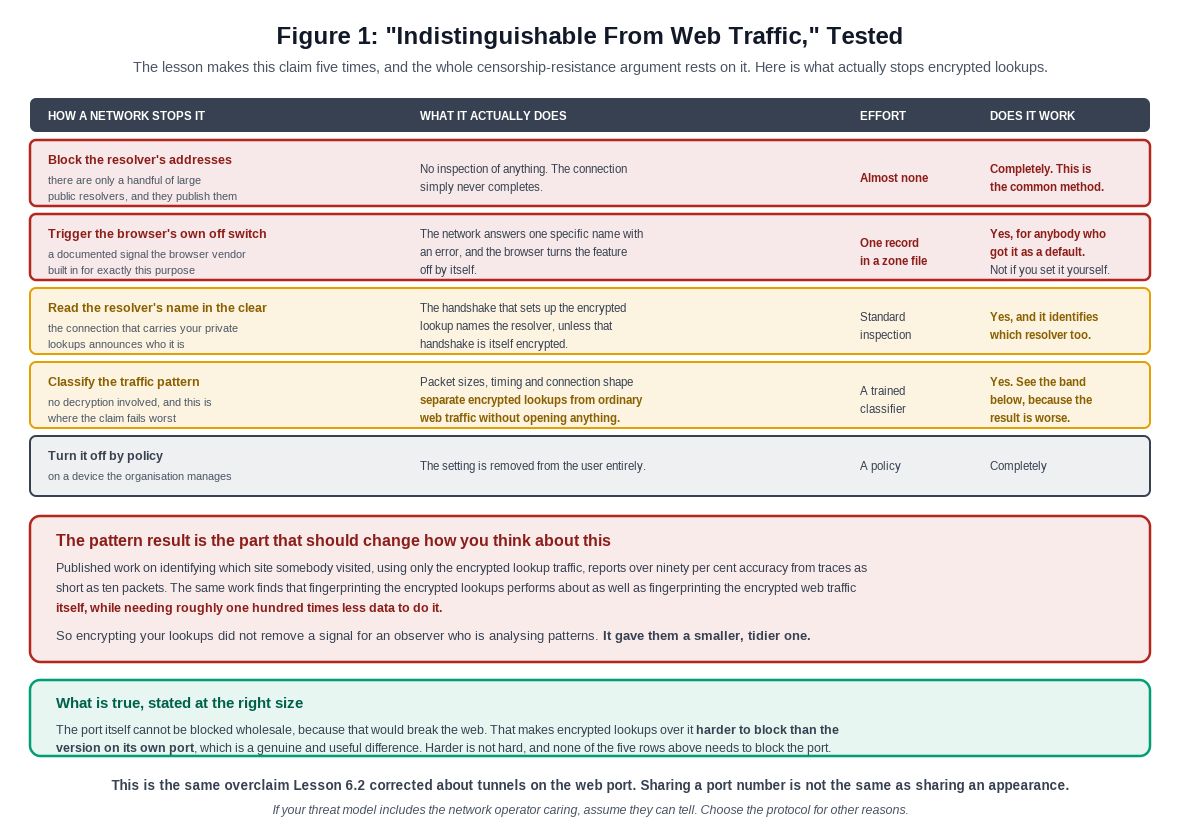
Figure 1. Five ways a network stops encrypted lookups on the web port.
This is the claim to take apart, because every censorship-resistance argument for DoH depends on it.
Block the resolver’s addresses. There are a handful of large public resolvers and they publish their addresses. The network drops traffic to them and the connection never completes. No inspection, no classifier, no cost. This is the common method, and it does not care which port you used.
Trigger the browser’s own off switch. Firefox checks one specific name at startup. If the network answers it with an error, Firefox disables its encrypted lookups by itself. Mozilla documents this and built it deliberately so that networks with content filtering could opt out (Reference 1).
There is an important limit, and it makes the point sharper rather than weaker: the signal only applies to people who received the feature as a default. If you turned it on yourself, Firefox ignores the signal. So the browser distinguishes between a setting you chose and a setting it chose for you, and honors the network’s veto only over the second. That is a reasonable design and it means the default population is switchable by any network operator who wants to.
Read the resolver’s name in the clear. The connection that carries your private lookups announces which resolver it is talking to, in the handshake, unless that handshake is itself encrypted. An observer learns you are using encrypted resolution and which provider. The standard that encrypts this handshake, Encrypted Client Hello, was published in March 2026 (Reference 7). The point still stands wherever that standard is not in use.
Classify the traffic pattern. Packet sizes, timing and connection shape separate encrypted lookups from ordinary web browsing without decrypting anything.
Turn it off by policy on a managed device.
The traffic-analysis result is worse than most guides imply
Most guides list traffic analysis as a limitation and move on. The published result deserves more weight than that.
Work on identifying which website somebody visited, using only the encrypted lookup traffic, reports over ninety per cent accuracy from traces as short as ten packets. The same work finds that fingerprinting the encrypted lookups performs about as well as fingerprinting the encrypted web traffic itself, while needing roughly one hundred times less data to do it (Reference 2).
That number needs a qualification, which Lesson 6.9 develops. Figures like it come from tests where the classifier chooses from a short fixed list of sites. In the open world, where a person may visit anything and usually visits none of the watched sites, the false positive rate decides usefulness rather than the accuracy figure, and measurements against genuine traffic show the gap is large. Treat the number as a laboratory result rather than a field capability.
The structural point survives the qualification, and it is the part that matters. Against an observer who analyses patterns, encrypting your lookups did not remove a signal. It gave them a smaller and tidier one. The lookups are short, structured, and occur in a predictable burst before each page load, which is close to ideal input for a classifier.
That does not make encrypted resolution useless. It makes it useless against that specific adversary, and good advice says which adversary each measure addresses rather than listing a limitation and continuing.
What is actually true
The port cannot be blocked wholesale, because that would break the web. That makes DoH harder to block than DoT, which is a genuine and useful difference, and it is the correct size of the claim.
Harder is not hard. None of the five rows above blocks the port.
This is the same overclaim Lesson 6.2 corrected about tunnels on the web port: sharing a port number is not the same as sharing an appearance. The same mistake about the same port shows up wherever a guide uses port 443 as a disguise, so check for it.
3. Every Default Falls Back to Plain Text

Figure 2. Five platforms, their defaults, and the settings that refuse to downgrade.
Encrypted resolution is not a switch with two positions. It has three, and the third one is the default everywhere.
Firefox defaults to trying the encrypted resolver first and using plain lookups when that fails. The strict mode refuses to fall back. There is also an intermediate setting that narrows which failures count as grounds for falling back (Reference 3).
Windows 11 offers an automatic option that encrypts where the resolver supports it and uses plain lookups otherwise, and an encrypted-only option set per resolver.
Android’s automatic private DNS setting is opportunistic. Entering a resolver hostname makes the encrypted connection mandatory, and Android shows an error rather than downgrading.
Apple devices encrypt nothing until a profile is installed, and an installed profile can still be bypassed per network unless it forbids that.
Linux resolver managers commonly default to opportunistic, which accepts plain lookups whenever encryption is unavailable.
Why they all do this, which is not a conspiracy
Refusing to fall back means losing name resolution entirely on any network that blocks your resolver, and Section 2 shows how easy that is. To an ordinary user that looks like a broken internet connection, not like a privacy control working correctly.
So the vendors chose working over private. That is a defensible decision to make on behalf of a billion people. It is not a defensible decision to inherit without knowing you have.
And common troubleshooting advice steers you into it
When pages will not load, common advice tells you to switch Firefox to the falling-back mode. That does resolve the symptom, and it resolves it by disabling the thing you just spent thirty minutes installing.
The page loads. No error appears. Every later verification that reads back the configuration still shows encrypted resolution enabled, because it is enabled, and it is silently declining to be used.
A privacy control whose failure looks identical to success is not a control. This is the connection-guard problem from Lesson 6.5, one layer down, and the same instruction applies: the interesting question is never whether it is on, it is what it does when it fails.
So choose deliberately
Falling back is reasonable on a hostile cafe network where the alternative is no connectivity. It is wrong for reconnaissance work, where a silent downgrade sends your target list to the local network in clear text.
Both are legitimate positions. Both have to be a choice. If you pick the strict setting, expect some networks to break, and understand that the breakage is the control reporting that it did its job.
4. “Redundant With a VPN” Is Three Outcomes
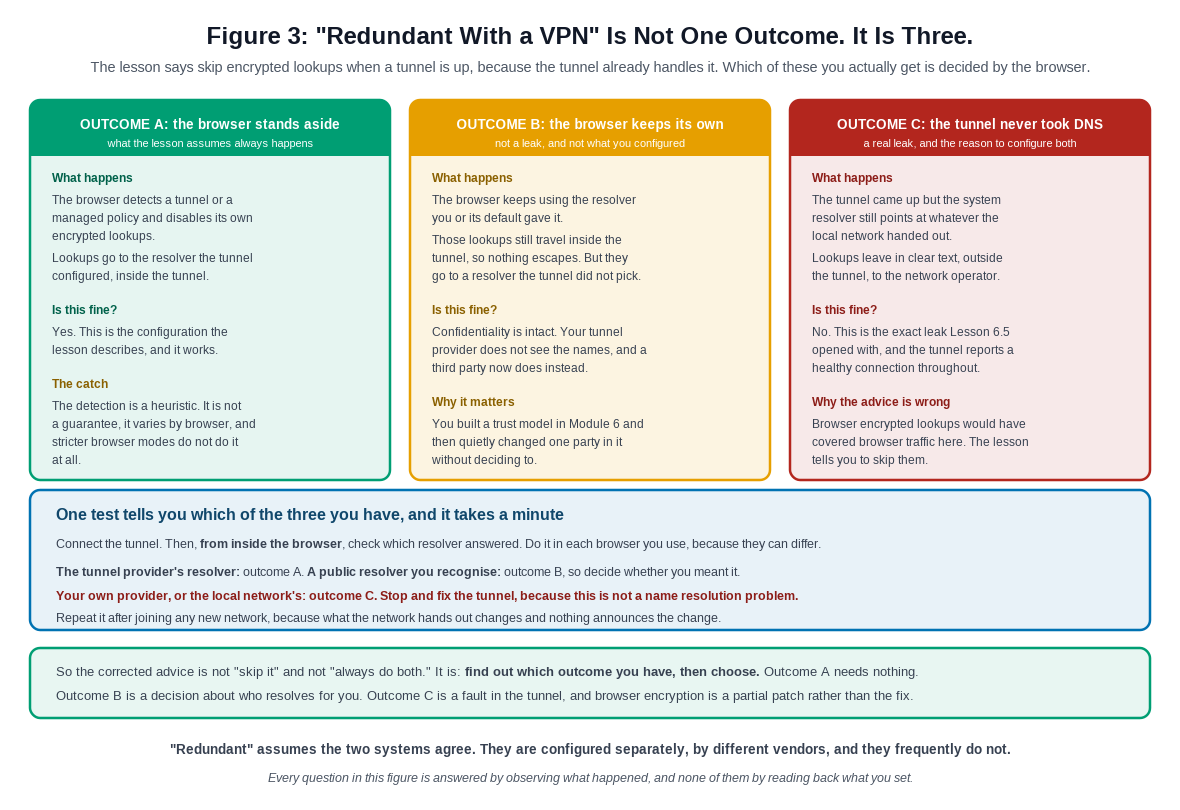
Figure 3. What actually happens when both are configured.
A common claim is that configuring encrypted lookups while using a tunnel is redundant, because the tunnel already encrypts resolution. That assumes one outcome. Three are possible on the same machine, and the browser decides which one you get, not the tunnel.
Outcome A: the browser stands aside. It detects a tunnel or a managed policy and disables its own encrypted lookups, so resolution goes to the resolver the tunnel configured, inside the tunnel. This is the outcome that claim assumes, and it works.
The catch is that the detection is a heuristic rather than a guarantee. It varies between browsers, and the stricter browser modes do not do it at all (Reference 4).
Outcome B: the browser keeps its own resolver. The lookups still travel inside the tunnel, so nothing escapes and this is not a leak. But they go to a resolver the tunnel did not choose. Confidentiality is intact and the party who sees your names is not the one you picked when you selected a tunnel provider.
That matters because you built a trust model in Module 6 and then changed a party in it without deciding to.
Outcome C: the tunnel never captured resolution. The tunnel is up, the system resolver still points at whatever the local network handed out, and lookups leave in clear text to the network operator. This is exactly the leak Lesson 6.5 opened with, and the tunnel reports a healthy connection throughout.
In this outcome the “redundant” advice is actively harmful. Browser encrypted lookups would have covered browser traffic. The advice tells you to skip them.
The test that distinguishes them
Connect the tunnel. Then, from inside the browser, check which resolver answered. Do it in each browser you use, because they can differ.
- The tunnel provider’s resolver: outcome A. Nothing to do.
- A public resolver you recognize: outcome B. Decide whether you meant that.
- Your own provider, or the local network’s: outcome C. Stop and fix the tunnel. This is not a name resolution problem and encrypted lookups are a partial patch rather than the fix.
Repeat after joining any new network, because what the network hands out changes and nothing announces the change.
The corrected advice is neither “skip it” nor “always do both.” It is: find out which outcome you have, then choose.
5. Verification That Tests the Right Thing
The usual verification advice has the right instinct and one structural gap.
The gap. It recommends a command-line lookup tool to confirm the resolver. That tool uses the system resolver. A browser doing its own encrypted lookups is invisible to it, which is precisely the case Lesson 7.1’s Figure 3 warns about. The check passes while the browser sends everything somewhere else.
Test each application separately. For a browser, use its own diagnostic page or a resolver-identification service loaded in that browser. Two browsers on one machine reporting different resolvers is normal, not a fault.
Check what it does when it fails, not only that it works. This is the test nobody runs and it is the one Section 3 argues for. Point the configuration at an unreachable resolver, or use a network that blocks yours, and see whether resolution fails or quietly succeeds. If it succeeds, you are in fall-back mode.
The port checks are useful and limited. Confirming an active connection on the dedicated port proves DoT is running. Confirming a connection on the web port proves nothing on its own, because everything uses that port. The absence of plain lookups is the stronger signal, and a packet capture is the honest way to establish it.
Test on each network you use. Most guides test once. Lesson 7.1’s Figure 3 explains why once is not enough.
6. Choosing Between Them
The usual decision matrix rests on the two claims that Sections 2 and 3 correct, so it needs rebuilding. Three questions decide this, in order.
What does the network permit? If the network blocks your resolver’s addresses, neither protocol works and the protocol choice is irrelevant. If it blocks only the dedicated port, DoH works and DoT does not. That is the real and useful difference, and it is narrower than “hard to block.”
What should happen when it fails? Section 3. This matters more than the protocol choice, and most guides do not ask it.
What is the scope? Not a protocol question any more. Every current platform can do system-wide encrypted resolution with either protocol. Set it at the system level so applications inherit it, and separately decide what your browser should do, because the browser will decide for itself otherwise.
One common recommendation is to use neither when running Tor Browser. That is right, for this reason: Tor Browser resolves names through the circuit rather than locally, so configuring encrypted lookups in it does not add privacy and can break the isolation the browser is built to provide. Leave it alone.
Key Takeaways
- Both protocols work and the configuration instructions are sound. The corrections here are to the claims made about them, not to the mechanics.
- The web port does not make lookups indistinguishable. Five common methods stop them and none blocks the port. The true claim is “harder to block than the dedicated port.”
- Traffic analysis is worse than listed. Encrypted lookups are short, structured and predictably timed, which makes them good input for a classifier. Published accuracy figures describe a closed-world task, so read them at the size Lesson 6.9 sets out.
- Firefox ships a documented off switch that any network can trigger, for anybody who got the feature as a default rather than choosing it.
- Every platform default falls back to plain text, and common troubleshooting advice steers you into that mode.
- A privacy control whose failure looks like success is not a control. Test what happens when it fails, not just that it works.
- “Redundant with a VPN” is three different outcomes, one of which is the leak from Lesson 6.5. Find out which one you have.
- Verify per application. A command-line lookup tool cannot see what a browser is doing.
Knowledge Check
Question 1. Which method of stopping encrypted lookups on the web port is both the easiest and the most commonly used?
A. Blocking the resolver’s addresses, which needs no inspection at all B. Deep inspection of every connection on the port C. Blocking the web port entirely D. Requiring every device to install a management profile
Answer: A
There are a handful of large public resolvers and they publish their addresses. The network drops traffic to them and the connection never completes. The port stays open and nothing needs decrypting.
Question 2. What does Firefox’s canary domain mechanism do, and who does it affect?
A. It verifies the resolver’s certificate before any lookup is sent B. It checks one name at startup, and disables encrypted lookups if the network answers with an error, for users who received the feature as a default C. It rotates between resolvers to prevent any one seeing all queries D. It warns the user that the network is filtering content
Answer: B
Mozilla built it so networks with content filtering could opt out. It does not affect users who turned the feature on themselves, so the browser honors the network’s veto only over its own default.
Question 3. What did published research find about fingerprinting websites from encrypted lookup traffic alone?
A. It is possible only when the observer also controls the resolver B. It fails once the handshake is also encrypted C. Over ninety per cent accuracy from as few as ten packets, using far less data than fingerprinting the web traffic itself D. It requires capturing several hours of traffic to reach useful accuracy
Answer: C
Lookups are short, structured, and occur in a predictable burst before each page load, which is close to ideal input for a classifier. Against a pattern-analyzing observer, encryption produced a tidier signal rather than removing one.
Question 4. What is the accurate version of the claim that encrypted lookups on the web port resist blocking?
A. They cannot be blocked without blocking all web traffic B. They are indistinguishable from ordinary web browsing C. They can only be blocked by a network that performs deep inspection D. They are harder to block than the version on a dedicated port, which is a real but narrow advantage
Answer: D
The port cannot be blocked wholesale. That is the whole of the advantage, and none of the common blocking methods needs to touch the port.
Question 5. On every platform listed in this lesson, what does the default encrypted resolution setting do when the encrypted resolver cannot be reached?
A. It falls back to plain text lookups B. It retries indefinitely and reports an error to the user C. It switches automatically to a backup encrypted resolver D. It blocks all traffic until the resolver is reachable again
Answer: A
The vendors chose connectivity over privacy, which is defensible for a general population. The problem is inheriting that choice without knowing, because the configuration still reads as enabled.
Question 6. Why is the common fix for pages that will not load a problem?
A. It requires administrator access that most users do not have B. It switches the browser to a different resolver with a worse privacy policy C. It clears the cache, which discards information needed for troubleshooting D. It switches the browser into fall-back mode, which fixes the symptom by disabling the feature while every configuration check still reports success
Answer: D
Encrypted resolution remains enabled and is silently declining to be used. A control whose failure is indistinguishable from success is not a control.
Question 7. You have a tunnel connected and your browser is set to use its own encrypted resolver. Which outcome is a genuine leak?
A. The browser stands aside and lookups go to the tunnel’s resolver B. The browser keeps its own resolver and the lookups travel inside the tunnel C. The tunnel never captured resolution, so lookups go in clear text to the local network D. All three outcomes leak in different ways
Answer: C
Option B is not a leak: the lookups are inside the tunnel, but they reach a resolver the tunnel did not choose, which is a trust decision rather than an exposure. Option C is the failure Lesson 6.5 opened with, and the tunnel reports healthy throughout.
Question 8. What is the correct test to tell those three outcomes apart?
A. Read the tunnel client’s configured resolver from its settings panel B. With the tunnel connected, check which resolver answered from inside each browser C. Run a command-line lookup and confirm it does not return your provider’s resolver D. Confirm the tunnel interface is up and passing traffic
Answer: B
A command-line tool uses the system resolver and cannot see what a browser doing its own lookups is doing, which is exactly the case that needs catching. Browsers can differ from each other on the same machine.
Question 9. Why is the common split between “DoT for system-wide” and “DoH for browsers” no longer a useful basis for choosing?
A. Because one of the two protocols has been deprecated B. Because browsers now support both protocols equally C. Because every current platform can do system-wide encrypted resolution with either protocol D. Because system-wide configuration is no longer possible without a management profile
Answer: C
Windows 11, Android, Apple devices and Linux all support system-wide encrypted resolution. Choose on what the network permits and on failure behavior instead.
Question 10. Common advice says to use neither protocol inside Tor Browser. Is that correct?
A. No, encrypted lookups should be enabled in every browser without exception B. No, it is correct only on networks that do not filter content C. Yes, but only because the overhead would slow the circuit noticeably D. Yes, because Tor Browser resolves names through the circuit rather than locally, so configuring encrypted lookups adds nothing and can break its isolation
Answer: D
This is one place the common advice is right. The reason matters, because it is about where resolution happens rather than about whether encryption is good.
References
- Mozilla, “Canary domain: use-application-dns.net,” including the limit that it applies only to users who received DoH as a default. https://support.mozilla.org/en-US/kb/canary-domain-use-application-dnsnet
- Siby, Juarez, Diaz, Vallina-Rodriguez and Troncoso, “Encrypted DNS, Privacy? A Traffic Analysis Perspective.” https://arxiv.org/pdf/1906.09682
- Mozilla, Firefox source documentation, “DNS over HTTPS (Trusted Recursive Resolver),” on the first-try, strict-fallback and only modes. https://firefox-source-docs.mozilla.org/networking/dns/dns-over-https-trr.html
- Mozilla, “DNS over HTTPS FAQs,” on default regions and behavior when a tunnel or enterprise policy is detected. https://support.mozilla.org/en-US/kb/dns-over-https-doh-faqs
- RFC 8484, DNS Queries over HTTPS. https://www.rfc-editor.org/rfc/rfc8484.html
- RFC 7858, Specification for DNS over Transport Layer Security. https://www.rfc-editor.org/rfc/rfc7858.html
- RFC 9849, TLS Encrypted Client Hello, published March 2026. https://www.rfc-editor.org/rfc/rfc9849.html
- Android Developers, Private DNS and the DNS resolver module, on DoT from version 9 and native DoH from version 13. https://source.android.com/docs/core/ota/modular-system/dns-resolver
- Apple, configuring encrypted DNS on iOS 14 and macOS 11 and later through a configuration profile. https://developer.apple.com/documentation/devicemanagement/dnssettings
Where This Goes Next
Lesson 7.3 covers separating who you are from what you asked. That is the answer to the concentration problem Lesson 7.1 raised and this lesson does not solve, because both protocols here still deliver every lookup to one resolver that knows your address.
It is also the layer that addresses Section 2’s traffic-analysis finding, at least in part, and it is worth reading with Figure 1 open.
Lesson 7.4 builds a resolver you run yourself, which removes the resolver from the trust list and puts the recursive chain back in your hands. Figure 1 in Lesson 7.1 is the thing to check it against: it changes one row, and leaves the rest as they were.
Next lesson: Module 7 Lesson 3: Anonymized DNS: A Good Design, Running on Seven Operators