DNS Surveillance: What It Reveals, and What Encrypting It Does Not Fix
About This Lesson
Most DNS privacy guides open with the same case, and the case is largely correct. Name resolution happens before every connection you make. By default it travels in clear text. Your internet provider sees all of it, keeps it, and in some places is legally required to keep it. That is a real exposure, it is invisible, and most people have never heard of it.
Most guides make that case well. They go wrong at the point where they promise what fixing it achieves.
The framing is that DNS is the leak, so encrypting DNS closes it. That is not what happens. Your device still has to open a connection to an address, and your provider still routes that connection. Encrypting name resolution takes the names away from them and leaves every destination address exactly where it was. For a site sharing an address with thousands of others, that is a large gain. For a site on its own address, the address names the site, and no amount of encryption further up changes it.
So the honest statement is not “your provider can no longer see your browsing.” It is “your provider learns where you went, but not what you asked for.” Both are worth having. Only one of them is true.
This lesson also corrects claims that have aged or gone too far, and one common factual error about how a specific censorship system works.
Learning Objectives
After you read this lesson, you can do these tasks:
- Explain what name resolution reveals, and why metadata is the point rather than a lesser version of content.
- State exactly what encrypting resolution removes from your provider’s view, and what it leaves untouched.
- Explain why the destination address is the observation that survives every layer.
- Say which hop in the resolution chain was fixed years ago, and stop citing it as a risk.
- Compare resolvers on testable behavior rather than on their privacy policies.
- Explain what client subnet forwarding is and why it separates otherwise similar providers.
- Find all six places resolution is configured on one machine, and test which one is winning.
- Build a threat model that names the observer rather than the technology.
Prerequisites
- Module 6, particularly Lesson 6.1 on what a tunnel moves, and Lesson 6.5 on leaks.
- Basic familiarity with how a connection is established.
1. What Resolution Reveals
Every connection begins with a name lookup. The pattern of those lookups over a day describes your reading, your health, your finances, your politics, your working hours, your devices, and who you talk to. It is metadata, not content, and metadata is not the weaker thing. It is the more structured thing: content is hard to search at scale and a list of names with timestamps is trivial to search at scale.
One more point matters most for the audience of this course. Your lookups also reveal your tooling. Queries for security services, research infrastructure, and privacy tools mark you out. For a penetration tester doing reconnaissance, the queries themselves are the exposure, and they happen before any tool logs a single result.
Remember that, because it is the case where the usual advice is weakest. Section 5 explains why.
2. What Encryption Moves, and What It Does Not
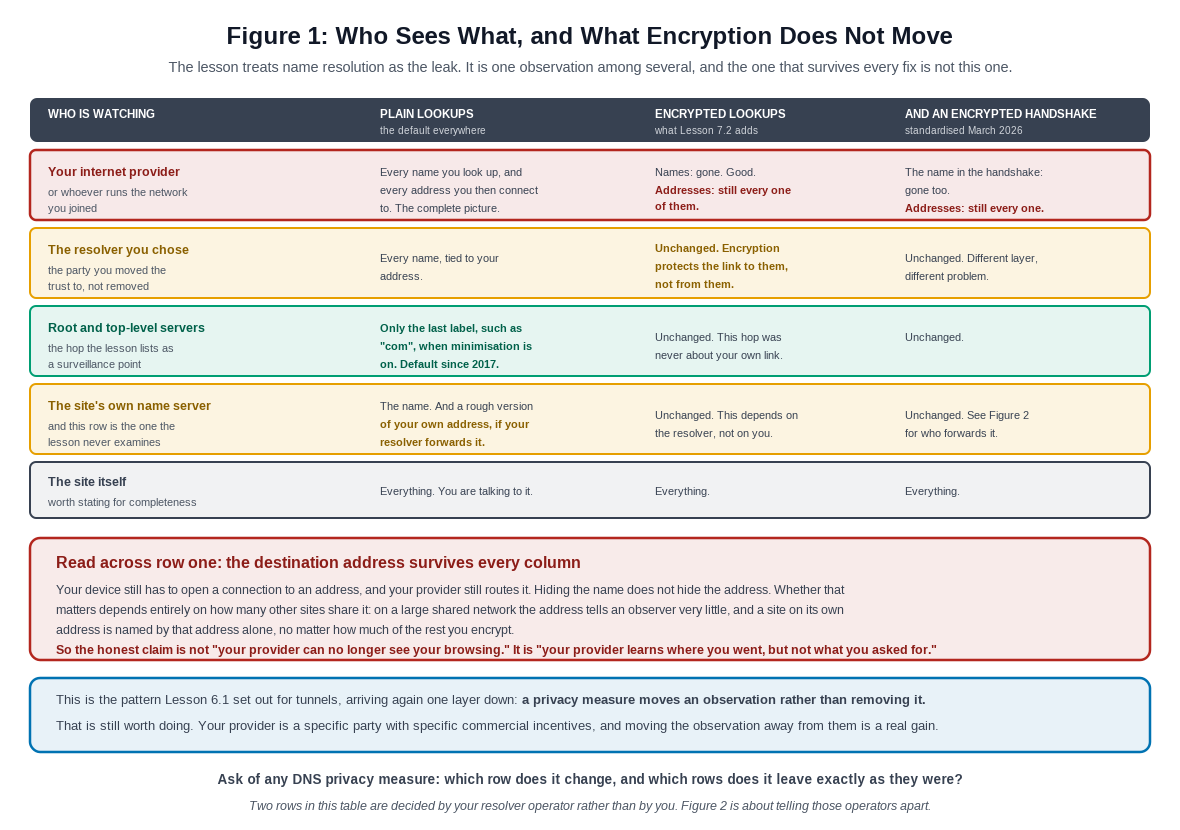
Figure 1. Five observers, three configurations.
Set out every observer and check them against each configuration, and the shape of the problem changes.
Your internet provider. Under plain resolution they see every name and every address. Add encrypted resolution and the names are gone. Add an encrypted handshake and the name inside the connection setup is gone too. The addresses remain, in all three columns. This is the row that matters, and most guides leave it out.
The resolver you chose. Sees every name, tied to your address, in all three columns. Encryption protects the link to your resolver. It does not protect you from your resolver. This is the party you moved the trust to, and Section 4 is about telling them apart.
Root and top-level servers. Discussed in Section 3, because this hop is already fixed.
The site’s own name server. Sees the name it is authoritative for. It may also see a rough version of your address, depending on your resolver’s behavior. Most guides never examine this row, and it is the row that most cleanly separates one resolver from another.
The site itself. Sees everything. You are talking to it.
Why the address survives
Hiding a name does not hide an address, because you still have to connect to the address. How much that costs you depends on one thing: how many other sites share it.
A site behind a large content network shares an address with an enormous number of others, and the address tells an observer almost nothing. A site on its own address is named by that address alone. The encrypted handshake standard, published in early 2026, is explicitly strongest in the first case and weakest in the second (Reference 1). It is a real improvement and it is not a cloak.
None of this makes encrypted resolution not worth doing. Your provider is a specific party with commercial incentives, retention obligations, and a legal relationship with you. Moving an observation away from them is a genuine gain. It is just a narrower gain than “they can no longer see your browsing,” and stating it narrowly is what lets someone reason about the next layer instead of stopping.
This is Lesson 6.1’s pattern arriving one layer down: a privacy measure moves an observation rather than removing it. By Module 7 that should read as a familiar shape rather than a disappointment.
3. The Hop That Was Already Fixed
Many guides list root servers and top-level servers as surveillance points, and describe each server in the chain receiving your full query. Some go further and present query name minimization as an improvement to aim for.
It is not something to aim for. It has been the default for years.
Under minimization, a resolver looking up a name sends the root server only the last label, such as “com”. It sends the top-level server only enough to find the next step. Only the final, authoritative server receives the full name (Reference 2). The technique was standardized, and the major resolver software enabled it by default: Unbound from early 2017, BIND from the same period, Knot likewise (Reference 3).
So if you use any mainstream resolver, that hop was closed before this course was written. The claim is not wrong in principle. It is wrong about the present, which is the same failure Lesson 6.5 described for expired leak fixes.
The general habit is the transferable part. When a guide lists a risk, ask when it was last true, and check whether the defaults moved underneath it. Defaults move quietly and guidance does not follow.
4. Choosing a Resolver on Facts
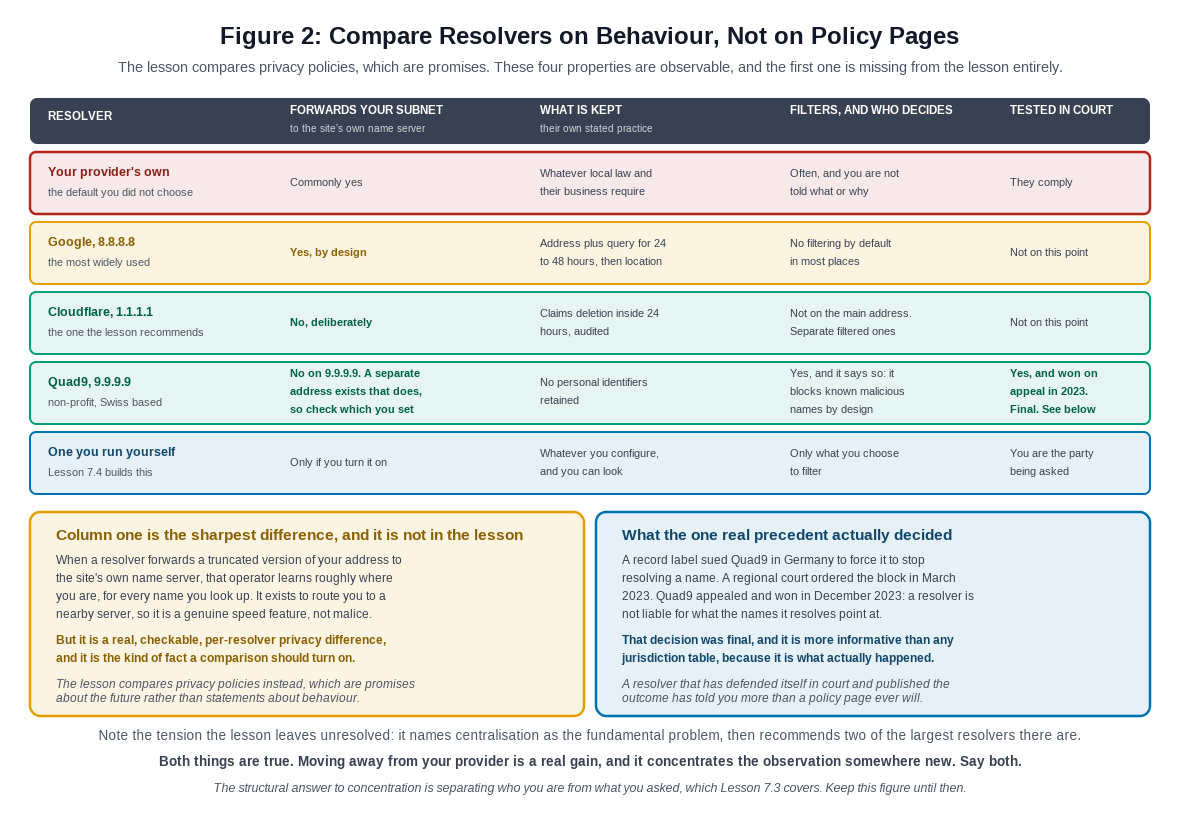
Figure 2. Five options, compared on properties you can check.
The usual comparison of Google, Cloudflare and Quad9 summarizes their privacy policies. A privacy policy is a promise about the future. Here are four properties that are statements about behavior instead.
Client subnet forwarding, which most comparisons omit
When you look up a name, your resolver can forward a truncated version of your address to the site’s own name server. The purpose is legitimate: it lets a content network return a server near you rather than near your resolver, which makes things faster.
The privacy cost is that the operator of every name you look up learns roughly where you are.
The providers differ, concretely and checkably. Google’s public resolver forwards it, by design, and separately keeps your address alongside your query for 24 to 48 hours before reducing it to a location (References 4, 8). Cloudflare deliberately does not forward it. Quad9’s main address does not, although it runs a separate address that does, so which one you configured matters (Reference 4).
That is a real, per-provider, verifiable privacy difference, and it is the kind of fact a comparison should turn on. Most comparisons leave it out.
What happens when somebody sues them
Most guides handle jurisdiction as a list of countries and laws. There is a better source of evidence: what happened when a resolver was actually taken to court.
A record label sued Quad9 in Germany to force it to stop resolving a particular name. A regional court ordered the block in March 2023. Quad9 appealed, and in December 2023 the higher regional court overturned it: a resolver is not liable for what the names it resolves point at, and the liability protection for access intermediaries applies to it. That decision was final (Reference 5).
That tells you more than any jurisdiction table, because it is what happened rather than what a statute permits. It also tells you something about the operator: they contested it rather than complying quietly, and they published the outcome.
The tension most guides leave open
Many guides call centralization “the fundamental problem,” then recommend two of the largest resolvers in existence. Both halves are defensible, and the guides never reconcile them.
Say both: moving away from your provider is a real gain, and it concentrates the observation somewhere new. The structural answer to concentration is separating who you are from what you asked, which is Lesson 7.3’s subject. Until then, the honest position is that you picked a better-behaved observer, not no observer.
5. You Set One of These. A Different One Is Deciding.
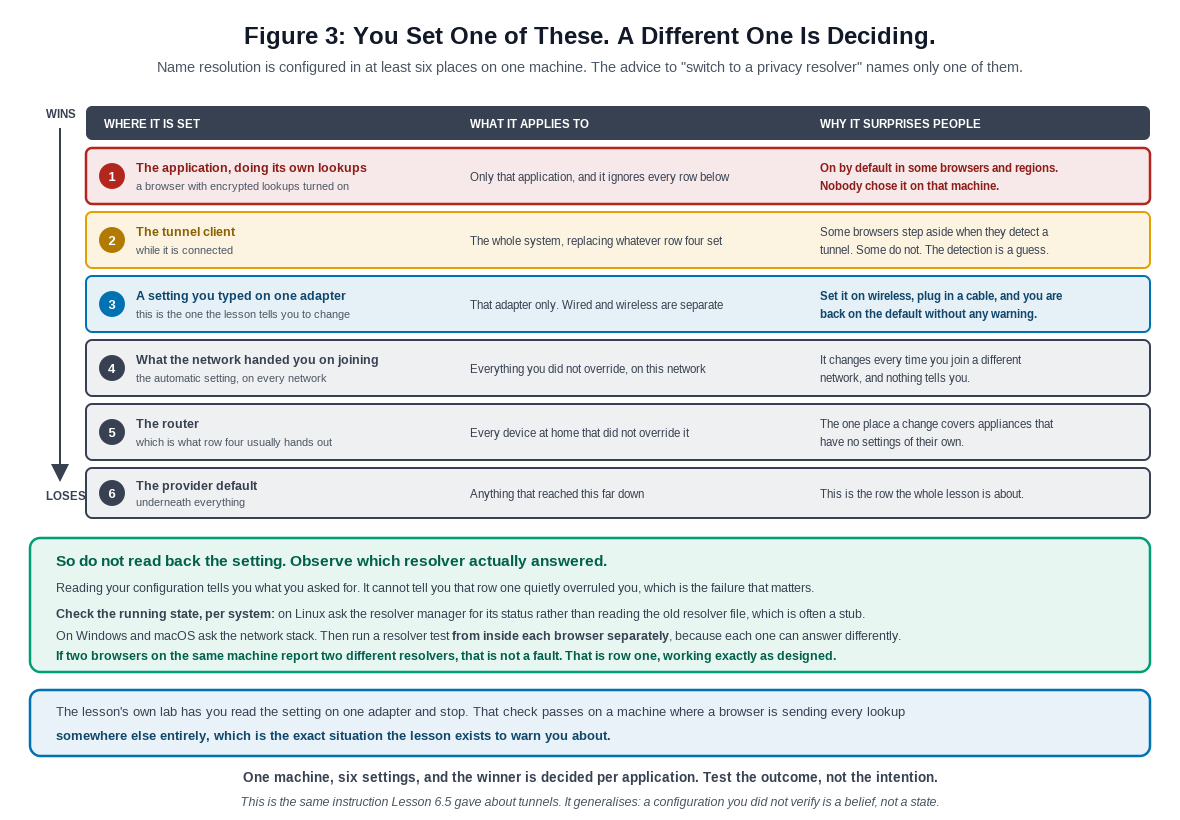
Figure 3. Six places resolution is decided on one machine, in precedence order.
This is the practical failure that undoes everything above, and most guides do not cover it.
Resolution is configured in at least six places on a single computer, and they do not all apply to the same traffic:
- The application itself. A browser can do its own encrypted lookups and ignore every setting below it. This is on by default in some browsers and regions, so nobody on that machine chose it.
- The tunnel client, while connected, replaces the system setting. Some browsers step aside when they detect a tunnel or an enterprise policy and some do not, and the detection is a heuristic rather than a guarantee (Reference 9).
- A setting you typed on one network adapter. This is the one most guides tell you to change. It applies to that adapter. Set it on wireless, plug in a cable, and you are back on the default with no warning.
- What the network handed you when you joined. Changes on every network, silently.
- The router, which is usually what hands out number four, and the only place a single change also covers appliances that have no settings of their own.
- The provider default, underneath everything.
So the check that matters is not “what did I configure.” It is “which resolver actually answered.” Reading your configuration back tells you what you asked for. It cannot tell you that an application overruled you.
A common check is to read the setting on one adapter and stop. That check passes on a machine where a browser is sending every lookup somewhere else entirely, which is the exact situation DNS privacy advice exists to warn about.
Test the running state rather than the stored setting, and test it from inside each browser separately. If two browsers on the same machine report two different resolvers, nothing is broken. That is row one, working as designed.
This is the same instruction Lesson 6.5 gave about tunnels, generalized: a configuration you did not verify is a belief, not a state.
6. Four Common Claims to Correct
The censorship example is wrong about mechanism. A common claim is that China identifies Tor users by monitoring queries for Tor bridge addresses. Bridges are distributed as an address and port precisely so that they are not in any public directory, and there is no name to query. The actual method is deep packet inspection flagging a suspicious connection, followed by scanners elsewhere in the country connecting to that address and port to see whether something answers like Tor. If it does, the address is blocked, often within minutes (Reference 6).
The correction matters beyond the detail, because the two mechanisms have opposite implications. If the risk were DNS, encrypted resolution would help. It is not, and it does not. Fixing the wrong layer is the failure mode this whole module teaches against.
The United Kingdom retention claim is overstated. A common claim is that UK providers must keep a record of every website you visit for a year. The power exists, and the retention period is twelve months, but it applies on notice served on a specific operator rather than automatically to all of them, and the record defined in law is the service contacted rather than the full address of the page (Reference 7). The distinction between the service and the page is the whole design of the provision. Keep the point, tighten the phrasing.
The provider comparison undersells the resolver’s own position. Saying Cloudflare “deletes logs within 24 hours” is a fair summary of their claim, but the row that matters is the one in Figure 1: they see every name, tied to you, in real time, in every configuration. Retention is what happens after. Visibility is what happens regardless.
“Switch to a privacy resolver” is incomplete as advice. For the reason in Section 5. Give it with the verification step attached, or it will be followed and will not take effect.
7. Threat Models, Tightened
The usual DNS threat models each name a kind of person, such as a journalist or a person in a hostile country. Name the observer instead, because the observer determines the fix.
| If the observer is | The measure that actually helps | What it does not fix |
|---|---|---|
| Your internet provider | Encrypted resolution to somebody else | They still see every address |
| Your resolver | A different resolver, or your own | Somebody still sees the names |
| The site’s own name server | A resolver that does not forward your subnet | It still learns the name |
| Whoever runs the local network | A tunnel, which carries resolution inside it | The tunnel operator becomes the resolver’s peer |
| A party with legal process | Nothing on this list, reliably | This is a jurisdiction and retention question |
Two things fall out of that table. Different observers need different measures, and encrypted resolution addresses exactly one row. And the last row is not a technical problem, which is why the highest-stakes scenarios, the journalist and the person at risk in a hostile country, are the ones where the technical advice matters least on its own.
For the security professional case, one specific correction to common advice. That advice tells you to use a privacy-respecting resolver for reconnaissance. Better: do not run reconnaissance from a network that identifies you, at all. Which resolver you used is a secondary question when the connection that follows the lookup carries your own address to the target.
8. What To Actually Do
In order, because the order is the useful part.
- Find out which resolver is answering, per application. Not the setting. The outcome. Do this before changing anything, because the answer often explains something.
- Move off your provider’s resolver, and encrypt the link. Real gain, correctly stated: it takes the names away from your provider. Lesson 7.2 covers the mechanism.
- Pick the resolver on the properties in Figure 2, with subnet forwarding as the first cut, rather than on the tone of a policy page.
- Set it at the router as well as on the machine, so devices that have no settings of their own are covered.
- Re-test after every change, and after joining a new network, because row four in Figure 3 changes without telling you.
- Accept the address exposure, or address it separately. A tunnel is the layer that changes it. That is Module 6, not this module, and it is a different decision.
Key Takeaways
- Resolution reveals your browsing, your routine and your tooling, before any encrypted connection exists. The core case for DNS privacy is correct.
- Encrypting it takes the names from your provider and leaves every destination address. Say the gain narrowly, because the narrow statement is the true one.
- How much the address costs you depends on how many sites share it. Shared infrastructure hides you. A site on its own address is named by its address.
- The root and top-level hop was fixed years ago by query name minimization, on by default in the major resolvers since 2017.
- Compare resolvers on behavior, not policy. Client subnet forwarding is the sharpest difference and most comparisons omit it.
- One court has actually decided this question, and the resolver won on appeal in 2023. That is better evidence than a jurisdiction table.
- Resolution is set in six places on one machine, and the winner is decided per application. Test the outcome, not the intention.
- China identifies Tor bridges by probing them, not through DNS. Fixing the wrong layer is the failure this module exists to prevent.
Knowledge Check
Question 1. After you switch to an encrypted resolver, what does your internet provider still see?
A. Every destination address you connect to, for every connection B. Only the total volume of your traffic C. Only the times at which you were online D. Nothing at all, which is the point of encrypting resolution
Answer: A
Your device still has to open a connection, and your provider still routes it. Encryption removes the names from their view and leaves every address in it.
Question 2. What determines how much a visible destination address reveals?
A. Whether the connection uses an encrypted handshake B. How many other sites share that address C. The retention period your provider is subject to D. Whether your resolver forwards your subnet
Answer: B
An address shared by many sites tells an observer very little. A site on its own address is identified by that address alone, whatever else is encrypted.
Question 3. Many guides list root and top-level servers as surveillance points. Why is that outdated?
A. Those servers were retired and replaced by a distributed system B. Encrypted resolution hides your queries from them C. Query name minimization sends them only the labels they need, and has been on by default in the major resolvers since 2017 D. They have never been able to see queries at all
Answer: C
Under minimization the root sees only the last label. Option B is wrong for an instructive reason: encryption protects the link between you and your resolver, not the hops your resolver makes afterward.
Question 4. What is client subnet forwarding, and why does it separate otherwise similar resolvers?
A. It forwards a truncated version of your address to the site’s own name server, so that operator learns roughly where you are B. It forwards your queries to a backup resolver when the first one is slow C. It splits your queries across several resolvers so none sees all of them D. It restricts which subnets are allowed to use the resolver
Answer: A
It exists to route you to a nearby server, so it is a genuine speed feature. It is also a checkable per-provider privacy difference: some forward it, some deliberately do not.
Question 5. Which statement about the resolver you chose is true in every configuration?
A. It cannot see your queries once resolution is encrypted B. It sees every name you look up, tied to your address, in real time C. It sees only aggregate statistics, never individual names D. It sees your queries only if it chooses to keep logs
Answer: B
Encryption protects the link to your resolver, not you from your resolver. Retention is a separate question about what happens afterward; visibility happens regardless.
Question 6. A record label sued a public resolver in Germany to force it to stop resolving a name. What was the final outcome?
A. The resolver was ordered to block the name worldwide B. The case was settled privately with no published outcome C. The resolver won on appeal in 2023; a resolver is not liable for what the names it resolves point at D. The resolver was ordered to begin retaining query logs
Answer: C
A regional court ordered the block in March 2023, the resolver appealed, and the higher regional court overturned it in December 2023. The decision was final.
Question 7. You set a privacy resolver on your wireless adapter. Which of these can still send lookups somewhere else?
A. Only another computer on the same network B. Nothing, once the adapter setting is saved C. Only an application you explicitly configured to do so D. A browser doing its own encrypted lookups, a tunnel client, or the wired adapter you did not change
Answer: D
Resolution is configured in at least six places, and which one wins is decided per application. This is why reading back the setting is not a test.
Question 8. What is the correct way to confirm your resolution setting took effect?
A. Observe which resolver actually answered, and do it from inside each browser separately B. Confirm the resolver’s address responds to a connectivity check C. Read the configured resolver back from the adapter settings D. Check that the encrypted resolution option is ticked in the operating system
Answer: A
Reading the configuration tells you what you asked for. Only observing the answer tells you whether an application overruled you. Two browsers reporting different resolvers is normal, not a fault.
Question 9. How does China’s censorship system actually identify Tor bridges?
A. By monitoring name lookups for bridge addresses B. By requiring providers to report users who look up privacy-related names C. By blocking every address that has ever appeared in the public relay list D. By flagging a suspicious connection, then having scanners elsewhere connect to that address and port to see whether it answers like Tor
Answer: D
Bridges are distributed as an address and port precisely so there is no name to look up. The distinction matters: if the risk were name resolution, encrypting it would help, and it does not.
Question 10. In the tightened threat model table, which observer is not addressed by anything on the technical list?
A. Your internet provider B. Whoever runs the local network you joined C. A party acting through legal process D. The site’s own name server
Answer: C
That is a jurisdiction and retention question, not a protocol question. It is why the highest-stakes scenarios are the ones where the technical advice matters least on its own.
References
- RFC 9849, TLS Encrypted Client Hello, and its stated limits regarding shared and dedicated addresses. https://www.rfc-editor.org/rfc/rfc9849.html
- RFC 9156, DNS Query Name Minimisation to Improve Privacy. https://www.rfc-editor.org/rfc/rfc9156.html
- CircleID, “Maximizing Qname Minimization: A New Chapter in DNS Protocol Evolution,” on default enablement in BIND, Knot and Unbound. https://circleid.com/posts/20200916-maximizing-qname-minimization-new-chapter-dns-protocol-evolution
- Farrokhi, “EDNS Client Subnet in Practice: Evaluating Public Resolver Behaviors.” https://farrokhi.net/posts/2025/10/edns-client-subnet-in-practice-evaluating-public-resolver-behaviors/
- Gesellschaft für Freiheitsrechte, “Quad9 website blocking: No copyright liability for DNS services.” https://freiheitsrechte.org/en/themen/demokratie/quad9-eng
- The Tor Project, “Learning more about the GFW’s active probing system.” https://blog.torproject.org/learning-more-about-gfws-active-probing-system/
- UK Home Office, “Internet Connection Records” factsheet, Investigatory Powers Bill. https://assets.publishing.service.gov.uk/media/5a80d70340f0b62305b8d718/Internet_Connection_Records_factsheet.pdf
- Google Public DNS, privacy and logging FAQ. https://developers.google.com/speed/public-dns/faq
- Mozilla, “DNS over HTTPS FAQs,” on default regions and behavior when a tunnel or policy is detected. https://support.mozilla.org/en-US/kb/dns-over-https-doh-faqs
Where This Goes Next
Lesson 7.2 covers the mechanisms for encrypting resolution, and Figure 1 is the thing to keep open while reading it. The question to ask of each mechanism is not whether it encrypts, but which row of that table it changes.
Lesson 7.3 covers separating who you are from what you asked, which is the only item in this module that addresses the concentration problem Section 4 raises rather than relocating it.
Lesson 7.4 builds a resolver you run yourself, which is the last row of Figure 2. Module 6 Lesson 6 is worth rereading first, because the trust ledger there applies unchanged: running it yourself moves the observer, and the machine it runs on still belongs to somebody.
Next lesson: Module 7 Lesson 2: DoH and DoT: The Question Is Not Whether It Is On, But What It Does When It Fails