Self-Hosting a VPN: Control Is Not Anonymity
About This Lesson
This is the last of the tunnel lessons in Module 6, and it is the one where you build something. You rent a small server, install WireGuard on it, and connect your devices to it. At the end you have a tunnel that you configured, running software you chose, on a machine only you log in to.
That is worth doing. It is also worth being exact about what it gives you, because the reason usually offered is wrong.
The standard framing is that self-hosting lets you trust yourself instead of trusting a company. It does not. You rented that machine from a company, you pay them with a card in your name, and they hold administrative access to the hardware your server runs on. You did not remove a third party from the path. You replaced one that sells privacy with one that sells servers and promises nothing at all about your traffic.
What you gained is different, and it is real: an exit whose configuration you can read. Lesson 6.3 spent its whole length on the fact that you cannot verify a provider’s claims. Here you can, because you wrote them. That is control, and control is a good reason to build this. It is not the same thing as anonymity, and on the anonymity question this build moves you backwards.
There is a second problem, which is structural. The name covers two different machines, and this lesson builds only one of them.
Learning Objectives
After you read this lesson, you can do these tasks:
- Tell apart the two different machines that both get called a self-hosted VPN, and pick the one your reason requires.
- State what renting a server moves in your trust model, and what it does not remove.
- Explain why a single-user exit address reduces anonymity rather than increasing it.
- Find the three build defects that fail loudly, and fix them.
- Find the three that fail quietly, one of which is a leak the previous lesson told you to test for.
- Build a WireGuard server that carries both address families instead of leaking one.
- Cost the build honestly, including the item the standard arithmetic leaves out.
- Decide between this, a machine at home, and a commercial provider, on the correct grounds.
Prerequisites
- Lessons 6.1 through 6.5. Lesson 6.5 in particular, because you are about to test this build against it.
- Comfort with a Linux command line and with connecting to a remote machine over a secure shell.
- A payment method. Note what that implies before you continue, and read Section 2 first.
1. Two Machines, One Name
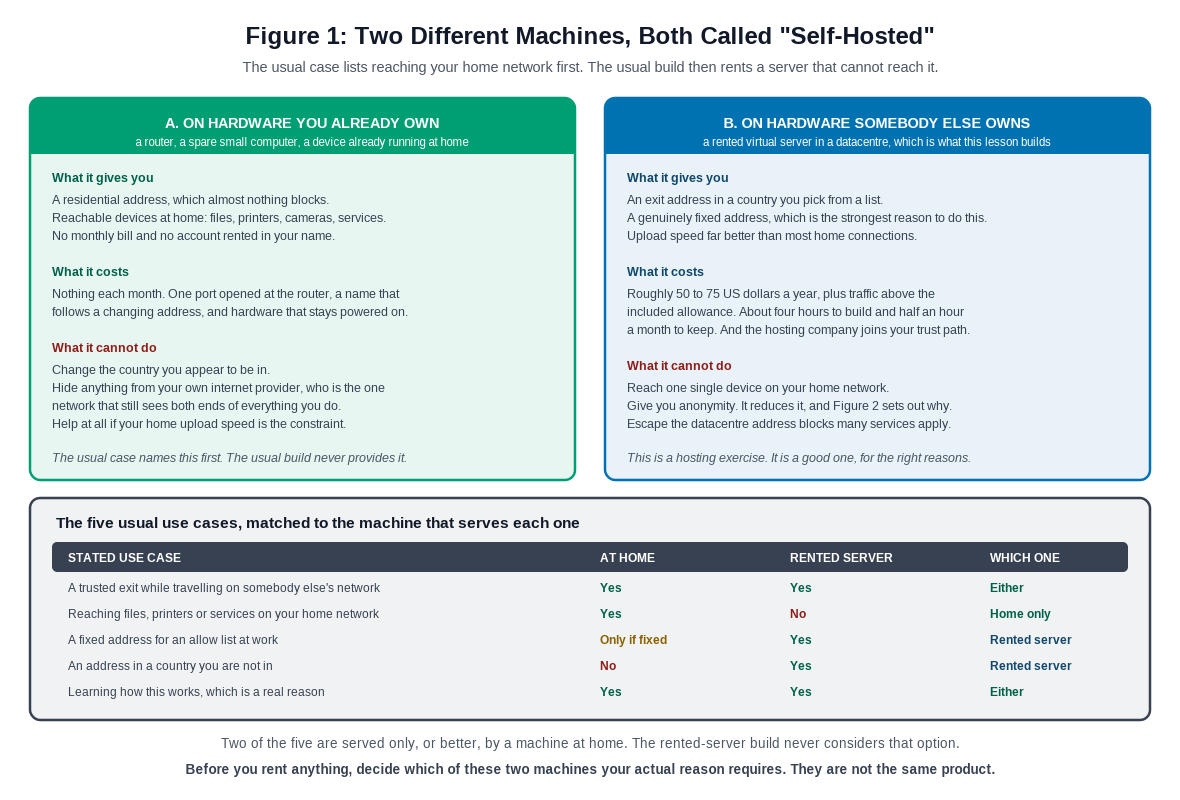
Figure 1. Two things both called a self-hosted VPN, and the use cases each one actually serves.
The usual case for self-hosting lists five reasons. The first is a secure connection while traveling, described as connecting to your home network. The usual build then rents a virtual server in a datacenter.
Those are different machines and they do different jobs. A tunnel endpoint at home gives you a residential address and reaches the devices on your home network. A rented server gives you a datacenter address in a country of your choice and reaches nothing at home. Neither one substitutes for the other.
Map the stated use cases onto the two options and the split is clean:
| Stated use case | Machine at home | Rented server |
|---|---|---|
| A trusted exit while traveling | Yes | Yes |
| Reaching files, printers or services at home | Yes | No |
| A fixed address for an allow list at work | Only if your provider gives you one | Yes, and this is the strongest case |
| An address in a country you are not in | No | Yes, and only this |
| Learning how it works | Yes | Yes |
Two of the five are served only, or better, by hardware you already own. The rented-server build never considers that option. That matters because the home build costs nothing each month, needs no account in your name at a hosting company, and gives you a residential address that almost no service blocks. If your reason is either of those two rows, renting a server is the wrong purchase.
The rented server has one case with no substitute anywhere: a fixed address that is yours. Allow lists at work, services that reject shared exits, remote access that must arrive from a known place. No commercial provider sells that, because their whole product is the opposite. If that is your reason, build the rented server and skip most of Section 2, because anonymity was never the point.
What the home build needs, briefly
It is outside this lesson’s scope to build, but it is three things: WireGuard on a device at home that stays powered on, one forwarded port at the router, and a name that follows your address when it changes. Many consumer routers do all three in their own interface. Several projects wrap the same thing in a coordination service so you do not open a port at all.
Say which of these two machines you are building before you spend anything.
2. What Renting a Server Moves
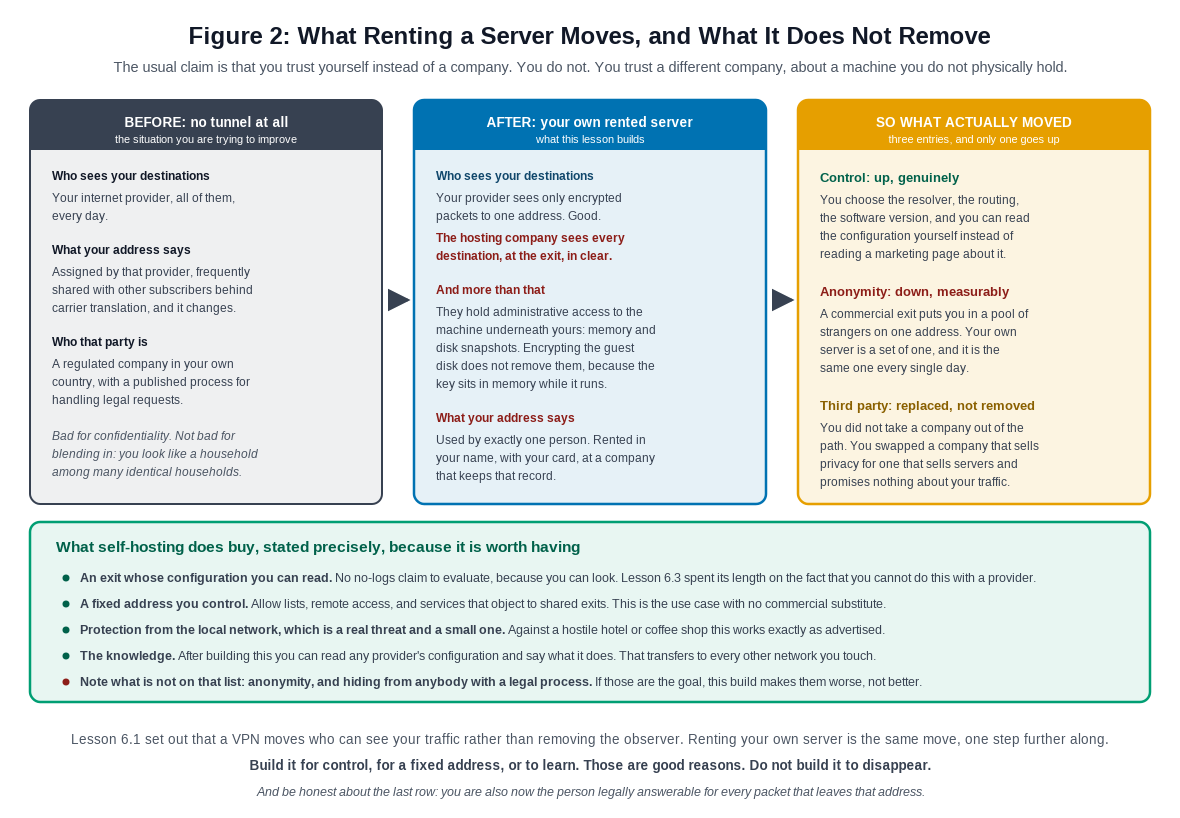
Figure 2. The trust ledger, before and after.
Set out who sees what, in both states, and the claim that self-hosting removes the third party does not survive.
Before, with no tunnel. Your internet provider sees every destination you visit. Your address comes from them, frequently shared with other subscribers behind carrier-grade translation, and it changes. That provider is a regulated company in your own country with a published process for legal requests. Bad for confidentiality. Not bad at all for blending in: you look like one household among many identical households.
After, with your own rented server. Your provider now sees encrypted packets going to one address, and nothing else. That is a genuine improvement and it is the whole point of the exercise.
But the hosting company now sees every destination, at the exit, in clear. They also hold administrative access to the physical machine your server runs on: memory, disk, and snapshots of both. Encrypting the guest disk does not remove them from the picture, because the key sits in memory the entire time the machine is running (Reference 1).
And your exit address is now used by exactly one person, every day, rented in your name with your card, at a company that keeps that record.
The anonymity-set problem, stated plainly
A commercial exit puts you in a pool of strangers on one address. When a site logs that address, it has logged a group. Your own server is a set of one. Every site you visit sees the same unique address, every time, and that address resolves through public registration data to a hosting company that can name the account holder (Reference 2).
That is not a small effect and it is not theoretical. It is the single clearest difference between the two products, and it runs the opposite way from how self-hosting is usually sold.
Self-hosting guides can mention this in passing, as a “single exit point,” and then compare the monthly price against Mullvad and IVPN as though the two were substitutes for each other. They are not substitutes. One sells a crowd to hide in; the other sells a machine you control. Comparing them on price implies a choice that does not exist.
What self-hosting genuinely buys
Stated precisely, because it is worth having:
- An exit whose configuration you can read. No no-logs claim to evaluate. You can look at the file.
- A fixed address you control. The use case with no commercial equivalent.
- Protection from the local network. Against a hostile network in a hotel or a coffee shop, this works exactly as advertised. Lesson 6.1 argued that this threat is smaller than the marketing suggests, and that argument still stands, but the protection is real.
- The knowledge. After building this you can read any provider’s configuration and say what it does. That transfers.
Not on the list: anonymity, and hiding from anybody with a legal process. If either of those is your goal, this build makes your position worse.
One more entry, which deserves weight
You become the person legally answerable for every packet that leaves that address. If you share the tunnel with family or friends, that includes their traffic. Abuse reports go to the hosting company, and the hosting company’s remedy is to terminate your account. Read the acceptable use policy before you build, not after the first complaint.
3. Six Defects in the Build
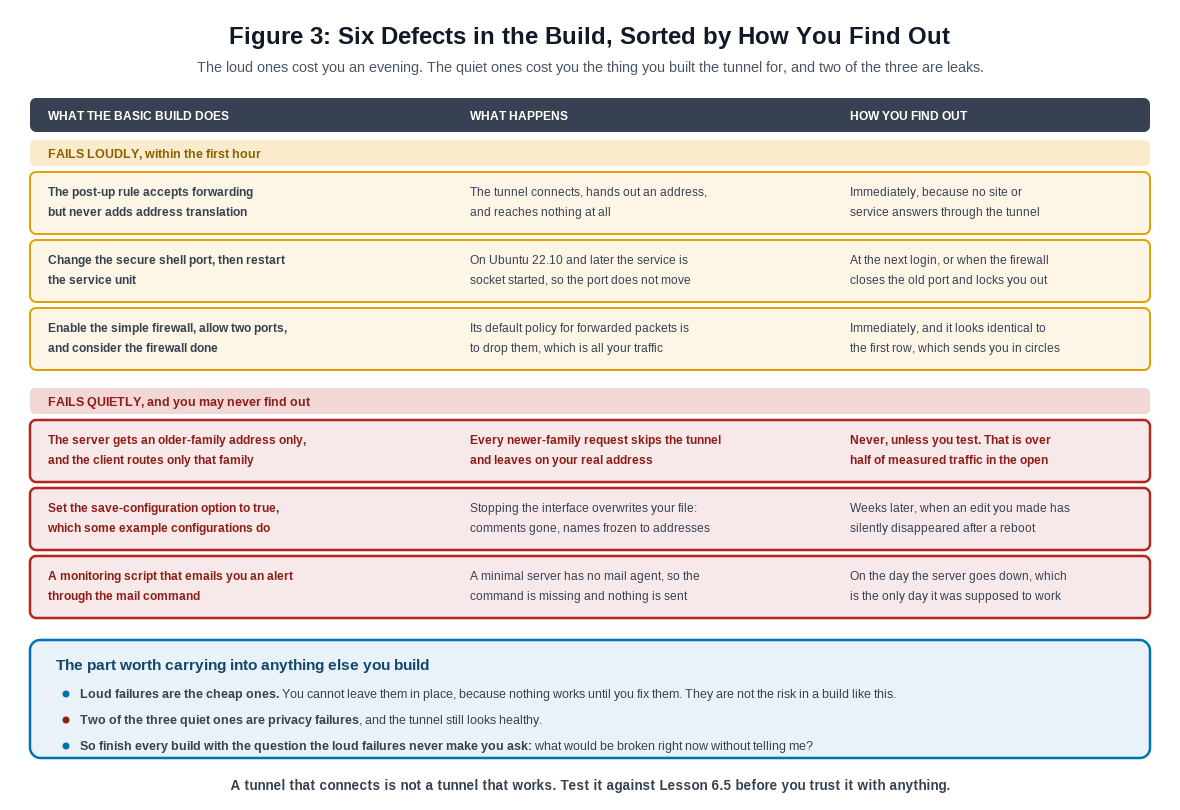
Figure 3. Six problems in the basic build, sorted by how you find out.
The basic build is short: rent a server, move the secure shell port, enable the firewall, bring up a WireGuard interface, and add a monitoring script. Done the obvious way, it has six defects. They are sorted by how you discover them, because that is the useful axis.
Fails loudly, within the first hour
1. The post-up rule has no address translation. A basic server configuration can look like this:
PostUp = iptables -A FORWARD -i wg0 -j ACCEPT
PostDown = iptables -D FORWARD -i wg0 -j ACCEPT
There is no POSTROUTING masquerade rule. Use that configuration and the tunnel connects, hands out an address, completes a handshake, and reaches nothing. The full configuration under defect 4 has the rule.
2. Changing the secure shell port and then restarting the wrong unit. The usual instruction is to set Port 2222 in the daemon configuration and run systemctl restart ssh. On Ubuntu 22.10 and later the daemon is socket started, and the socket decides the port. On 22.10 through 23.10 the Port line in the daemon configuration is ignored entirely. On 24.04 the port is read from that file again, but the change takes effect only when you restart the socket unit (Reference 3):
sudo systemctl daemon-reload
sudo systemctl restart ssh.socket
This is worse than an inconvenience. The usual sequence is to set the port, restart the service, and then close the firewall to the old port. If the port did not actually move, you have locked yourself out of a machine with no console.
If you prefer the old behavior, disable the socket and use the service directly:
sudo systemctl disable --now ssh.socket
sudo systemctl enable --now ssh.service
Either way, open a second session and confirm you can log in before you close the first one. That is the most valuable check in this build.
3. The firewall drops forwarded packets by default. The basic build enables the simple firewall, allows the secure shell port and the WireGuard port, and stops. But its default policy for forwarded traffic is to drop, and forwarded traffic is everything your clients send. The post-up rules append to the forward chain, behind the firewall’s own jumps, so they do not always win (Reference 4).
Set the forward policy in /etc/default/ufw:
DEFAULT_FORWARD_POLICY="ACCEPT"
Then reload the firewall so the new policy takes effect:
sudo ufw reloadThis failure looks identical to the first one, which is how people spend an evening on it.
Fails quietly, and you may never find out
4. The build leaks the newer address family. This is the important one.
The server configuration assigns only 10.8.0.1/24, an older-family address. The post-up rules translate only the older family. The client configuration routes only AllowedIPs = 0.0.0.0/0.
WireGuard’s allowed-address entries are family specific. List only older-family prefixes and every newer-family request skips the tunnel entirely and leaves on your real address (Reference 5). Not a partial leak. All of it.
Lesson 6.5 established that this family now carries more than half of measured global traffic. Lesson 6.5 also listed this exact leak and gave you a test for it. The basic build has it.
Two correct fixes exist. Either carry the family, or block it at the interface. Carrying it means giving the server a private range in the newer family, translating it, and routing it on the client:
# Server, /etc/wireguard/wg0.conf
[Interface]
Address = 10.8.0.1/24, fd42:8:8::1/64
ListenPort = 51820
PrivateKey = <server private key>

PostUp = iptables -A FORWARD -i wg0 -j ACCEPT; iptables -A FORWARD -o wg0 -j ACCEPT; iptables -t nat -A POSTROUTING -o eth0 -j MASQUERADE
PostUp = ip6tables -A FORWARD -i wg0 -j ACCEPT; ip6tables -A FORWARD -o wg0 -j ACCEPT; ip6tables -t nat -A POSTROUTING -o eth0 -j MASQUERADE
PostDown = iptables -D FORWARD -i wg0 -j ACCEPT; iptables -D FORWARD -o wg0 -j ACCEPT; iptables -t nat -D POSTROUTING -o eth0 -j MASQUERADE
PostDown = ip6tables -D FORWARD -i wg0 -j ACCEPT; ip6tables -D FORWARD -o wg0 -j ACCEPT; ip6tables -t nat -D POSTROUTING -o eth0 -j MASQUERADE
Enable forwarding for both families, not only the older one:
echo 'net.ipv4.ip_forward=1' | sudo tee -a /etc/sysctl.conf
echo 'net.ipv6.conf.all.forwarding=1' | sudo tee -a /etc/sysctl.conf
sudo sysctl -p
And route both on the client:
AllowedIPs = 0.0.0.0/0, ::/0
Replace eth0 with the name your server actually uses. Check with ip -brief address.
Then test it, using the procedure from Lesson 6.5. Do not assume it worked.
5. The save-configuration option overwrites your file. Example server configurations can set SaveConfig = true. When the interface stops, the running state is written back over your configuration file. That discards every comment, and it permanently resolves any host name in an endpoint down to a bare address (Reference 6).
The practical result is that an edit you made by hand disappears after the next reboot, and you find out weeks later. Leave it out and edit the file directly. To apply changes without dropping the tunnel:
sudo wg syncconf wg0 <(sudo wg-quick strip wg0)6. The monitoring script sends its alert into nothing. A simple check script pipes its alert to the mail command. A minimal server image has no mail agent installed, so the command does not exist, and the alert is never sent. The script’s restart line still runs, so the service does come back, and you never learn that it went down.
That is the worst kind of monitoring: it looks like coverage and it is not. Either install and configure a mail relay, or point the check at an external uptime service that alerts on silence rather than on a message you have to successfully send. An external watcher also survives the case where the whole machine is gone, which a script on that machine cannot.
A smaller one
Some client configurations set Address = 10.8.0.2/24. Use /32. The wider prefix makes the client treat the whole tunnel range as directly reachable, which breaks traffic between clients that should route through the server.
4. The Cost Arithmetic, Corrected
Published figures are often close on the base price and incomplete on the total.
Base prices, as of September 2026. A basic droplet at DigitalOcean starts at four dollars a month for the smallest size and six for one gigabyte of memory. Linode’s smallest shared plan is still five dollars. Vultr starts at two dollars fifty for a small address-family-limited plan and five dollars for one gigabyte. Hetzner’s entry cloud plan is about four and a half dollars, and Hetzner raised prices on several plans in 2026, so check current figures rather than trusting any article, this one included (References 7, 8, 9).
The item the arithmetic leaves out is traffic. The included allowance on these plans is typically one terabyte a month. Beyond it, DigitalOcean charges one cent per gibibyte, the allowance pools across machines on the same account, and unused allowance does not carry forward (Reference 7). Other hosts charge more.
That matters because of how the tunnel is used. If this is your daily route for every device in the house, video included, one terabyte is not a large number. Two hours of high-definition video a day is roughly a third of it. A quote of seventy-two dollars a year has no variable component at all. Give the real answer: a fixed price plus a rate, and the rate depends on what you do. Watch the first month’s usage before deciding whether the comparison holds.
And the comparison itself is the wrong comparison, for the reason in Section 2. The honest version reads: this costs about the same as a commercial subscription and buys a different product. Choose on what the product is, not on the price.
5. Choosing the Base System
You will still see Ubuntu 22.04 LTS recommended. That was correct when those guides were written and it is not correct now.
Standard support for 22.04 ends in April 2027 (Reference 10). Building a new machine on it in late 2026 means a release upgrade inside a year, on the machine that carries all your traffic. Build on the current long-term release instead, which buys you the full five years.
The general rule is more useful than the specific version: a guide that names an operating system version is making a claim with an expiry date on it. Check the support end date rather than the version number. This is the same failure Lesson 6.5 described for leak fixes, in a different place.
Provider lists age in the same way, though less severely. They are usually still accurate on who these companies are. Treat every price in one as indicative and check the current page.
6. Post-Quantum, Briefly
Lesson 6.2 covered the harvest-now-decrypt-later problem and the standardized key encapsulation mechanisms that answer it. WireGuard’s handshake is not post-quantum, and nothing in this build changes that.
The available answer is Rosenpass, which runs beside WireGuard, performs a post-quantum key exchange, and feeds the result into WireGuard’s pre-shared key field about every two minutes. It uses Classic McEliece together with a lattice mechanism, which is the same hybrid pattern Lesson 6.2 described (Reference 11).
Whether that matters to you depends on your threat model, which is the honest answer rather than a hedge. Traffic that must stay confidential for a decade against an adversary who records everything is a different case from a tunnel you use in hotels. But it is a real option, and it works with the build in this lesson. If you are building this to learn, it is worth the extra hour.
7. Maintenance That Actually Runs
The usual schedule is weekly, monthly, quarterly and annual tasks. The schedule is fine. The problem is that it will not be followed, and it is better to say so now than to discover it later.
Automate the part that must happen. Unattended upgrades for security patches is the one item on the list that cannot be allowed to slip, and it is also the one that automates cleanly:
sudo apt install unattended-upgrades
sudo dpkg-reconfigure --priority=low unattended-upgrades
Kernel updates still need a reboot to take effect. Either schedule one or install the live-patching option your distribution offers.
Put the watching outside the machine. An external uptime service that alerts when the server stops answering is more reliable than a script on the server, for the reason in Section 3, defect six.
Then honestly assess the rest. The realistic monthly commitment is one check that updates applied, one look at the connected peers, and one leak test against Lesson 6.5. That is ten minutes, not thirty, and ten minutes that happen beats thirty that do not.
Remove peers you no longer use. A key that is still in the server configuration is still an access grant. This is the one manual task with a security consequence, and WireGuard makes it easy: remove the peer and the access is gone immediately, with no revocation list involved.
8. The Decision, Corrected
The usual decision framework is reasonable and it asks one wrong question. It offers self-hosted against commercial as though those were the two options. There are three.
Build it on hardware at home when you want to reach things at home, or you want a trusted exit while traveling and a residential address suits you. It costs nothing each month. It is the answer to two of the five use cases in Section 1.
Rent a server when you need a fixed address that is yours, or an address in a country you are not in, or upload speed your home connection cannot give you. Those are the cases with no substitute. Build it knowing what Section 2 says.
Buy a commercial subscription when you want to be one of many on an exit address, when you need to appear in many places, or when you do not want to run a server. A crowd is a product, and you cannot build one yourself.
And a fourth answer that belongs on the list: build it to learn. That is a good reason on its own, independent of whether you keep it running. You will finish able to read a provider’s configuration and say what it actually does, which is a skill that outlasts the server.
Any of these can be right. What is not right is building the rented server because you read that self-hosting is more private, when your reason was one of the two rows a machine at home would have served for nothing.
Key Takeaways
- Two different machines get called a self-hosted VPN. One is at home and reaches your home network. One is rented and gives you a datacenter address elsewhere. Decide which your reason needs before spending anything.
- Self-hosting replaces the third party rather than removing it. The hosting company sees every destination at the exit and holds administrative access to the hardware underneath your server.
- A single-user exit address is an anonymity set of one. On anonymity this build moves you backwards, not forwards.
- What it does buy is control, a fixed address, protection from the local network, and the knowledge. Those are good reasons. Build it for those.
- Three defects in the build fail loudly: the missing translation rule, restarting the wrong unit after changing the secure shell port, and the firewall’s default forward policy.
- Three fail quietly, and two of those are privacy failures: the build leaks the newer address family, the save option overwrites your configuration, and the alert script sends nothing.
- Test the finished build against Lesson 6.5 before you trust it. A tunnel that connects is not a tunnel that works.
- Cost it as a fixed price plus a traffic rate, and check the support end date of the operating system rather than the version number.
Knowledge Check
Question 1. A guide lists reaching your home network as a use case, then builds a rented server in a datacenter. What is wrong with that?
A. Nothing, because a rented server can be configured to reach a home network B. Renting a server is more expensive than the guide states C. A rented server cannot reach anything on your home network, so the build does not serve the use case it opens with D. Home networks are not a suitable subject for a privacy course
Answer: C
A rented server gives you an exit address in a datacenter. It has no path to the devices on your home network. Serving that use case needs a tunnel endpoint on hardware at home, which the guide never mentions.
Question 2. What happens to the third party in your trust model when you move from a commercial VPN to a server you rent?
A. It is replaced by a company that sells servers and makes no promises about your traffic B. It is removed, because you now control the exit C. It is reduced to your internet provider only D. It becomes the manufacturer of your client software
Answer: A
The hosting company sees every destination at the exit and holds administrative access to the underlying hardware, including memory and disk snapshots. You changed which company is in the path. You did not empty it.
Question 3. Why does a single-user exit address reduce anonymity compared to a commercial exit?
A. Because self-hosted servers use weaker encryption B. Because hosting companies publish their customer lists C. Because datacenter addresses are blocked by more services D. Because every site sees the same unique address every time, and that address is registered to an account in your name
Answer: D
A commercial exit puts you in a pool of strangers, so an observation identifies a group. Your own server identifies you. Option C is true and is a separate problem about usability, not about anonymity.
Question 4. The post-up rule in defect 1 accepts forwarding but adds no address translation. What is the result?
A. Traffic is encrypted but travels slowly B. The tunnel connects and completes a handshake, but reaches nothing C. The tunnel refuses to start D. Clients receive no address from the server
Answer: B
Without the translation rule, packets are forwarded out of the server with their private source address and nothing can answer them. The tunnel looks healthy.
Question 5. On Ubuntu 22.10 and later, why does changing the port in the secure shell daemon configuration and restarting the service often fail?
A. The port change needs a full system reboot B. The firewall silently blocks the new port C. The daemon requires a signed configuration file D. The daemon is socket started, so the port is decided by the socket unit and the change needs that unit restarted
Answer: D
On 22.10 through 23.10 the port line is ignored entirely. On 24.04 it is read again, but only a restart of the socket unit applies it. This locks people out, because the usual sequence closes the old port in the firewall immediately afterward.
Question 6. The basic build assigns the server an older-family address only, and its client configuration routes only that family. What is the effect?
A. Nothing, because the newer family is rarely used B. Newer-family traffic is slower but still encrypted C. All newer-family traffic bypasses the tunnel and leaves on your real address D. The tunnel refuses connections from newer-family clients
Answer: C
Allowed-address entries are family specific. Traffic in a family you did not route does not enter the tunnel at all. That family now carries more than half of measured global traffic, and the previous lesson listed this exact leak.
Question 7. What does setting the save-configuration option to true do that causes trouble later?
A. It writes the running state over your configuration file when the interface stops, discarding comments and freezing resolved names B. It sends the configuration to the software vendor C. It stores private keys in an unencrypted backup D. It prevents the interface from starting after a reboot
Answer: A
You edit the file, it works, and then a reboot silently reverts your edit. Leave the option out and apply changes with a synchronize command instead.
Question 8. A monitoring script emails an alert through the mail command and restarts the service. Why is this worse than having no monitoring?
A. It consumes significant server resources B. Restarting the service too often damages the configuration C. The alert never arrives on a minimal server with no mail agent, so a failure looks like coverage that is not there D. It exposes the email address in the process list
Answer: C
The restart still runs, so the service returns and you never learn it went down. Watch the server from outside it, so the check also survives the machine being gone entirely.
Question 9. A guide quotes about seventy-two dollars a year. What does that figure leave out?
A. The cost of the client software licenses B. Traffic above the included allowance, which is billed by the gibibyte and does not carry forward C. Mandatory backup charges on all providers D. The cost of a second server for redundancy
Answer: B
The correct answer is a fixed price plus a rate. One terabyte goes quickly if the tunnel carries every device in the house, video included. Measure the first month before trusting any annual comparison.
Question 10. A guide recommends Ubuntu 22.04 LTS. What is the problem, and what is the general rule?
A. That release never supported WireGuard, and you should choose a distribution by its package count B. Standard support ends in April 2027, so a new build faces a release upgrade within a year; check the support end date rather than the version number C. It is no longer available from any hosting provider, so choose whatever the provider offers D. It uses an outdated package manager, so prefer a rolling release
Answer: B
A named version in a guide is a claim with an expiry date. The rule transfers to every other pinned recommendation you will read, which is the same point Lesson 6.5 made about leak fixes.
References
- SSD Nodes, “Is VPS hosting safe? What you control.” https://www.ssdnodes.com/learn/is-vps-hosting-safe
- Encapsulated Network, “What Is a Self-Hosted VPN? How It Works and Who It Is For in 2026.” https://encapsulated.network/self-hosted-vpn/
- Ubuntu Community Hub, “SSHd now uses socket-based activation, Ubuntu 22.10 and later.” https://discourse.ubuntu.com/t/sshd-now-uses-socket-based-activation-ubuntu-22-10-and-later/30189
- Pro Custodibus, “How to Use WireGuard With UFW.” https://www.procustodibus.com/blog/2021/05/wireguard-ufw/
- Stanislas Lange, “How to set up a VPN server using WireGuard, with NAT and IPv6.” https://stanislas.blog/2019/01/how-to-setup-vpn-server-wireguard-nat-ipv6/
- Debian manual pages,
wg-quick(8), wireguard-tools. https://manpages.debian.org/unstable/wireguard-tools/wg-quick.8.en.html - DigitalOcean droplet pricing and bandwidth overage, 2026. https://www.digitalocean.com/pricing/droplets
- Hetzner Docs, “Price Adjustment 15 June 2026.” https://web.archive.org/web/20261022142746/https://docs.hetzner.com/general/infrastructure-and-availability/price-adjustment/
- Akamai Linode shared plan pricing, 2026. https://www.linode.com/pricing/
- TuxCare, “Ubuntu 22.04 End of Life: Key Dates, Risks and Next Steps.” https://tuxcare.com/blog/ubuntu-22-04-end-of-life/
- Rosenpass, post-quantum security for WireGuard. https://rosenpass.eu/
The Tunnel Half of Module 6 Is Complete
Six lessons on tunnels, and a thread runs through all of them.
Lesson 6.1 established that a VPN moves who can watch your traffic rather than removing the observer. Lesson 6.2 compared the protocols and found the interesting differences were not the ones the marketing named. Lesson 6.3 showed that a provider’s central claim is the one you cannot verify. Lesson 6.4 found that chaining tunnels multiplies cost and latency for a threat model most people do not have. Lesson 6.5 showed that leaks are stable while the fixes attached to them expire, and that the most consequential leak class is invisible to every test in the standard list.
And this lesson lands in the same place. Building the exit yourself does not remove the party you have to trust. It changes who it is, and it hands you something more useful than trust: a configuration you can read.
That is the module’s actual subject. Not which product to buy. The question of what a given piece of network privacy machinery moves, what it leaves in place, and who decides. Ask that of the next tool you meet, and the answer will usually be less than the page claims and more useful than nothing.
Lessons 6.7 to 6.10 take that question to a system built differently. Every arrangement in these six lessons asked you to trust a company and gave you no way to check. Tor is constructed so that no single party is in a position to be trusted, which is a different kind of answer, with its own limits that it publishes. Lesson 6.10 closes the module with a table covering all ten lessons at once.
Next lesson: Module 6 Lesson 7 - Onion Routing: Why Tor Is Not a Tunnel With Extra Hops