VPN Leaks: Test the Mechanism, Not the Symptom
About This Lesson
A VPN leak is traffic that leaves your machine outside the tunnel while the tunnel is running. The standard treatment lists the leaks by name, gives a testing website for each, and gives a fix.
Three problems with that. The list is organized by symptom rather than by mechanism, so two leaks that look identical get the same fix when they need different ones. Two of the standard fixes have expired and now cost more than the leak. And the most consequential leak class of the last decade is absent from it entirely, because it is invisible to every testing website in the list.
That last one is the reason this lesson exists in the form it does. A leak taxonomy assembled from testing sites will never contain the leak that testing sites cannot see.
Learning Objectives
After you read this lesson, you can do these tasks:
- Sort leaks by which component decides the route, and explain why that changes the fix.
- Say which leaks leave the tunnel connected, and why that matters for detection.
- Describe route injection, why a connection guard does not fire, and what mitigates it.
- Explain why disabling the newer address family is now bad advice.
- Explain what browsers changed about real time communication in 2019, and what remains.
- Identify the resolver conflict that is on by default and is nobody’s misconfiguration.
- Build a testing routine that covers mechanisms a single website cannot.
Prerequisites
- Lessons 6.1 through 6.4.
- Lesson 6.2’s section on protocol fingerprinting, which Section 8 returns to.
1. Sort by Mechanism
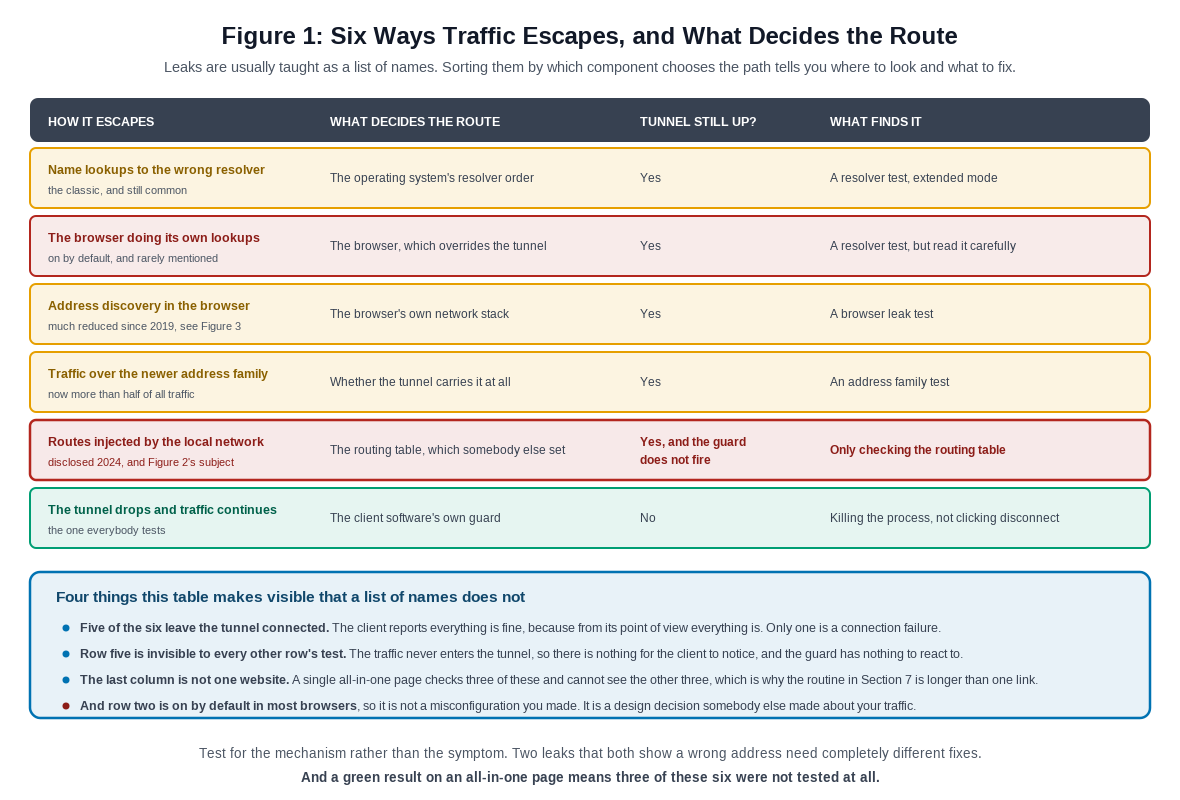
Figure 1. Six ways traffic escapes, organized by which component chooses the path.
Name lookups reaching the wrong resolver. The operating system’s resolver order decides this. The classic leak, still common, and the one every guide leads with.
The browser doing its own lookups. The browser decides, and it overrides the resolver your tunnel configured. On by default in several regions and rarely mentioned. Section 6.
Address discovery in the browser. The browser’s own network stack decides. Much reduced since 2019, and Section 5 covers what changed.
Traffic over the newer address family. Whether the tunnel carries it at all decides. Now more than half of measured global traffic.
Routes injected by the local network. The routing table decides, and somebody else set it. Section 4, and it is the important one.
The tunnel drops and traffic continues. The client software’s own guard decides. The one everybody tests.
What This Ordering Makes Visible
Five of the six leave the tunnel connected. The client reports everything is fine because, from its point of view, everything is. Only the last is a connection failure, and it is the only one most people ever test for.
Row five is invisible to every other row’s test. The traffic never enters the tunnel, so there is nothing for the client to notice.
The last column is not one website. A single all-in-one page checks three of these and cannot see the other three. A green result there means half the list was not tested.
And row two is on by default, so it is not a misconfiguration you made. It is a design decision somebody else made about your traffic.
2. Why This Matters More For You
Because you will assume the tunnel is working. Every one of these leaks except the last produces a client that says “connected” while some of your traffic is outside. If you are doing authorized reconnaissance from behind a tunnel, the address a target logs is the thing you were trying to control.
And because you will write leak guides. Section 5 is about how the standard advice went stale, and it went stale by being copied rather than rechecked. That is a failure mode worth recognizing in your own work before somebody else recognizes it in it.
3. Name Resolution, Correctly
The mechanism first, because the fix follows from it.
Every connection begins with a lookup. Without a tunnel, that lookup goes to whichever resolver your network handed you, usually your operator’s, which therefore has a list of every domain you asked about.
With a tunnel working properly, the lookup goes through the tunnel to the provider’s resolver, and your network operator sees only the tunnel.
A leak here means the lookup went to the original resolver anyway, while the traffic itself went through the tunnel. Your operator cannot read your traffic and has a complete list of where you went, which for most purposes is the part that mattered.
Why it happens: the operating system’s resolver order does not always prefer the tunnel’s resolver, a manually configured resolver may not be overridable by the client, and address assignment on the local network can reintroduce one.
Test it with an extended test, which issues lookups against several resolvers rather than one, and read which servers come back. Only the provider’s should appear.
And read Section 6 before concluding you have fixed it, because the most common current cause is not in this section at all.
4. The Leak Your Kill Switch Cannot See
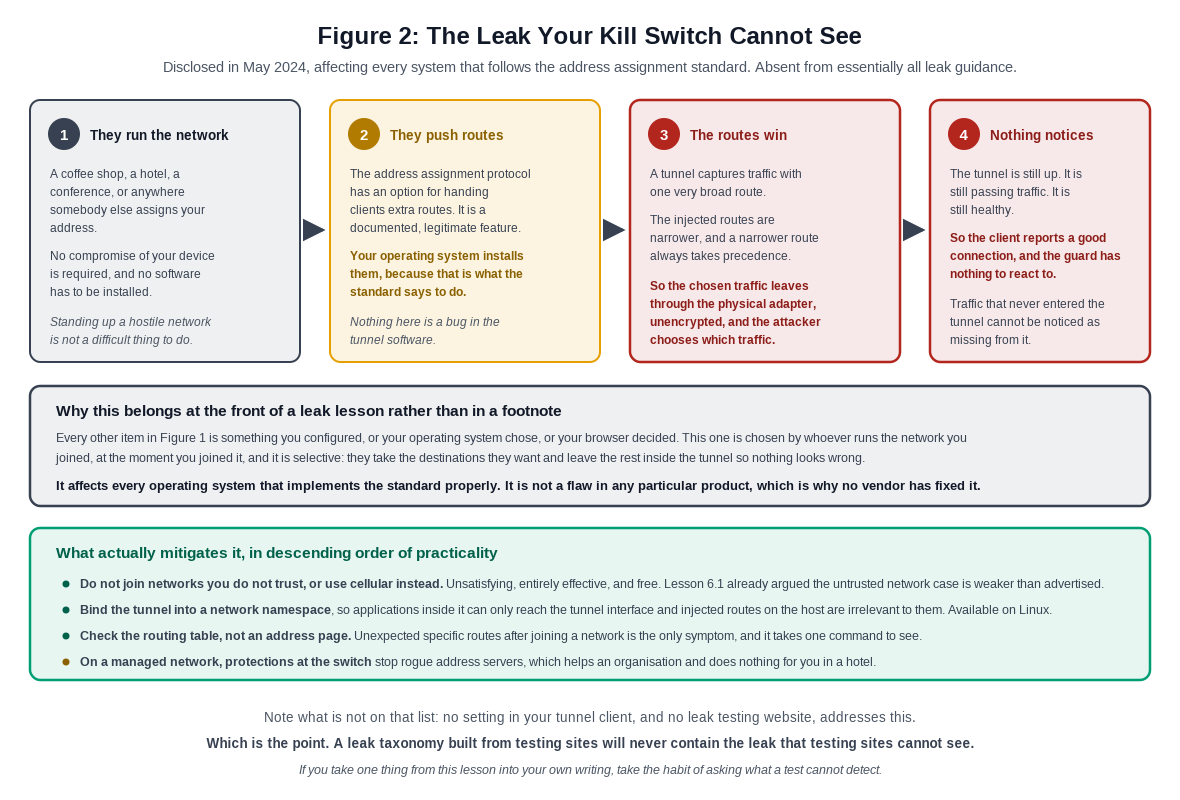
Figure 2. Four steps, and nothing in the tunnel client notices any of them.
Disclosed in May 2024 by a security research group, this affects every operating system that implements the address assignment standard correctly. (Reference 1)
Step one: they run the network. A coffee shop, a hotel, a conference, anywhere somebody else assigns your address. No compromise of your device is required and no software has to be installed.
Step two: they push routes. The address assignment protocol includes an option for handing clients additional routes. It is a documented, legitimate feature with ordinary uses. Your operating system installs them because the standard says to.
Step three: the routes win. A tunnel captures traffic with one very broad route. The injected routes are narrower, and a narrower route always takes precedence. So traffic for the destinations the attacker chose leaves through the physical adapter, unencrypted.
Step four: nothing notices. The tunnel is still up, still passing traffic, still healthy. The client reports a good connection and the guard has nothing to react to, because traffic that never entered the tunnel cannot be noticed as missing from it. (Reference 2)
Why This Belongs at the Front Rather Than in a Footnote
Every other item in Figure 1 is something you configured, or your operating system chose, or your browser decided. This one is chosen by whoever runs the network you joined, at the moment you joined it. And it is selective: they take the destinations they want and leave everything else inside the tunnel, so a casual check looks normal.
It is not a flaw in any particular product, which is why no vendor has issued a patch for it. It is a consequence of two standards interacting exactly as each was written.
What Actually Mitigates It
Do not join networks you do not trust, or use cellular instead. Unsatisfying, entirely effective, and free. Lesson 6.1 already argued that the untrusted network case for a VPN is weaker than advertised; this is a second reason to be skeptical of the coffee shop.
Bind the tunnel into a network namespace, so applications inside it can only reach the tunnel interface and routes on the host are irrelevant to them. Available on Linux and the cleanest technical answer.
Check the routing table rather than an address page. Unexpected specific routes appearing after you join a network is the only symptom, and it is one command to look.
On a managed network, protections at the switch stop rogue address servers. That helps an organization and does nothing for you in a hotel.
Note what is not on that list. No setting in your tunnel client and no leak testing website addresses this.
5. Two Fixes That Expired
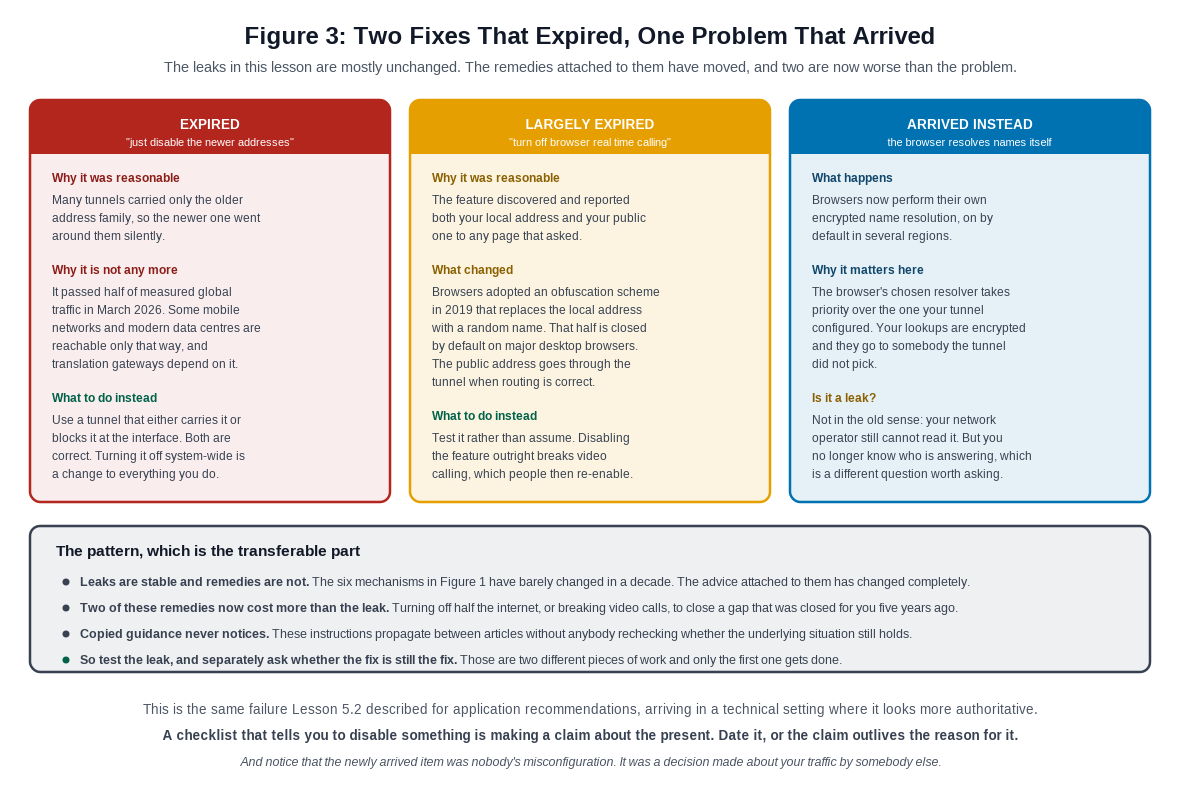
Figure 3. The leaks are stable. The remedies moved.
”Just Disable the Newer Addresses”
Why it was reasonable. Many tunnels carried only the older address family, so traffic over the newer one went around them silently. Disabling it closed the gap.
Why it is not any more. Traffic over the newer family passed half of Google’s measured global total in March 2026. (Reference 3) Some mobile networks and modern data centers are reachable only that way, and translation gateways depend on it. Disabling it system-wide breaks connectivity in ways that surface later and confusingly.
What to do instead. Use a tunnel that either carries the newer family or blocks it at the interface. Both are correct answers. Turning it off across your whole system to fix one application’s routing is a change to everything you do.
”Turn Off Browser Real Time Calling”
Why it was reasonable. The feature discovered and reported both your local address and your public one to any page that asked.
What changed. Browsers adopted an obfuscation scheme in 2019 that replaces the local address with a random name, and that half is closed by default on the major desktop browsers. (Reference 4) The public address still goes through the tunnel when routing is correct, which is the situation this whole lesson is about ensuring.
What to do instead. Test it rather than assume it. Disabling the feature outright breaks video calling, which people then re-enable and forget, leaving them worse off than if they had checked.
The honest residual. Public address exposure through this mechanism is not solved at the protocol level, and mobile browsers lagged behind on the obfuscation. So it is worth testing. It is not worth a permanent setting change that breaks a common use.
6. The One That Arrived
Browsers now perform their own encrypted name resolution, on by default in several regions, and the browser’s chosen resolver takes priority over the one your tunnel configured. (Reference 5)
Is it a leak? Not in the old sense. Your network operator still cannot read the queries, because they are encrypted. But you no longer know who is answering them, and it is not the party your tunnel selected.
Why this matters given the rest of the module. Lesson 6.1 recommended encrypted name resolution as a genuine improvement, and it is. Lesson 6.3 argued that the party holding your data is the thing you are actually choosing. Those two combine here: encrypted resolution is good and it moved the choice of resolver from your tunnel to your browser vendor’s default.
What to do. Decide deliberately. Either point the browser’s resolver at your provider’s, or turn the browser’s own resolution off and let the tunnel handle it. Both are defensible. The one to avoid is not knowing which is happening, which is where most people are.
7. A Testing Routine That Covers the Mechanisms
The standard routine is a list of websites. Here is one organized around Figure 1, with the parts a website cannot do.
Before anything, know your baseline. Record your address and resolver with the tunnel off. You cannot recognize a leak without it.
One: resolver. An extended test that issues lookups to several servers. Only the provider’s should appear. Then repeat it in a second browser, because Section 6 means two browsers can give different answers on the same machine.
Two: address family. A test that reports whether the newer family is reachable and which address it sees. An address from your operator here is the leak.
Three: browser address discovery. A browser leak page. Expect no local address and the tunnel’s public address.
Four: the routing table. One command, before and after joining any network you do not control. This is the only check that sees Section 4, and no website performs it.
Five: the guard, properly. Do not click disconnect, which triggers a graceful teardown the guard is designed to handle. Kill the client process, or drop the tunnel interface, and see whether traffic continues. That is the failure mode that actually happens.
Six: repeat on each network you use. Home, office, and one untrusted network. The results differ, and the differences are the finding.
8. Detection and Correlation, Corrected
Two common claims need adjusting for consistency with earlier lessons.
“Use port 443, it blends with normal web traffic.” Lesson 6.2 covered why this is no longer true: inspection equipment fingerprints the handshake, the client, the traffic shape and the server’s response to probing, none of which is the port. Obfuscation is a separate layer with its own name at each provider.
“Timing attacks require nation-state adversaries.” This was a fair description once. Traffic analysis using machine learning has become considerably more accessible, which is precisely why a shipping defense against it exists and was covered in Lesson 6.2. The correct statement is that these attacks need visibility at both ends, which is a different and much more available thing than being a nation state.
9. What to Take From This
Sort by mechanism. Two leaks that both show the wrong address can need completely different fixes, and the name tells you less than the component that chose the route.
Five of the six leave the tunnel connected, so “the client says connected” is not evidence of anything.
Route injection is the one that matters most and the one nobody teaches, because no testing site can see it and no client setting addresses it.
Two standard fixes now cost more than the leak. Disabling half the internet, and breaking video calls, to close gaps that were largely closed for you.
And one new conflict is on by default, which is not your misconfiguration but is still your problem.
Next lesson: running your own, where every one of these becomes your responsibility rather than a provider’s.
Knowledge Check
Question 1. How many of the six leak types in Figure 1 leave the tunnel connected and reporting success?
- A) Five, and only a dropped tunnel is a connection failure
- B) All six
- C) Three
- D) None, every leak breaks the connection
Answer: A. Which means “the client says connected” is not evidence that your traffic is going where you think.
Question 2. In route injection, why does the connection guard not fire?
- A) Because the guard only monitors name resolution
- B) Because the attack disables the guard first
- C) Because the tunnel stays up and healthy, so traffic that never entered it cannot be noticed as missing
- D) Because guards only work on the newer address family
Answer: C. The routes are installed by the operating system as the standard specifies, and the tunnel client has no visibility into traffic that bypassed it.
Question 3. What mechanism does route injection use?
- A) An option in the address assignment protocol that pushes additional routes to clients
- B) A vulnerability in the tunnel software
- C) A forged certificate
- D) Exhaustion of the tunnel’s address pool
Answer: A. It is a documented, legitimate feature with ordinary uses, which is why no vendor has patched it. Narrower routes take precedence over the tunnel’s broad one.
Question 4. Why is “disable the newer address family” now bad advice?
- A) It has no effect on modern systems
- B) It requires administrator access
- C) It is blocked by most tunnel clients
- D) It passed half of measured global traffic in March 2026, some networks are reachable only that way, and disabling it breaks connectivity
Answer: D. Use a tunnel that either carries it or blocks it at the interface, rather than changing everything you do to fix one routing problem.
Question 5. What did browsers change about real time communication in 2019?
- A) They removed the feature entirely
- B) They adopted an obfuscation scheme that replaces the local address with a random name, closing that half by default
- C) They began routing it through the operating system resolver
- D) They restricted it to encrypted pages only
Answer: B. Disabling the feature outright still breaks video calling, which people re-enable and forget, leaving them worse off than if they had tested.
Question 6. A browser performs its own encrypted name resolution. What is the effect when a tunnel is running?
- A) The queries are sent unencrypted to your network operator
- B) The tunnel blocks them automatically
- C) The browser’s chosen resolver takes priority over the one the tunnel configured
- D) Nothing, the tunnel always wins
Answer: C. Your operator still cannot read them, and you no longer know who is answering, which is a different question worth asking deliberately.
Question 7. What is the correct way to test a connection guard?
- A) Click disconnect in the client
- B) Change server locations rapidly
- C) Disconnect the network cable
- D) Kill the client process or drop the tunnel interface, because clicking disconnect triggers a graceful teardown the guard is designed to handle
Answer: D. The failure mode that actually happens is an unexpected drop, not an orderly one.
Question 8. Which check in the testing routine sees route injection?
- A) The extended resolver test
- B) The browser leak page
- C) Inspecting the routing table before and after joining a network
- D) The all-in-one address test
Answer: C. No website performs it, and no client setting addresses the underlying issue.
Question 9. What does a green result on an all-in-one leak testing page actually tell you?
- A) That your tunnel is configured correctly
- B) That roughly half the mechanisms in Figure 1 were tested and the rest were not
- C) That no leaks of any kind are present
- D) That the guard is working
Answer: B. A single page checks three of the six and cannot see the other three.
Question 10. What is the general pattern behind the two expired fixes?
- A) Leaks change constantly while remedies stay stable
- B) The remedies were never correct in the first place
- C) Testing sites became less accurate over time
- D) The leaks are stable and the remedies moved, and copied guidance propagates instructions without rechecking whether the reason still holds
Answer: D. A checklist telling you to disable something is making a claim about the present, and undated claims outlive their reasons.
Lab: Test the Mechanisms, Including the Untestable One
Time: 2 to 3 hours. Requires an active tunnel subscription and administrative access.
Part 1: Baseline (15 minutes)
With the tunnel off, record what a leak looks like when it is total.
| Value | |
|---|---|
| Address, older family | |
| Address, newer family, or none | |
| Resolvers in use | |
| Browser reported address | |
| Default route |
Deliverable. The table. You cannot recognize a leak without this, and most guides skip it.
Part 2: The Six Mechanisms (45 minutes)
Tunnel on. Work through Figure 1 row by row.
| Mechanism | Test used | Result | Leak? |
|---|---|---|---|
| Resolver order | |||
| Browser’s own resolution | |||
| Browser address discovery | |||
| Newer address family | |||
| Injected routes | |||
| Guard on unexpected drop |
Two requirements. Do the resolver test in two different browsers and record both. And for the guard, kill the process rather than clicking disconnect, and say which method you used.
Deliverable. The table with both browser results and your guard method.
Part 3: Look at the Routing Table (25 minutes)
The check no website performs.
- Record your routing table on a network you control.
- Join a different network. A phone hotspot counts, and a public network is better if you have one available safely.
- Record the routing table again.
- Compare. Note any routes present in the second that were not in the first.
| Network A | Network B | Difference |
|---|
You are unlikely to find an attack. You are learning what normal looks like, which is the only way to recognize abnormal later. Record the command you used, because you will want it again.
Deliverable. Both tables and the command.
Part 4: Check Whether the Fixes Expired (30 minutes)
For each of the three items in Figure 3, establish the current position on your own system rather than accepting this article.
| What the guidance says | What you found | Still correct? | |
|---|---|---|---|
| Newer address family | |||
| Browser real time communication | |||
| Browser name resolution |
For the second row specifically: test whether your browser exposes a local address, and report what you actually see rather than what you were told to expect.
Deliverable. The table with evidence for each row.
Part 5: Three Networks (25 minutes)
Repeat Part 2’s six checks on three different networks: one you control, one you use regularly but do not control, and one more.
| Mechanism | Network 1 | Network 2 | Network 3 |
|---|
Deliverable. The table, and one sentence on any mechanism that differed between networks. Differences are the finding, not noise.
Part 6: Write the Routine (20 minutes)
Write the leak testing routine you will actually run, and say how often.
It must cover all six mechanisms, name which checks a website can do and which it cannot, and state what each check would miss.
Deliverable. One page maximum, in a form you would follow rather than file.
Submission
- Baseline, Part 1.
- Six mechanisms, Part 2, with two browsers and your guard method.
- Routing tables, Part 3, with the command.
- Expired fixes, Part 4, with evidence.
- Three networks, Part 5.
- Your routine, Part 6.
- Reflection, half a page: which mechanism had you never tested, and what had you assumed about it?
Assessment
| Area | Points | What is measured |
|---|---|---|
| Baseline | 10 | Recorded before testing, not reconstructed after |
| Six mechanisms | 25 | All six attempted, two browsers used, guard killed rather than clicked |
| Routing tables | 20 | Actually compared across two networks, command recorded |
| Expired fixes | 20 | Verified on your own system rather than accepted from the article |
| Three networks | 15 | Genuinely different networks, differences noted |
| Your routine | 5 | Covers all six and states what each check misses |
| Reflection | 5 | Names a real gap in prior practice |
| Total | 100 |
Note the weighting. The routing table comparison and verifying the expired fixes together carry 40 points, because both are things no leak testing website will do for you and both are habits rather than one-off tasks.
Additional Resources
Primary Sources
- The original disclosure of route injection against tunnelled traffic, May 2024: https://www.securityweek.com/new-tunnelvision-technique-leaks-traffic-from-any-vpn-system/
- Analysis of the same, including the effect on connection guards: https://www.zscaler.com/blogs/security-research/cve-2024-3661-k-tunnelvision-exposes-vpn-bypass-vulnerability
- Measured adoption of the newer address family: https://www.google.com/intl/en/ipv6/statistics.html
On the Expired Fixes
- On preventing local address exposure in browsers, including what the obfuscation scheme does and does not cover: https://github.com/gorhill/uBlock/wiki/Prevent-WebRTC-from-leaking-local-IP-address
Read this alongside your own test result. The gap between the two is the useful part.
Discussion Questions
- Part 3 asked you to look at your routing table on two networks. Had you ever looked at it before, and what does that suggest about how leak testing is usually taught?
- Section 5 argues two standard fixes now cost more than the leak. How would you have found that out if this article had not told you?
References
- SecurityWeek, on the route injection technique that leaks traffic from any tunnelled system
- Zscaler ThreatLabz, on the same technique and its effect on connection guards
- Internet Society Pulse, on the newer address family passing half of measured traffic in 2026
- uBlock Origin documentation, on browser local address obfuscation and what it covers
- Mullvad, on encrypted name resolution in browsers and its interaction with a tunnel’s resolver
Next lesson: Module 6 Lesson 6 - Self-Hosting a VPN: Control Is Not Anonymity