Using Tor Without Breaking It
About This Lesson
Lesson 6.7 described a network built so that no single party holds both your address and your destination. That property is real and it is structural.
It is also, in practice, almost never the thing that fails.
What fails is what happens above the network, in the browser and in your own behavior. You sign in to something. You open a downloaded file. You install an extension because a site looks wrong. You do your research and check your email in the same window. None of those attacks the circuit. They all go around it, by getting you to identify yourself through a channel the relays never see.
So this lesson is not about configuring Tor. The correct configuration is mostly “leave it alone,” and understanding why that is the answer is more useful than a list of settings.
Three things it does cover in detail: what the security levels actually do and one way the control lied to users for years, what genuinely identifies you and what turns out not to any more, and how to reach the network when somebody is blocking it.
A Note on This Lesson
Module 2 Lesson 3 covers installing Tor Browser and remains the right place to start if you have never opened it. This lesson assumes it is installed.
One point from that lesson has changed. Advice about window resizing was correct when it was written, and the browser now handles it itself. Section 3 covers what changed.
Learning Objectives
After you read this lesson, you can do these tasks:
- Explain why Tor Browser is the client, and why routing another browser through Tor is worse than it sounds.
- Say what each security level disables, what it breaks, and what raising it costs beyond broken pages.
- Explain a flaw in the security level control that made it report success while doing nothing, and what the project did about it.
- List what actually identifies a Tor user, and say which of those the network can address. Most of them it cannot.
- Explain what an onion service is and what it removes from the picture.
- Choose a bridge type in the correct order, and describe how bridges are actually found by a censor.
Prerequisites
- Lesson 6.7, particularly the circuit structure and the point about being rare.
- Module 2 Lesson 3 for installation.
1. Why Tor Browser Is the Client
The most common shortcut is to point an ordinary browser at Tor’s local proxy. It works, in the sense that traffic goes through the network. It is the worst idea in this lesson.
Tor Browser is not Firefox with the proxy pre-filled. Its central design goal is that every user looks identical to every other user. Same reported window size, same fonts, same time zone, same set of capabilities. A site trying to distinguish one Tor Browser user from another has very little to work with.
Your own browser is the opposite. Your fonts, your extensions, your window size, your language, your hardware, your settings. That configuration is close to unique, and it stays unique whichever route the request takes.
So routing your own browser through Tor hides your address and leaves your identity intact. That is backwards: it pays the whole cost of Tor and keeps the thing that identifies you.
The same reasoning rules out installing extensions in Tor Browser, and it is why the browser ships with a small fixed set and no easy way to add more.
On mobile, Tor Browser exists for Android. There is no official build for iOS, because Apple requires browsers to use the system engine, and the recommended alternative is a separate third-party application. That is a real gap rather than an oversight, and worth knowing before you rely on a phone for anything sensitive.
2. The Security Levels
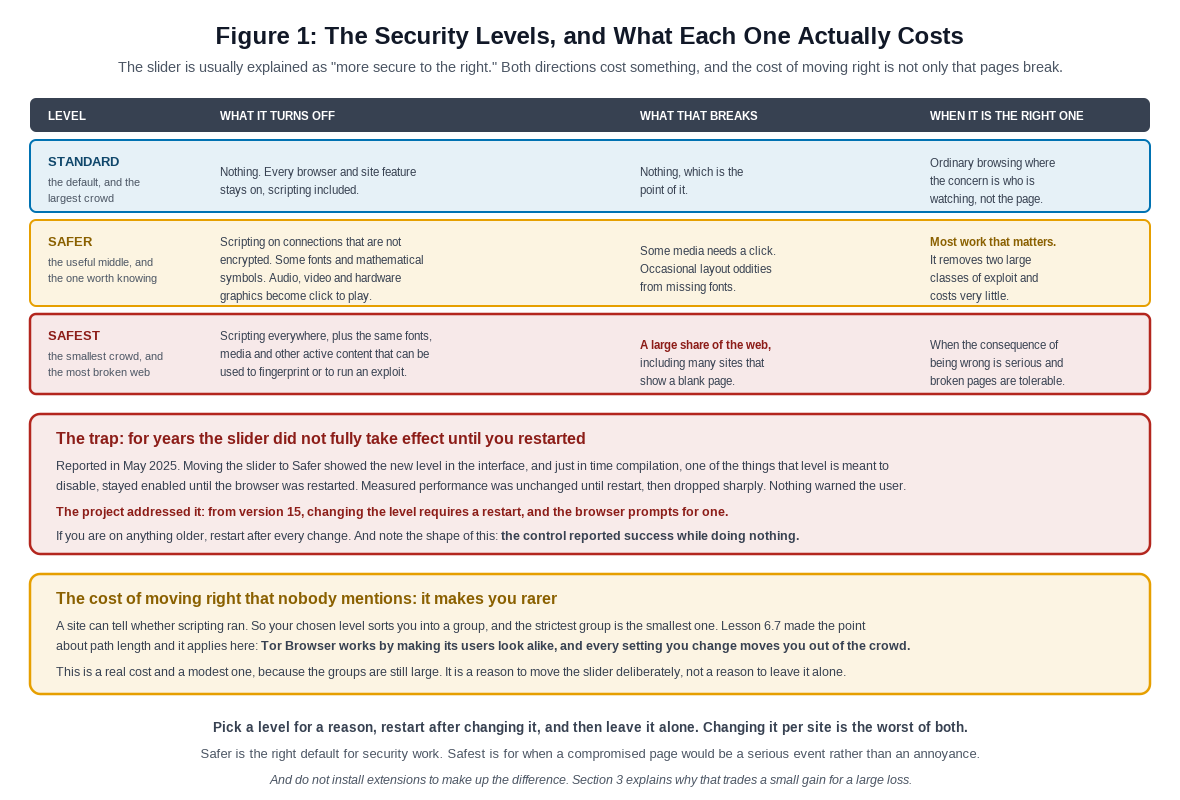
Figure 1. Three levels, what each disables, and both of the costs.
The slider has three positions and is usually explained as “more secure to the right.” Both directions cost something.
Standard leaves everything on, scripting included. Nothing breaks. This is the right choice when your concern is who is watching rather than what the page might do.
Safer blocks scripting on connections that are not encrypted, disables some fonts and mathematical symbols, and makes audio, video and hardware graphics click to play. It also disables just-in-time compilation and the WebAssembly runtime, which are two of the larger sources of browser exploits (Reference 1). Some media needs a click and occasional layouts look odd.
This is the right default for security work. It removes two substantial exploit classes and costs very little.
Safest disables scripting everywhere, along with the same fonts, media and active content. A large share of the web stops working, including sites that show a blank page rather than a useful error. Correct when a compromised page would be a serious event rather than an annoyance.
The flaw: for years the control reported success while doing nothing
Reported in May 2025. Moving the slider showed the new level in the interface, and just-in-time compilation, one of the things Safer is meant to disable, stayed enabled until the browser was restarted. Measured performance was unchanged until a restart, then dropped sharply, which is how it was found. Nothing in the interface warned the user (Reference 2).
The project addressed it. From version 15, changing the level requires a restart and the browser prompts for one (Reference 3). If you are running anything older, restart after every change.
Note the shape of this, because it is the third time this course has met it. A kill switch that does not fire (6.5). Encrypted resolution that silently falls back (7.2). And now a security control that displays the level you asked for and does not apply it. A control whose failure looks identical to success is the hardest kind to catch, and none of these were caught by reading the configuration back.
The cost of moving right that nobody mentions
A site can tell whether scripting ran. So your chosen level sorts you into a group, and the strictest group is the smallest one.
Lesson 6.7 made this point about path length and it applies here. Tor Browser works by making its users look alike, and every setting you change moves you out of the crowd.
This is a real cost and a modest one, because the groups are still large. It is a reason to move the slider deliberately and then leave it there, not a reason to leave it at Standard. Changing it per site is the worst of both: you get the fingerprinting cost and lose the consistency.
3. What Actually Identifies You
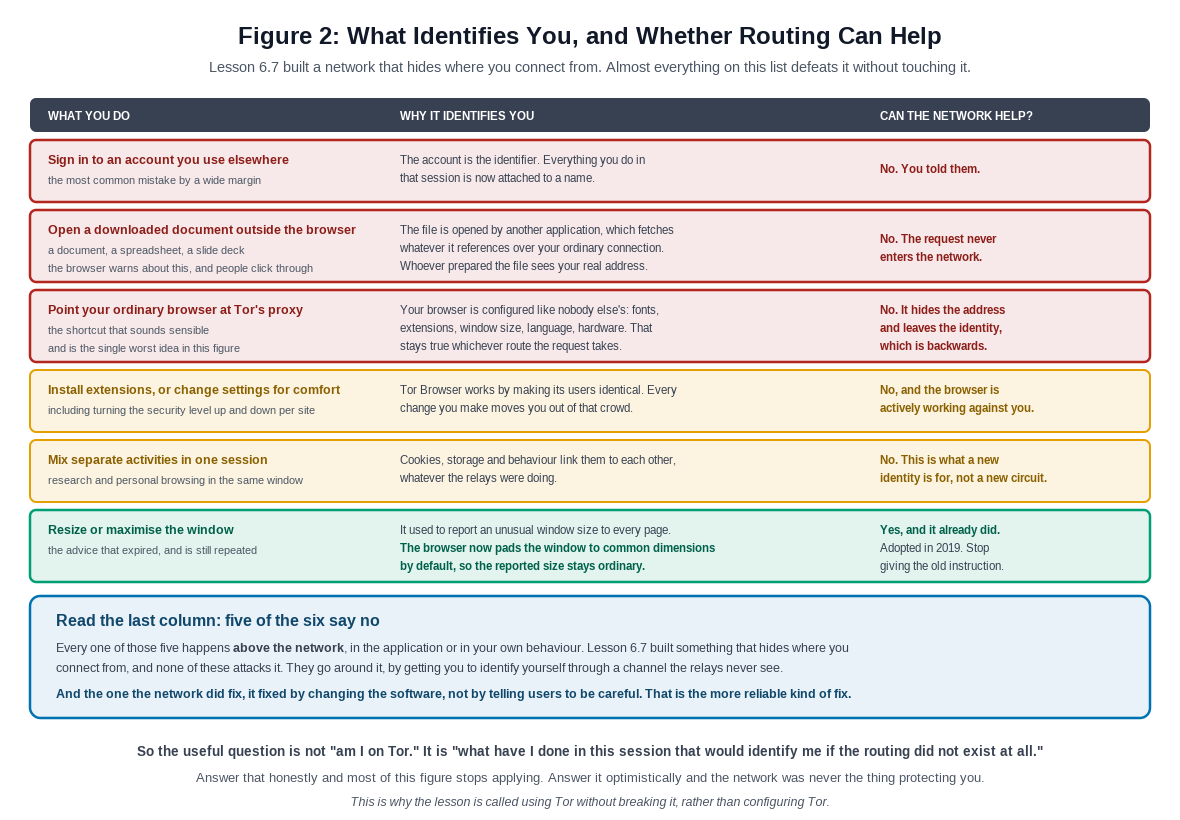
Figure 2. Six ways people are identified, and whether routing helps.
Signing in to an account you use elsewhere. The account is the identifier. Everything in that session is now attached to a name. The network cannot help, because you told them.
This is the most common failure by a wide margin, and it is worth being blunt: there is no configuration that protects you from this.
Opening a downloaded document outside the browser. You download a document and open it in the application that handles that file type. That application fetches whatever the file references, over your ordinary connection. Whoever prepared the file sees your real address.
Tor Browser warns about this on download and people click through. The request never enters the network, so nothing in the network can intervene.
Pointing your ordinary browser at Tor’s proxy. Section 1. Hides the address, keeps the identity.
Installing extensions, or changing settings for comfort. Every change moves you out of the crowd the browser built for you.
Mixing separate activities in one session. Cookies, storage and behavior link them, whatever the relays were doing. This is what a new identity is for, and it is worth repeating Lesson 6.7’s point: a new circuit changes the relays and clears nothing. Only a new identity closes tabs and clears state (Reference 4). The relays were never what linked you.
And one that expired
Resizing or maximizing the window used to report an unusual size to every page you visited, and “never resize the window” became standard advice.
The browser now pads the window to common dimensions by default, filling the difference with plain margins, so the reported size stays ordinary even when you maximize. The technique was adopted in 2019 and later refined with options for how it behaves (Reference 5).
The old instruction is still repeated widely. It costs usability for a defense that arrived six years ago.
The organizing point
Read the last column of that figure: five of the six say the network cannot help.
Every one of those five happens above the network. Lesson 6.7 built something that hides where you connect from, and none of these attacks it. They go around it.
And the one the network did fix, it fixed by changing the software rather than by telling users to be careful. That is the more reliable kind of fix, and it is worth preferring wherever it is available.
So the useful question is not “am I on Tor.” It is: what have I done in this session that would identify me if the routing did not exist at all?
4. Onion Services
An onion service is a service reachable only through Tor, at an address that is not a domain name but a cryptographic key rendered as text, ending in .onion.
Current addresses are 56 characters, because the address contains a full public key rather than a hash of one. The older 16-character format was deprecated and support removed in 2021, so any 16-character address you find is dead (References 6, 7).
Two things follow, and the second is the interesting one.
The address authenticates the service. There is no certificate authority in the picture because there is nothing to vouch for. The address is the key, so connecting to the right address means talking to the right service, by construction.
The connection never leaves the network. There is no exit relay. Lesson 6.7 noted that the exit is where your traffic returns to the ordinary internet and where anything not separately encrypted is readable. An onion service removes that position entirely, and the connection is encrypted end to end as a property of the design (Reference 8).
That is why some sites you already use publish onion addresses. It is not about being hidden. It removes the exit relay from your threat model, which is the single most exposed position in a normal circuit and the subject of much of Lesson 6.9.
The practical cost is that these addresses are unmemorable and unguessable, which is deliberate and does mean you must obtain them from somewhere you trust.
5. Getting In When Tor Is Blocked
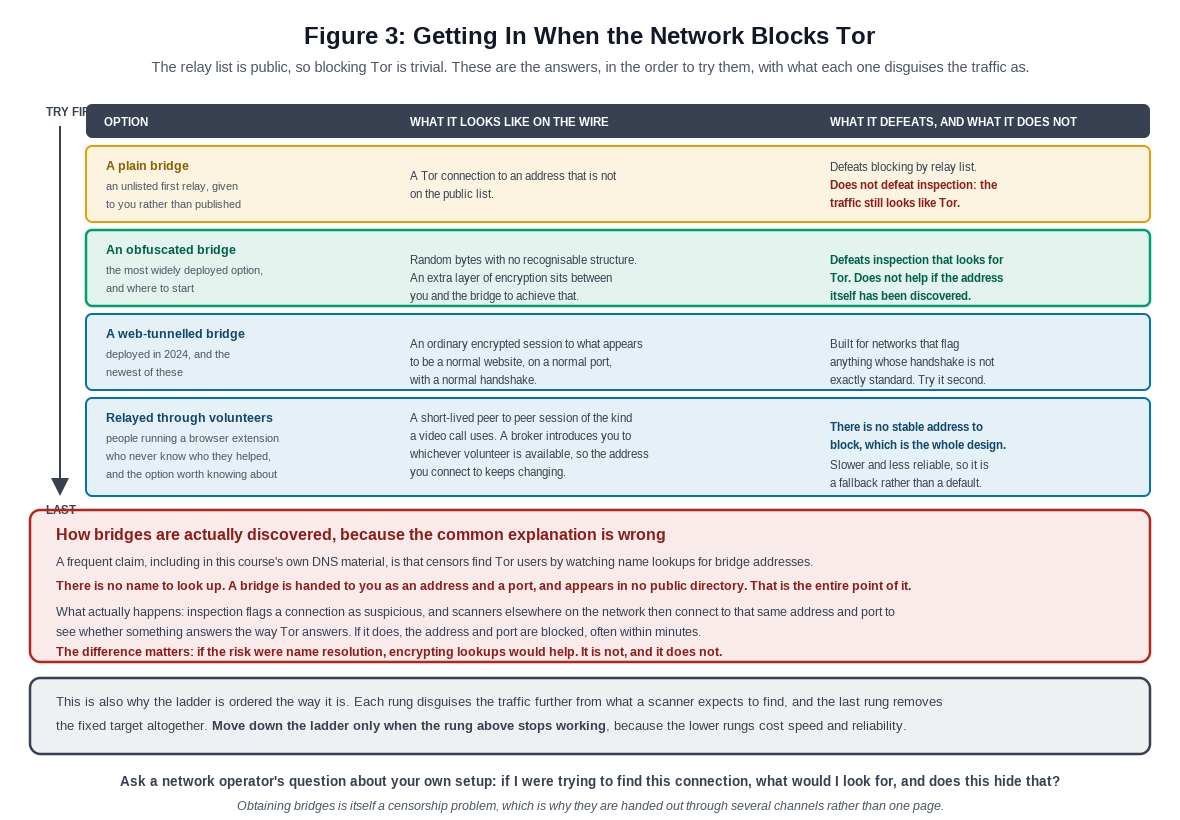
Figure 3. The ladder, in the order to try it.
The relay list is public, by design, because clients need it. That makes blocking Tor trivial: drop traffic to every listed relay.
Bridges are the answer. A bridge is a first relay that is not in the public list, handed to you through one of several channels rather than published. Obtaining one is itself a censorship problem, which is why several channels exist.
A plain bridge defeats blocking by list. It does not defeat inspection, because the traffic still looks like Tor.
Pluggable transports disguise the traffic, and there is a correct order to try them (Reference 9).
Start with the obfuscated transport. It makes the connection look like random bytes with no recognizable structure, by adding a layer of encryption between you and the bridge. It is the most widely deployed option and it is where to begin.
Then the web-tunnelled transport. Deployed in 2024, it wraps the connection inside an ordinary encrypted web session to what appears to be a normal website, on a normal port, with a normal handshake. It is built for networks that flag anything whose handshake deviates from standard.
Then relaying through volunteers. People run a browser extension, a broker introduces you to whichever volunteer is available, and the connection looks like a short-lived peer-to-peer session of the kind a video call uses. Because the volunteer pool constantly changes, there is no stable address to block, which is the entire design. It is slower and less reliable, so it is a fallback rather than a default.
Move down the ladder only when the rung above stops working, because the lower rungs cost speed.
How bridges are actually found, because the usual explanation is wrong
A claim that appears widely, including in this course’s own DNS material, is that censors identify Tor users by watching name lookups for bridge addresses.
There is no name to look up. A bridge is handed to you as an address and a port and appears in no public directory. That is the entire point of it.
What actually happens: inspection flags a connection as suspicious, and scanners elsewhere on the network then connect to that same address and port to see whether something answers the way Tor answers. If it does, the address and port are blocked, often within minutes (Reference 10).
The difference matters beyond the detail. If the risk were name resolution, encrypting lookups would help. It is not, and it does not. Fixing the wrong layer is the failure this whole course keeps circling, and here is a clean example of it.
Key Takeaways
- Tor Browser is the client because it makes its users identical. Routing your own browser through Tor hides your address and keeps your identity, which is backwards.
- Safer is the right default for security work. It removes two large exploit classes and costs very little.
- The security control reported success while doing nothing, for years, until a restart was required from version 15. Restart after changing it on anything older.
- Raising the level also makes you rarer. Choose deliberately, then leave it. Changing it per site is the worst option.
- Five of the six things that identify a Tor user happen above the network, and no amount of routing addresses any of them.
- A new circuit is not a new identity. The relays were never what linked you.
- “Never resize the window” expired in 2019. The browser pads the window by default.
- An onion service removes the exit relay from your threat model, which is its most useful property and not the one usually cited.
- Bridges are found by probing an address and port, not through name resolution. Encrypting lookups does not help.
Knowledge Check
Question 1. Why is routing your ordinary browser through Tor’s proxy worse than using Tor Browser?
A. The proxy connection is unencrypted between your browser and the Tor client B. Ordinary browsers cannot build circuits with more than one relay C. Your browser’s configuration is close to unique and stays unique whichever route the request takes D. Tor blocks connections from browsers it does not recognize
Answer: C
Tor Browser’s central design goal is that every user looks identical. Your own browser is the opposite, so this arrangement hides your address and keeps the thing that actually identifies you.
Question 2. What does the Safer security level disable that Standard does not?
A. All scripting, everywhere, along with images B. Scripting on connections that are not encrypted, some fonts and symbols, and just-in-time compilation C. Only cookies and local storage D. The ability to reach onion services
Answer: B
It also makes audio, video and hardware graphics click to play. It removes two substantial exploit classes for very little cost, which is why it is the sensible default for security work.
Question 3. What was the flaw reported in the security level control in May 2025?
A. The level reset to Standard every time the browser was closed B. Selecting Safest silently enabled scripting on onion services C. The level could be read by any website through a scripting interface D. The interface showed the new level while some protections stayed off until the browser was restarted, with no warning
Answer: D
It was found through performance measurement: just-in-time compilation stayed enabled until restart. From version 15 a restart is required and prompted for.
Question 4. Beyond broken pages, what does raising the security level cost?
A. It sorts you into a smaller group of users, because a site can tell whether scripting ran B. It disables the guard relay mechanism described in Lesson 6.7 C. Nothing; the only cost is site compatibility D. It increases circuit latency because fewer relays support the stricter settings
Answer: A
Tor Browser works by making its users look alike. Every setting you change moves you out of the crowd, which is a real if modest cost, and a reason to choose once rather than adjust per site.
Question 5. Why can the network do nothing about a downloaded document that identifies you?
A. Because Tor Browser cannot encrypt file downloads B. Because the file is opened by another application, which fetches what it references over your ordinary connection C. Because exit relays strip the encryption from downloaded files D. Because documents are always downloaded outside the circuit
Answer: B
The request never enters the network, so nothing in the network can intervene. The browser warns about this on download, and people click through.
Question 6. In Figure 2, five of six identification methods cannot be addressed by the network. What do those five have in common?
A. They all require the attacker to control an exit relay B. They are all specific to desktop rather than mobile C. They all depend on scripting being enabled D. They all happen above the network, in the application or in your own behavior
Answer: D
The circuit hides where you connect from. None of these attacks it; they go around it by getting you to identify yourself through a channel the relays never see.
Question 7. What is the current status of the advice “never resize or maximize your Tor Browser window”?
A. Expired by default: the browser pads the window to common dimensions, a technique adopted in 2019 B. Still essential, because window size remains the strongest fingerprinting signal C. Never was correct; window size was never visible to websites D. Only relevant at the Safest security level
Answer: A
The instruction is still widely repeated. It costs usability for a defense the software has provided for years, and this is the same pattern as the expired leak fixes in Lesson 6.5.
Question 8. What is the most useful property of an onion service?
A. It guarantees the operator cannot identify visitors B. It makes the connection faster by shortening the circuit C. There is no exit relay, so the connection never returns to the ordinary internet D. It allows the service to be reached without running Tor
Answer: C
The exit is the most exposed position in a normal circuit. Removing it is why some ordinary sites publish onion addresses, and it matters more than the hiding that is usually cited.
Question 9. In what order should pluggable transports be tried, and why?
A. Volunteer relaying first, because it has no fixed address to block B. In any order, since they all disguise traffic identically C. Whichever the network operator permits, which they publish D. Obfuscated first, then web-tunnelled, then volunteer relaying, because each rung disguises the traffic further and costs more speed
Answer: D
The obfuscated transport is the most widely deployed and the fastest of the three. Move down only when the rung above stops working.
Question 10. How does a censor actually discover an unlisted bridge?
A. By watching name lookups for the bridge’s address B. By requesting the bridge list from the directory authorities C. By inspection flagging a suspicious connection, then scanners connecting to that address and port to see whether it answers like Tor D. By correlating the bridge’s bandwidth with published network statistics
Answer: C
Bridges are handed out as an address and port and appear in no public directory, so there is no name to look up. The distinction matters: if it were name resolution, encrypting lookups would help, and it does not.
References
- Tor Project support, “Security levels.” https://support.torproject.org/tor-browser/features/security-levels/
- Privacy Guides, “A Flaw With the Security Level Slider in Tor Browser,” May 2025. https://www.privacyguides.org/articles/2025/05/02/tor-security-slider-flaw/
- Tor Project, issue 42572 and the security level restart notification introduced in the version 15 cycle. https://gitlab.torproject.org/tpo/applications/tor-browser/-/issues/42572
- Tor Browser manual, “Managing identities.” https://tb-manual.torproject.org/managing-identities/
- Tor Project support, “Fingerprinting protections,” on window size rounding and letterboxing. https://support.torproject.org/tor-browser/features/fingerprinting-protections/
- Tor Project, “Onion Service version 2 deprecation timeline.” https://blog.torproject.org/v2-deprecation-timeline/
- Tor Project, “V3 onion services usage,” on the 56-character address format. https://blog.torproject.org/v3-onion-services-usage/
- Tor Project, onion services properties, on end-to-end encryption and the absence of an exit relay. https://onionservices.torproject.org/technology/properties/
- Tor Project support, “Using bridges,” on the available transports and the order to try them. https://support.torproject.org/little-t-tor/circumvention/using-bridges/
- The Tor Project, “Learning more about the GFW’s active probing system.” https://blog.torproject.org/learning-more-about-gfws-active-probing-system/
Where This Goes Next
Lesson 6.9 covers the limits, stated the way the Tor Project states them: correlation by an observer who can see both ends, what a malicious exit relay can and cannot do, and what the anonymity-set argument means once you have read Lesson 6.7’s figures on network concentration. Section 4’s point about onion services removing the exit relay is developed there.
Lesson 6.10 covers Tor for security work, when it is the wrong tool, and what running a relay involves.
Next lesson: Module 6 Lesson 9 - What Tor Does Not Protect Against